Introduction to Functional Programming
About the course
This is the homepage for
CS 254: Introduction to Functional Programming,
a course offered by
Fritz Ruehr at the
Computer Science Department of
Willamette University.
This course provides a broad introduction to programming in the functional
style, including motivations, history, programming techniques and theory.
Functional programming provides concise and elegant solutions to many problems,
using an approach based on mathematics, logic and proof.
The course will be taught in Haskell, a powerful, modern programming language
which can be used for both mathematical investigations and serious system
development. Topics covered will include a broad introduction to computing,
symbolic representation of data, list manipulation, recursion, algebraic data
types, higher-order functions and type systems.
The study of functional programming languages provides a useful foundation
and perspective for further study of topics in algebra, logic, programming
languages, computer science theory and linguistics.
News
- Don't believe everything you
read on the internet about exams.
- Study for the midterm using the
final exam review!
- The "recipe for folds" handout is
here.
- The introduction to web programming with Haskell pages are
here.
- You can find the "Rubik's Waffle" files here:
Waffle.hs (for the main code) and
ANSI.hs (for the ANSI terminal code utilities).
- Here are some links to class material on monads:
- See
these notes on possible end-of-class topics.
- I really cannot make this stuff up! Tonight (Mon 20 April 2009) on reddit,
there was an announcement about Haskabelle, a tool which checks proofs about Haskell code.
... and example #2 in
this demonstration code?
That would be the exact example of proof we did in lecture
about reversal and mirroring!
- Here are some links related to formal proofs and proof systems:
- Here's a link to the proof about reversal and mirroring.
... and here's a link to the proof from lecture about the
commutativity of plus over the Nat data type.
- For more about folds and unfolds, you might want to read
Jeremy Gibbon's chapter in the festschrift for Richard Bird
called
Origami Programming. [link fixed]
- Study for the midterm using the
midterm exam review
and take a look at a (very short) sample exam, too!
- For an example of an application of Haskell to a problem in mathematics and computation,
see
Conal Elliott's latest paper,
Beautiful Differentiation.
- The functional graphics files are here:
- The file of Natural number classes is here:
Natty.hs
- Click here for the discussion and sample
solutions to the segment problem from tha labs.
- It requires GHC (a different compiler), but the
HLint tool from Neil Mitchell
is very cool, and might be helpful (as we reach an intermediate coding level) for cleaning
up your code.
- a tutorial (with pictures!) on list comprehensions
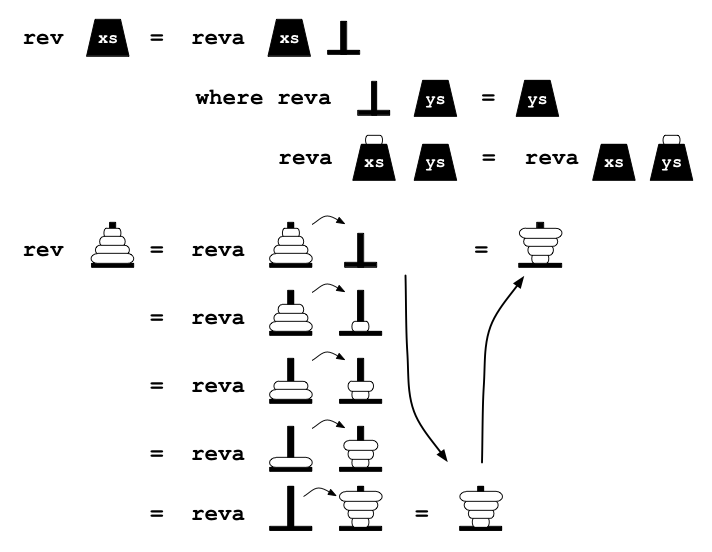
- See this graphical version of the
definition and use of reversal by accumulating parameter!
(And here's that promised copy of MyFile.hs,
suitably annotated, for students who missed class due to the candidate lunch:
search for "HERE").
- Some more "outside news", this time a couple of nice, concise blog posts
reporting on why Haskell is appealing:
Brad Clow's Why Haskell?
and
Matthieu Riou's Why Not Haskell?
.
- OK, still not exactly news, but still fun:
a blog post with a fun unit of measure for learning Haskell.
- Well, this news isn't exactly class news, but here is the latest
issue of the Haskell Weekly News from the rest of the Haskell
community. (And the previous issue, too, just for good measure.)
Labs and written homework (in rev. chron. order)
Handouts, examples for lecture, etc.
On-line references
We will be using the Haskell programming language as
our main implementation vehicle. There are plenty of links there about the
language, how to use it and some implementations (check out the wiki in
particular for programming advice).
Installing Hugs (Mac) or WinHugs (Windows)
On the Mac, you can either try to install the newer version of Hugs (but this requires DarwinPorts,
which is little trickier) or you can install this previous version (which should be straightforward,
although it may have some minor differences with the one in the lab):
Older (2002) version of Hugs
(Basically, if you are handy with Unix, or if you already have the Apple Developer Tools installed,
you should at least try the newer DarwinPorts one; otherwise use the older, 2002 version.)
For a text editor on the Mac, I recommend the free program TextWrangler;
you can also use TextEdit (already on your Mac for free), or vi/vim or emacs, if you know one of those.
On Windows, install the latest version of WinHugs and Crimson Editor (since this is what we use in lecture and lab) as follow:
- Install WinHugs; you can find
an installation for Windows here
(installations for Macs and Linux don't give you the cute Winhugs interface and
are a little trickier, but you can find information for them on the same page).
- Don't use the default installation directory!
Program Files contains a space,
which can mess things up: I recommend just C:\Haskell instead. (This should
create a directory C:\Haskell\Hugs.)
- Create a shortcut on the desktop.
- Right click on the shortcut and select
Properties.
- Modify the
Start In: box to set the default directory.
In the lab, we use H:\ to default to the home drive
(you have to have the drive mapped for this to work).
Students setting this up on their own computers can select whatever directory they want to use.
- Open WinHugs and set up some options:
- in
File:Options:WinHugs, change the font size to 11 (or whatever you find legible);
- in
File:Options:WinHugs, change the default editor option to:
"C:\Program Files\Crimson Editor\cedt.exe /L:%d %s "
(just the stuff between the quotes, not the quotes themselves)
(note that there are spaces between the 2 words in the folder names and there is a
space after the %s!)
- change the system environment variable
Path
to include the path to the WinHugs folder.
- Install Crimson Editor:
- create a shortcut on the desktop and change the icon from the rabbit to the
paper/pencil;
- in
Tools:Preferences:General: select "use spaces in place of tabs";
- in
Tools:Preferences:Files: Deselect "load recent..."
(although students may want to leave this on their own computers);
- add 2 files to
C:\Program Files]Crimson Editor\spec folder:
haskell.spc and
haskell.key
"Pop culture", Haskell advocacy and miscellaneous links
Here are a few fun, interesting or otherwise difficult to categorize links that came up
in lecture at various points.
- Haskell, Epic Games and Unreal Tournament: here's a presentation on
the next mainstream programming language by
Tim Sweeney,
CEO and Chief Architect of Epic Games, creator of Unreal Tournament and
the Unreal game engine, about how Haskell and related technologies are crucial to the gaming
architectures of the future.
- Sweeney interview: just for good meaure, here's an interview
Sweeney did about
programming language issues for games
(this was in January 2000, before he'd been completely bitten by the Haskell bug
☺ ).
(Psst: click here for the segment stuff.)