Functioning Karel

Jed Rembold

August 27, 2025

Announcements

  • Ensure you have the tech installed on your system!
    • Then swing by my office during office hours (or when my door is open) to check in with me
  • I’ll be in Ford 202 again tomorrow from 3-4 in case folks want help with the software setup
  • Sections start next week. If you have not yet filled out your availability, please do that now here!
  • Only about 11 of you have joined the Discord channel. Check Canvas for the invite link. In addition to announcements from this class, the Section Leaders will use it extensively to communicate with you and deliver materials to you.
  • Participation polling starts today! polling.jedrembold.prof

Karel’s World

Giving Clear Instructions

  • We will initially make the language extremely simple so that we can focus on the second layer
  • Karel the Robot exists in a very simple 2D world
  • Has a very limited set of actions:
    • Can move forward one space
    • Can rotate counter-clockwise (turn left) 90 degrees
    • Can pick up a beeper
    • Can drop off a beeper
  • We will be spending the first several class days just interested in how we can take these simple instructions and get Karel to solve a wide variety of problems
    • This content is not in your text, but more in-depth descriptions can be found here

The World

  • Karel’s world is defined on a grid
    • avenues run north-south
    • streets run east-west
    • The intersection between a street and avenue is called a corner
  • Compass directions are as you’d have them on a map, with North pointing upwards
  • Walls are impassable
  • Beepers are diamonds
  • Karel is a house-shaped polygon

Commands

  • As we mentioned before, Karel is a simple robot, and can really only do 4 potential actions

  • A shared language is important, so we will use the below commands to communicate that we want Karel to do a specific action:

    Command Action
    move() Moves Karel forward one intersection in whatever direction they are facing
    turn_left() Rotates Karel 90 deg counter-clockwise
    pick_beeper() Picks up a beeper on the intersection Karel is standing on
    put_beeper() Places a beeper at the intersection Karel is standing on
  • Our instructions are just sequences of these actions

Example

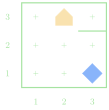
  • Suppose we had the situation to the right and wanted to navigate to the beeper, pick it up, and then drop it at the corner of 1st avenue and 1st street.
  • Take a moment to write out your instructions.
    • Remember you can only move, rotate left, and pick up or drop the beeper
  • Note that there are multiple ways to do this! Which is better?
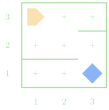
One Solution

def main():
    move()
    turn_left()
    turn_left()
    turn_left()
    move()
    turn_left()
    move()
    turn_left()
    turn_left()
    turn_left()
    move()
    pick_beeper()
    turn_left()
    turn_left()
    turn_left()
    move()
    move()
    put_beeper()

Watching Karel Work

  • In Python, we can run Karel programs by including import karel near the top of the program
    • The file karel.py also needs to be in the same directory as your program
image/svg+xml Load newworld Save newworld Run entireprogram Run nextcommand Animationspeed Reset tobeginning Programtracer
Karel Interface

Understanding Check

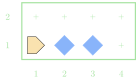
Suppose you had Karel starting in the world shown to the right. If Karel then executed the commands shown to the far right, what intersection would they end up at?
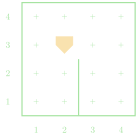
move()
turn_left()
turn_left()
move()
move()
turn_left()
turn_left()
turn_left()
move()
  1. 2nd avenue and 1st street
  2. 4th avenue and 2nd street
  3. 3rd avenue and 4th street
  4. Karel would hit a wall and error

Bundling code: Functions

Functional Programs

  • Recall that we had to execute 3 left turns whenever we wanted to turn right
  • Functions give us a way to “bundle-up” this code in a form that is easier to use!
    • This is largely a convenience
    • Especially useful when the same sequence of commands is used repeatedly
  • Using functions takes place in two parts:
  • Where you define what is in the bundle

  • Syntactically, it looks like:

    def |||your_function_name|||():
        |||any commands you want bundled|||
  • Note that bundled commands need to be tabbed in!

  • Where you use the earlier defined bundle (the function)

  • Commonly referred to as calling the function

  • Use matched parentheses after the function name:

    |||your_function_name|||()

Turn Right Round

  • We can define a convenience function to turn right!

    def turn_right():
        turn_left()
        turn_left()
        turn_left()
  • Then we can just type turn_right() whenever we want to turn right

  • Internally, this is no different from what we had before (Karel still turns left 3 times), it is just easier to read and write

def main():
    turn_left()
    turn_left()
    turn_left()
    move()
    turn_left()
    move()
    move()
    turn_left()
    turn_left()
    turn_left()
    move()
    pick_beeper()
    turn_left()
    turn_left()
    turn_left()
    move()
    move()
    put_beeper()

Turn Right Round

  • We can define a convenience function to turn right!

    def turn_right():
        turn_left()
        turn_left()
        turn_left()
  • Then we can just type turn_right() whenever we want to turn right

  • Internally, this is no different from what we had before (Karel still turns left 3 times), it is just easier to read and write

def main():
    turn_right()
    move()
    turn_left()
    move()
    move()
    turn_right()
    move()
    pick_beeper()
    turn_right()
    move()
    move()
    put_beeper()

def turn_right():
    turn_left()
    turn_left()
    turn_left()

Pothole Decomposition

  • Functions can also be a very effective way to break a larger problem into smaller, more manageable pieces
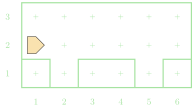
  • Suppose we wanted Karel to fill all the “holes” in the below world with a beeper
Breaking down Potholes

  • From a big picture perspective, we might break this down something like:
    • Moving between potholes
    • Filling a pothole
  • Wherever one of those actions is simple and routine enough to write a function, we probably should!
    • Moving between potholes: this is not currently routine as the amount we need to move changes
    • Filling a pothole: this would be the same every time!
def main():
    move()
    fill_pothole()
    move()
    move()
    fill_pothole()
    move()

def fill_pothole():
    turn_right()
    move()
    put_beeper()
    turn_around()
    move()
    turn_right()

def turn_right():
    turn_left()
    turn_left()
    turn_left()

def turn_around():
    turn_left()
    turn_left()

A Quick Comment

  • It is always a good idea to document and leave notes to yourself (or future readers of your code)
  • Comments are pieces of text in your program that are ignored when the program is run
  • Python has two methods to make a comment:
    • Hashtag method: Everything following a hashtag (#) on the same line is ignored

      # This is a short comment!
      • Commonly used to make quick explanatory or labeling comments
    • Triple quote method: Everything inside triple quotes (“““) is ignored

      """ This is also a comment! """
      • Commonly used to describe what functions do
      • Can span multiple lines

Commenting Example

def main():
    """
    Main function to fill 2 potholes 
    at known locations.
    """
    move()
    fill_pothole()
    move()
    move()
    fill_pothole()
    move()

def fill_pothole():
    """
    Fills a single pothole and returns 
    to where it started. 
    """
    turn_right()
    move()
    put_beeper() #assuming infinite beepers available
    turn_around()
    move()
    turn_right()

def turn_right():
    """ Turns Karel 90 to the right. """
    turn_left()
    turn_left()
    turn_left()

def turn_around():
    """ Convenience function to turn Karel 180 around. """
    turn_left()
    turn_left()

Branching Code

Making Choices

  • To solve more interesting tasks, we need to be able to write programs that can make choices about what they should be doing
  • Commands that alter the order that a program will run its commands are called control statements, which come in two flavors:
    • Conditional statements: Only run portions of the program if a condition is true
    • Iterative statements: Repeat portions of the program if certain conditions are met
  • Conditions are answers to yes or no (or true/false) type questions
    • Am I facing a wall?
    • Do I have any beepers in my bag?
  • You can ask these questions of Karel using what are called predicate functions, which are the programming equivalent of yes-or-no questions

Interrogating Karel

Potential questions you can ask Karel include:

front_is_clear() front_is_blocked()
left_is_clear() left_is_blocked()
right_is_clear() right_is_blocked()
beepers_present() no_beepers_present()
beepers_in_bag() no_beepers_in_bag()
facing_north() not_facing_north()
facing_south() not_facing_south()
facing_east() not_facing_east()
facing_west() not_facing_west()

Kinda Iffy

  • Predicate functions can be used to control a kind of “switch”: running one piece of code if the answer is yes and a different piece of code if the answer is no.

  • Commonly called if or if-else statements, they take on the syntax of:

    if |||conditional_test|||:
        |||code to run if the test answer is yes|||
    else:
        |||code to run if the test answer is no|||
  • If you don’t want the code to do anything special if the answer is no, you can ignore the “else” part of the statement:

    if |||conditional_test|||:
        |||code to run if the test answer is yes/true|||
    |||code that will always run, regardless of the test answer|||

Karel’s Decisions Example

  • Suppose we want Karel to move across the bottom of the world and fill in any gaps in the beepers
    • We want an even layer of beepers, no stacks
    • What questions should we have Karel ask?
// reveal.js plugins