Clever Karel
Jed Rembold
August 29, 2025
Announcements
- Is your setup complete? If not, prioritize that!
- Don’t forget you need to swing by my office for a quick chat by the end of next Wednesday
- I’ll be around for a good chunk of this afternoon after 2pm
- Small sections starting up next week
- I still need about 6 of you to fill out the availability form here! If that is you, do so now please!
- Don’t forget to join the course Discord server
- Polling : polling.jedrembold.prof
- QUAD Center opens today!
- Hours
- Your section leaders will also eventually be manning hours in the QUAD, but almost all the tutors have taken this course and should be able to help as well
Review Question
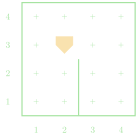
Karel starts as shown and executes the code to the right. How many beepers are placed in the world at the conclusion of the program?
- 1
- 2
- 3
- Hits a wall and errors
import karel

def main():
    turn_left()
    cool_thing()
    neat_thing()
    cool_thing()

def cool_thing():
    move()
    turn_left()
    turn_left()
    neat_thing()

def neat_thing():
    put_beeper()
    turn_left()
move()A Quick Comment
- It is always a good idea to document and leave notes to yourself (or future readers of your code)
- Comments are pieces of text in your program that are ignored when the program is run
- Python has two methods to make a comment:
Hashtag method: Everything following a hashtag (#) on the same line is ignored
# This is a short comment!- Commonly used to make quick explanatory or labeling comments
Triple quote method: Everything inside triple quotes (“““) is ignored
""" This is also a comment! """- Commonly used to describe what functions do
- Can span multiple lines
Commenting Example
def main():
    """ Main function to fill 2 potholes
    at known locations.
    """
    move()
    fill_pothole()
    move()
    move()
    fill_pothole()
    move()

def fill_pothole():
    """ Fills a single pothole and returns
    to where it started.
    """
    turn_right()
    move()
    put_beeper() #assuming infinite beepers available
    turn_around()
    move()
    turn_right()

def turn_right():
    """ Turns Karel 90 to the right. """
    turn_left()
    turn_left()
    turn_left()

def turn_around():
    """ Convenience function to turn Karel 180 around. """
    turn_left()
    turn_left()
Decisions
Making Choices
- To solve more interesting tasks, we need to be able to write programs that can make choices about what they should be doing
- Commands that alter the order that a program will run its commands
are called control statements, which come in two flavors:
- Conditional statements: Only run portions of the program if a condition is true
- Iterative statements: Repeat portions of the program if certain conditions are met
- Conditions are answers to yes or no (or true/false) type questions
- Am I facing a wall?
- Do I have any beepers in my bag?
- You can ask these questions of Karel using what are called predicate functions, which are the programming equivalent of yes-or-no questions
Interrogating Karel
Potential questions you can ask Karel include:
front_is_clear() |
front_is_blocked() |
left_is_clear() |
left_is_blocked() |
right_is_clear() |
right_is_blocked() |
beepers_present() |
no_beepers_present() |
beepers_in_bag() |
no_beepers_in_bag() |
facing_north() |
not_facing_north() |
facing_south() |
not_facing_south() |
facing_east() |
not_facing_east() |
facing_west() |
not_facing_west() |
Kinda Iffy
Predicate functions can be used to control a kind of “switch”: running one piece of code if the answer is yes and a different piece of code if the answer is no.
Commonly called if or if-else statements, they take on the syntax of:
if |||conditional test|||:
    |||code to run if the test answer is yes/true|||
else:
    |||code to run if if the test answer is no|||
If you don’t want the code to do anything special if the answer is no, you can ignore the “else” part of the statement:
if |||conditional test|||:
    |||code to run if the test answer is yes/true|||
|||code that will always run, regardless of the test answer|||
Karel’s Decisions Example
- Suppose we want Karel to move across the bottom of any of the below
worlds and fill in any gaps in the beepers
- We want an even layer of beepers, no stacks
- What questions should we have Karel ask?

Iterations: While
It’s been a while
Another common use of predicate functions is in controlling a type of iterative function called a while loop
The structure of a while loop looks like:
while |||conditional test|||:
    |||code to repeat as long as the answer to the test in yes|||
|||code to run once the answer to the test is no|||
All of our predicate functions give yes-or-no answers though! So we can do something like
while front_is_clear():
    move()
which will continually move Karel forward as long as there is not a wall in front of them!
Smarty Karel
- Combining conditional statements with loops lets us write a program for Karel in which it can react to different situations in different ways, all using the same code
- Our pothole code from Wednesday could only handle two potholes, and they had to be perfectly spaced
- With one loop and one if statement, we can make the program fill any number of potholes with any manner of spacing!
- Key questions:
- How do we know when we are done?
- How do we know when we reach a pothole?
Smart Potholes
def main():
    """
    Main function to fill any number of
    potholes at any location!
    """
    while front_is_clear():
        if right_is_clear():
            fill_pothole()
        move()

def fill_pothole():
    """
    Fills a single pothole and returns
    to where it started.
    """
    turn_right()
    move()
    put_beeper() #assuming infinite beepers available
    turn_around()
    move()
    turn_right()

def turn_right():
    """ Turns Karel 90 deg to the right. """
    turn_left()
    turn_left()
    turn_left()

def turn_around():
    """ Turns Karel 180 deg around. """
    turn_left()
    turn_left()
Inception: Loops in Loops
Whenever a loop ends, you just return to the same indentation level as when that loop began
For loops inside other loops then, this means that the “inner-most” loop runs from start to finish for every single step of the outer loop
What does the below chunk of code accomplish?
while front_is_clear():
    move()
    while not_facing_north():
        turn_left()
    turn_left()
put_beeper()
Understanding Check
Karel starts as shown to the right with 20 beepers in its bag. After executing the commands below, how many beepers are left in the bag upon the conclusion of the program?
while left_is_clear():
    while front_is_clear():
        move()
        if no_beepers_present():
            put_beeper()
    turn_left()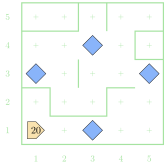
- 12
- 13
- 15
- 19
Working with Assignments
Accepting
- Every assignment will have a portion near the top that prompts you to click it to “Accept” the assignment
- What is really happening when you do this is that GitHub is creating a private space for you to work and populating that space with the starting template materials that I have provided
- What is usually provided?
- Starting templates for each problem
- Any extra libraries that are needed
- Any extra files that are needed
Making it Local
- Initially, these resources only exist in your online space (repository)
- You will basically always want to download everything to work with it locally
- Hit the big green “Code” button and select “Download as Zip”
- Then actually unzip it wherever you downloaded it
to
- You can organize yourself however you want here
- Now you can open that folder in VSCode and start editing!
Submitting
- All you need to do to submit is upload your altered template files back to your online space (repository)
- Navigate back to the directory (you can always click to accept the assignment again and it will just take you there)
- Next to the green Code button, click the “Add file” button, and then select “Upload files”
- From your file browser, drag and drop in the changed files (or click
“choose your files” and then select which files you edited)
- Do not select the entire directory! Just the edited files.
- Add a little message of what you changed
- Click the green “Commit changes” button! You have submitted that file!
Extra Considerations
- You can always upload files as you complete problems. You don’t need to upload everything at once.
- You can always upload the same file multiple times.
- GitHub tracks the entire history of the file, but all that will ever be graded in your last submission
- Uploading your work partway is never a bad idea, in case something should happen to your local copy
- You can view the files online once you have uploaded them. Check them before the due date to make sure your uploads have gone through.
- You should never rename files. Just upload them with the exact same filename and override the previous.
Comments