What is your type?
September 5, 2025
Review Question
Karel starts in the empty world shown at one of the marked positions and runs the below code. One of the starting positions will result in an error before the code finishes. Which one?
for i in range(2):
    move()
    turn_left()
    for i in range(2):
        if front_is_blocked():
            turn_around()
        move()
    turn_right()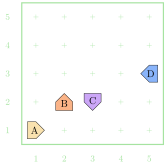
An Amazing Algorithm
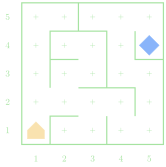
- Consider a simple, loop-less, maze that we want to move through
- Karel can start anywhere
- The end of the maze is a beeper, and can be anywhere
- A common algorithm to get through the maze is to essentially always
follow or touch the wall to your right
- How could we phrase this in language Karel would understand?
- Take 5 minutes with a neighbor to write out how you could implement the above algorithm in a way Karel could understand
Expressions
- Python describes computation using arithmetic expressions,
which consist of terms joined by operators
- Very similar to how a logical English sentence has nouns connected by verbs
- A term in an expression can be:
- an explicit numeric value (called a literal) like 1 or 3.14
- a variable name serving as a placeholder to a value (more on those in a moment!)
- a value resulting from the output of a function call (more on those on Monday!)
- another expression enclosed in parentheses

Tis Variable
- One of the terms that can appear in expressions is what we term a variable
- A variable is a placeholder or nametag for a value that can be updated as the program progresses
- Envision as a named box capable of storing a value
!['Will this work?]()
- Each variable has the following attributes:
- A name: which enables you to tell variables apart
- A value: which represents the current contents of the variable
- A variable’s name is fixed, but the value can change whenever you assign a new value to the variable