Class Actions
Jed Rembold
November 3, 2025
Announcements
- ImageShop due tonight!
- PS5’s feedback is coming, sorry for the delay
- Exam 2 on Friday!
- Learning Objectives posted
- Practice Exam 1 posted with solutions
- Practice Exam 2 posted with solutions
- We will introduce the Enigma project next Monday in case you are
itching to get started on that
- Not due until Nov 17
- Polling: polling.jedrembold.prof
Adding Behavior
What’s your Method?
Most classes define additional functions called methods to allow clients to read or update attributes or manipulate the object
Methods look like a normal function definition but will always declare the parameter
selfat the beginning of the parameter list- This is true even if the method has no other parameters
Methods are defined in the body of the class and would thus look something like:
def |||method name||| (self, |||other parameters|||):
  |||...body of the method...|||
For example
def give_raise(self, amount):
  self.salary += amount
Accessing and Using Methods
- Once defined, there are two mains ways you can access and use the
method:
- Dot Notation (Conventional)
Python sets
selfto be a reference to the receiver, which is the object to which the method is applied (the object that comes before the dot)clerk = Employee('Bob', 'clerk', 15) clerk.give_raise(15)
- Function Notation
You retrieve the method from the class itself, and then provide
selfmanually, whereselfis the object you want to act onclerk = Employee('Bob', 'clerk', 15) Employee.give_raise(clerk, 15)
- Dot Notation (Conventional)
Visualization Summary
- To summarize in a visual manner, we can look at everything together on PythonTutor
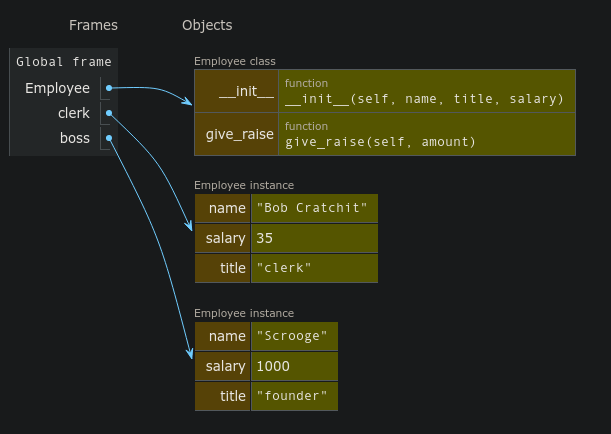
Understanding Check
What would be the output of the last print statement in the code to the right?
- True
- False
- Error: Index out of range
- Error: Python will not know how to compare the new Demo objects
class Demo:
    def __init__(self):
        self.x = []

    def add(self, v):
        self.x.append(v)

    def get_x(self):
        return self.x

A, B = Demo(), Demo()
C = B.get_x()
A.add(3)
B.add(3)
C.append(A)
print(A.get_x() == B.get_x())
Defining Good Methods
Getters and Setters
In the abstraction boundary, object-oriented model, the client is not supposed to muck-about with the object internals
The implementation should therefore provide methods to retrieve desired attributes (called getters) or to make changes to desired attributes (called setters)
Setting up getters and setters for the attribute
salarymight look like:def get_salary(self): return self.salary def set_salary(self, new_salary): self.salary = new_salaryGetters are far more common than setters, as you don’t always want the client to have the freedom to change attributes on a whim
Privacy Please
- The idea behind object-oriented programming and the abstraction boundary is that we interact with the class though methods, and the class takes care of the internal representation
- Python works well with this, but it doesn’t really enforce it
- We can freely access, change, or even add new attributes to the class
- But in most cases, we really should not
- Maybe the class will get updated in a way that changes all the internal variable names. Now all our code referring to them is broken!
- Use (and define) getters and setters for your classes!
- Convention is that we preface a class attribute with an underscore
if we really want to make clear that the client should
not mess with that attribute
- This is just convention. Python will still allow it to be altered, but it is a bad practice to get in the habit of doing
Representation
Printing out an object that you just created as an instance of a custom class will look ugly:
>>> C = Employee('Bob', 'clerk', 15) >>> print(C) <__main__.Employee object at 0x7f942ba13550>You can define special methods for a class that specify how your object should be converted to a string (or anything else really)
- All these special methods have double underscores before and after, and hence are frequently termed “dunder” (double underscore) methods
- Define the
__str__or__repr__method to specify how your object should be printed- These should return a string
A Good Employee
class Employee:
def __init__(self, name, title, salary):
self.name = name
self.title = title
self.salary = salary
def __str__(self):
return f"{self.name} ({self.title}): {self.salary}"
def get_salary(self):
  return self.salary

def set_salary(self, new_salary):
self.salary = new_salaryWhy write a class? An example
The Objective
- Suppose we want to write a program to simulate a fireworks show in PGL
- Fireworks should travel upward on the screen for some random time at some random angle until they explode
- When they explode, they should grow in a circle of some random color to some random size

Return of the Firework
from pgl import GWindow, GOval, GRect
import random

GW_WIDTH = 500
GW_HEIGHT = 500

def random_color():
    color = "#"
    for _ in range(6):
        color += random.choice("0123456789ABCDEF")
    return color

class Firework:
    """ Creates a new firework with initial flight and then
    explosion.
    """
    def __init__(self, size):
        self.obj = GOval(GW_WIDTH/2, GW_HEIGHT, size, size)
        self.obj.set_filled(True)
        self.obj.set_color("white")
        self.speed = 5
        self.heading = random.randint(60,120)
        self.fuse = random.randint(50,100)
        self.maxsize = random.randint(60,100)
        self.color = random_color()
        self.mode = 0

    def get_object(self):
        """ Returns the firework graphical object. """
        return self.obj

    def should_terminate(self):
        """ Checks if the firework should be removed. """
        return self.mode > 1

    def move(self):
        """ Moves the firework in its initial flight. """
        self.obj.move_polar(self.speed, self.heading)
        self.fuse -= 1
        if self.fuse < 0:
            self.mode += 1
            self.obj.set_color(self.color)

    def explode(self):
        """ Grows the firework explosion upon detonation. """
        R = 2
        x = self.obj.get_x()
        y = self.obj.get_y()
        S = self.obj.get_width()
        self.obj.set_bounds(x-R/2, y-R/2, S+R, S+R)
        if self.obj.get_width() >= self.maxsize:
            self.mode += 1

    def update(self):
        """ Controls what the firework should be doing during
        each stage.
        """
        if self.mode == 0:
            self.move()
        elif self.mode == 1:
            self.explode()


def fireworks_show():
    """ Makes a fireworks show! """
    def step():
        """ Calls up update method on all fireworks in the box
        and removes if necessary.
        """
        for f in firework_box[:]:
            f.update()
            if f.should_terminate():
                gw.remove(f.get_object())
                firework_box.remove(f)


    def give_me_more_fireworks():
        """ Adds more fireworks to the box. """
        new = Firework(2)
        firework_box.append(new)
        gw.add(new.get_object())

    gw = GWindow(GW_WIDTH, GW_HEIGHT)
    sky = GRect(GW_WIDTH, GW_HEIGHT)
    sky.set_filled(True)
    gw.add(sky)
    firework_box = []

    gw.set_interval(step, 20)
    gw.set_interval(give_me_more_fireworks, 100)

if __name__ == '__main__':
    fireworks_show()
Paired Object Types
Maps and Dictionaries
- A common form of information associates pairs of data values
- Commonly called a map in computer science
- Python calls such a structure a dictionary
- A dictionary associates two different values:
- A simple value called the key, which is often a string but doesn’t need to be
- A larger and more complex object called the value
- This idea of associating pairs of values is exhibited all over in
the real world
- Actual dictionaries! The words are the keys, the definitions the values.
- Web addresses! Keys are the urls, the values are the webpage contents.
Creating Dictionaries
Python dictionaries use squiggly brackets or braces
{}to enclose their contentsCan create an empty dictionary by providing no key-value pairs:
empty_dict = {}If creating a dictionary with key-value pairs
- Keys are separated from values with a colon
: - Pairs are separated by a comma
,
generic_dict = {'Bob': 21, 0: False, 13: 'Thirteen'}- Keys are separated from values with a colon
Keys and Values
- The value of a key-value pair can be any Python
object, mutable or immutable
- This include other dictionaries!
- The key is more restricted:
- Must be immutable
- So dictionaries or lists can not work as a key
- Tuples can though!
- Must be unique per dictionary
- Must be immutable
A = {True: 'Seth', False: 'Jesse'}
B = {'Jill': 13, 'Jack': 12}
C = {(1,2): {'x': 1}}
X = {{'x': 1, 'y': 2}: 'Shark'}
Y = {[1,3,5]: 'Odd'}
Z = {'A': 13, 'B': 24, 'A': 15}Selection
The fundamental operation on dictionaries is selection, which is still indicated with square brackets:
[]Dictionaries though are unordered, so it is not a numeric index that goes inside the
[ ]You instead use the key directly to select corresponding values:
>>> A = {'Jack': 12, 'Jill': 13}['Jack']
>>> print(A)
13
>>> B = {True: 13, 0: 'Why?'}[0]
>>> print(B)
Why?
Losing your keys
If you attempt to index out a key that doesn’t exist:
A = {'Jack': 12, 'Jill': 13}
print(A['Jil'])
you will get an error!
If in doubt, check for the presence of a key with the
inoperator:if 'Jil' in A: print(A['Jil'])
Rewriting the Dictionary
- Dictionaries are mutable!
- We can add new key-value pairs
- We can change the value of corresponding keys
>>> d = {}
>>> d['A'] = 10
>>> d['B'] = 12
>>> print(d)
{'A':10, 'B':12}
>>> d['A'] = d['B']
>>> print(d)
{'A':12, 'B':12}
Understanding Check
What is the printed value of the below code?
A = [
    {'name': 'Jill',  'weight':125, 'height':62},
    {'name': 'Sam',   'height':68},
    {'name': 'Bobby', 'height':72},
]
A.append({'weight':204, 'height':70, 'name':'Jim'})
B= A[1]
B['weight'] = 167
print([d['weight'] for d in A if 'weight' in d])-
[100,204] -
[156,173,204]
-
[100,167,173,204] -
[125,167,204]
Iterating through a Dictionary
Frequently we might want to iterate through a dictionary, checking either its values or its keys
Python supports iteration with the
forstatement, which has the form of:for key in dictionary: value = dictionary[key] |||code to work with that key and value|||You can also use the
.itemsmethod to grab both key and values together:- Returns a tuple with both the key and corresponding pair
for key, value in dictionary.items():
    |||code to work with that key and value|||
Finding Students by grade
- Suppose we had a file of student ids and corresponding grades on a test
- We want a simple program where we can enter in a target grade and have it tell us all the students who received that grade
def read_to_dict(filename):
  dictionary = {}
  with open(filename) as f:
      for line in f:
          ID, score = line.strip().split(',')
          dictionary[ID] = score
  return dictionary

def get_students_with_score():
    scores = read_to_dict('SampleGrades.txt')
    done = False
    while not done:
        des_grade = input('Enter a letter grade: ')
        if des_grade == "":
            done = True
        else:
            for st_id, grade in scores.items():
                if grade == des_grade.strip().upper():
                    print(f"{st_id} got a {grade}")
Common Dictionary Methods
| Method call | Description |
|---|---|
len(|||dict|||) |
Returns the number of key-value pairs in the dictionary |
|||dict|||.get(key, value) |
Returns the value associated with the
key in the dictionary. If the key is not
found, returns the specified value, which is
None by default) |
|||dict|||.pop(key) |
Removes the key-value pair corresponding to
key and returns the associated value. Will
raise an error if the key is not found. |
|||dict|||.clear() |
Removes all key-value pairs from the dictionary, leaving it empty. |
|||dict|||.items() |
Returns an iterable object that cycles through the successive tuples consisting of a key-value pair. |
Dictionary Records
While most commonly used to indicate mappings, dictionaries have seen increased use of late as structures to store records
Looks surprisingly close to our original template of:
boss = {
    'name': 'Scrooge',
    'title': 'founder',
    'salary': 1000
    }
Allows easy access of attributes without worrying about ordering
print(boss['name'])It is still using a mutable data-type to represent something that should be immutable though