Drawing Functions
Jed Rembold
February 8, 2023
Announcements
- Problem Set 3 due on Friday night!
- Remember you can contact your section leader if you have questions as well
- You’ll absolutely have everything to complete it after today
- Project guide for Wordle posted!
- Polling: rembold-class.ddns.net
Receiver Syntax
So far, all operations between or on objects have used symbols to indicate the operation
- The
+sign, for instance
- The
Going forward, we will begin to see more examples of operations on objects that use receiver syntax
In receiver syntax, we specify the object to act on, followed by a dot and then a predefined function (called a method here) name
obj.method_name()- This is like you are running this special function on the object, so
you need the
()at the end - Some methods also allow arguments, to influence exactly how the operation will proceed
- This is like you are running this special function on the object, so
you need the
An Approach to Success
- Each project is accompanied by a highly detailed guide: read
it!
- Explains background ideas so that you can understand the big picture of what you are needing to do
- Also included a breakdown of individual milestones
- A milestone is a discrete checkpoint that you should ensure is working (and that you understand!) before moving on
- Projects are all about managing complexity. If you start trying to implement milestones out of order, you are asking for disaster
- Don’t let yourself get overwhelmed by scale. Focus on one particular milestone at a time, which should involve focusing only on a small part of your overall code
The Worth of a Picture
- There comes a time when reading and entering text on a terminal
doesn’t cut it
- Maybe you need more complicated input
- Maybe you need a more complicated interface that pure text can manage
- Maybe you have output that can not be shown as text
- Standard Python really only deals with the terminal interface
- Lots of outside libraries give Python more visual input/output
- Turtle
- Matplotlib
- Tkinter ← PGL
- PyGame
- Arcade
The Portable Graphics Library
- Built atop Tkinter
- The library (
pgl.py) is available on the website- Put it in the same folder as your code, and then you can import it
- Operates on the idea of a collage or cork-board
- Note that newer objects can obscure older objects. This layering arrangement is called the stacking order.
The Pieces
- At its simplest then, we have two main parts:
- The window (or felt-board/cork-board)
- Created with the
GWindowfunction - Takes two arguments: a width and a height in pixels
- Created with the
- The contents
- A wide assortment of shapes that can be added to the scene
- Control over where they are placed, how large they are, what color they are, etc
- The window (or felt-board/cork-board)
Blue Rectangle!
from pgl import GWindow, GRect

GW_WIDTH = 500
GW_HEIGHT = 200

gw = GWindow(GW_WIDTH, GW_HEIGHT)
rect = GRect(150, 50 ,200, 100)
rect.set_color("Blue")
rect.set_filled(True)
gw.add(rect)
The Coordinate System
- Positions and distances on the screen are measured in terms of pixels
- The location of the origin and orientation of the y-axis are
different from math!
- Origin is in the upper left instead of lower left
- Y-values increase as you move downwards
Other Simple Objects
Functions to create simple geometric objects:
- Rectangles!
GRect( x, y, width, height )- Creates a rectangle whose upper left corner is at (x,y) of the specified size
- Circles/Ovals!
GOval( x, y, width, height )- Creates an oval that fits inside the rectangle with the same dimensions
- Lines!
GLine( x1, y1, x2, y2 )- Creates a line extending from (x1,y1) to (x2,y2)
The GObject Hierarchy
- The types of graphical objects form a hierarchy:
- The
GObjecttype represents the collection of all graphical objects - The
GFillableObjecttype represents those that have a fillable interior
Interacting with the GWindow
We’ve already shown creation:
gw = GWindow(width, height)You have several more operations that you can apply to the
GWindowobject:
gw.add(object) |
Adds an object to the window |
gw.add(object, x, y) |
Adds an object to the window after moving it to (x,y) |
gw.remove(object) |
Removes an object from the window |
gw.get_width() |
Returns the width of the graphics window in pixels |
gw.get_height() |
Returns the height of the graphics window in pixels |
Interacting with GObjects
- The following operations apply to all GObjects, where
objectis the name of any specific instance.
object.get_x() |
Returns the x coordinate of this object |
object.get_y() |
Returns the y coordinate of this object |
object.get_width() |
Returns the width of this object |
object.get_height() |
Returns the height of this object |
object.set_color(color) |
Sets the color of the object to the specified color |
- All coordinates and distances are measured in pixels
Interacting with GFillableObjects
- Fillable GObjects have a smaller subset of commands that also apply to them.
- Initially the only fillable objects available to you are rectangles and ovals
object.set_filled(bool) |
Sets the fill state of the object |
object.set_fill_color(color) |
Sets the color to be used to fill the interior, otherwise same as the outer line |
object.get_fill_color() |
Gets the current color used to display the object interior |
object.is_filled() |
Returns True or False depending on whether the object is currently filled |
Smile!
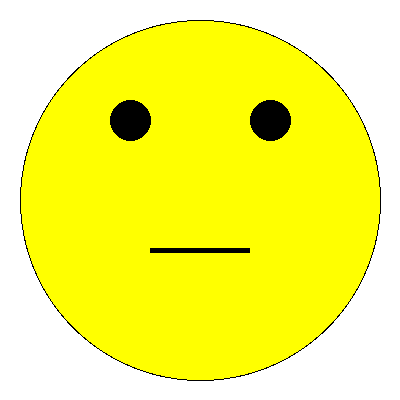
gw = GWindow(400, 400)

head = GOval(20, 20, 360, 360)
head.set_fill_color("yellow")
head.set_filled(True)
gw.add(head)

reye = GOval(110, 100, 40, 40)
reye.set_filled(True)
gw.add(reye)

leye = GOval(250, 100, 40, 40)
leye.set_filled(True)
gw.add(leye)

mouth = GLine(150, 250, 250, 250)
mouth.set_line_width(5)
gw.add(mouth)
Review Question
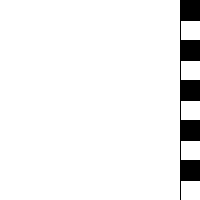
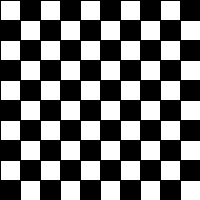
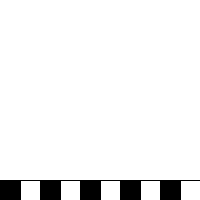
Which of the below images would be produced by the following code?
gw = GWindow(200,200)
for c in range(0,10):
    for r in range(0,10):
        rect = GRect(20*c,20*r,20,20)
        if (r+c) % 2 != 0:
            rect.set_filled(True)
    gw.add(rect)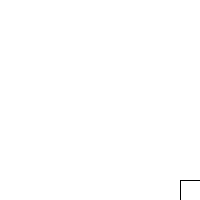
Label It!
Sometimes you need to add some text to the window
Can display any string using
GLabelusing the following format:msg = GLabel(string_to_add, x_location, y_location)Here
string_to_addis the text you want to display, andx_locationandy_locationare the (x,y) coordinates of where you want to place the origin of the label.
Label Geometry
- The
GLabelclass relies on some geometrical concepts that are derived from classical typesetting- The baseline is the imaginary line on which the characters rest
- The origin is the point on the baseline at which the text begins
- The width is the horizontal distance from the origin to the end of the text
- The height of the font is the distance between adjacent baselines
- The ascent is the distance the characters rise above the baseline
- The descent is the distance the characters drop below the baseline
Interacting with Labels
- A
GLabelhas several special methods that you can use to interact with itYou can use:
get_width(),get_height(),get_ascent(), andget_descent()methods to obtain the geometric propertiesYou can set a special font for the label using
labelname.set_font(font)Where
fontis a string comprised of the following elements:- The font style, which is usually blank or
italic - The font weight, which is usually blank or
bold - The font size, which is a number followed by the units
(typically
pt,px, orem) - The font family, which is the name of the font. Because what fonts are available can differ from machine to machine, the family is usually a sequence of fonts separated by commas
- The font family sequence usually ends with a standard family
(
serif,sans-serif, ormonospace) to ensure that the label can display
- The font style, which is usually blank or
Label Example
gw = GWindow(500, 200)
msg = GLabel("hello world!", 50, 100)
msg.set_font("italic bold 80px 'times new roman'")
gw.add(msg)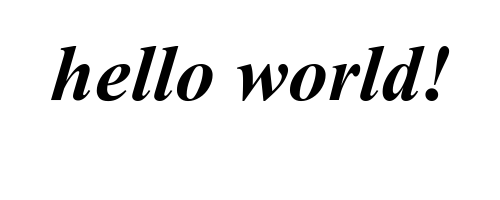
Centering a GLabel
- Frequently useful to center within the window or some shape
- To center properly, you need to know the label dimensions, but you can’t determine the dimensions until after you’ve created the label!
- The main idea then is to:
- Create a
GLabelwithout setting its location - Call the
.set_font()method to set the desired font (which could change the size) - Determine the horizontal position of the origin by subtracting half the width from the desired location x
- Determine the vertical position of the baseline by adding half the ascent to the desired location y
- Add the
GLabelat the newly calculated position
- Create a
Centering Example
gw = GWindow(500, 200)
msg = GLabel("hello world!")
msg.set_font("italic bold 20px 'times new roman'")
x = gw.get_width()  / 2 - msg.get_width()  / 2
y = gw.get_height() / 2 + msg.get_ascent() / 2
gw.add(msg, x, y)