Random Functional Labels
Jed Rembold
February 10, 2023
Announcements
- I’m still working through the PS2 feedback unfortunately
- It’s been a week, and this problem set takes a while to score
- Don’t forget that the Wordle Project is posted when you want to get
a start on that
- Please don’t wait until late next week to start it
- My availability today is almost non-existant, but I’ll be around for 30 min after class or after 5pm
- Visiting Faculty Candidate today!
- Teaching Demonstration at noon (this room)
- Research Talk at 1 (this room)
- Polling: rembold-class.ddns.net
Smile!
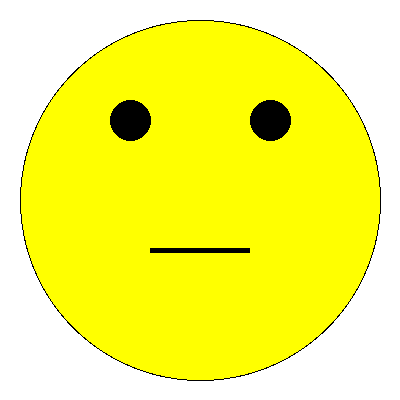
gw = GWindow(400, 400)

head = GOval(20, 20, 360, 360)
head.set_fill_color("yellow")
head.set_filled(True)
gw.add(head)

reye = GOval(110, 100, 40, 40)
reye.set_filled(True)
gw.add(reye)

leye = GOval(250, 100, 40, 40)
leye.set_filled(True)
gw.add(leye)

mouth = GLine(150, 250, 250, 250)
mouth.set_line_width(5)
gw.add(mouth)
Review Question
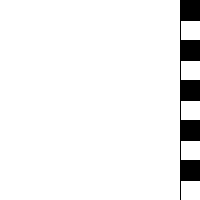
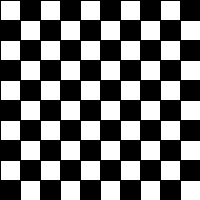
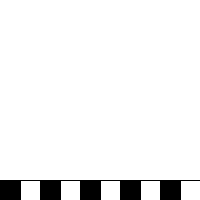
Which of the below images would be produced by the following code?
gw = GWindow(200,200)
for c in range(0,10):
    for r in range(0,10):
        rect = GRect(20*c,20*r,20,20)
        if (r+c) % 2 != 0:
            rect.set_filled(True)
    gw.add(rect)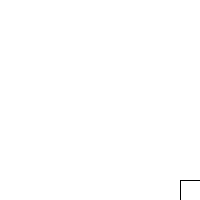
Label It!
Sometimes you need to add some text to the window
Can display any string using
GLabelusing the following format:msg = GLabel(string_to_add, x_location, y_location)Here
string_to_addis the text you want to display, andx_locationandy_locationare the (x,y) coordinates of where you want to place the origin of the label.
Label Geometry
- The
GLabelclass relies on some geometrical concepts that are derived from classical typesetting- The baseline is the imaginary line on which the characters rest
- The origin is the point on the baseline at which the text begins
- The width is the horizontal distance from the origin to the end of the text
- The height of the font is the distance between adjacent baselines
- The ascent is the distance the characters rise above the baseline
- The descent is the distance the characters drop below the baseline
Interacting with Labels
- A
GLabelhas several special methods that you can use to interact with itYou can use:
get_width(),get_height(),get_ascent(), andget_descent()methods to obtain the geometric propertiesYou can set a special font for the label using
labelname.set_font(font)Where
fontis a string comprised of the following elements:- The font style, which is usually blank or
italic - The font weight, which is usually blank or
bold - The font size, which is a number followed by the units
(typically
pt,px, orem) - The font family, which is the name of the font. Because what fonts are available can differ from machine to machine, the family is usually a sequence of fonts separated by commas
- The font family sequence usually ends with a standard family
(
serif,sans-serif, ormonospace) to ensure that the label can display
- The font style, which is usually blank or
Label Example
gw = GWindow(500, 200)
msg = GLabel("hello world!", 50, 100)
msg.set_font("italic bold 80px 'times new roman'")
gw.add(msg)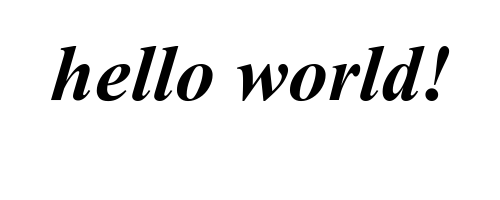
Centering a GLabel
- Frequently useful to center within the window or some shape
- To center properly, you need to know the label dimensions, but you can’t determine the dimensions until after you’ve created the label!
- The main idea then is to:
- Create a
GLabelwithout setting its location - Call the
.set_font()method to set the desired font (which could change the size) - Determine the horizontal position of the origin by subtracting half the width from the desired location x
- Determine the vertical position of the baseline by adding half the ascent to the desired location y
- Add the
GLabelat the newly calculated position
- Create a
Centering Example
gw = GWindow(500, 200)
msg = GLabel("hello world!")
msg.set_font("italic bold 20px 'times new roman'")
x = gw.get_width()  / 2 - msg.get_width()  / 2
y = gw.get_height() / 2 + msg.get_ascent() / 2
gw.add(msg, x, y)
Nondeterministic Programming
- For Wordle, the game is only interesting if the secret word is not the same every time!
- Let’s look at the built-in
randomlibrary, which lets us simulate random processes - Programs that involve random processes that cannot be predicted in advance are said to be nondeterministic
- Nondeterministic behavior is essential to many applications.
- Many games would not be enjoyable if they behaved the exact same way every playthrough
- Important practical uses in simulations, computer security, and algorithm research
Important Functions in random
- Random Integers
randint(minv, maxv) |
Returns an integer between minv and maxv, inclusive |
randrange(limit) |
Returns an integer from 0 up to but not including limit |
randrange(start,limit) |
Returns an integer from start up to but not including limit |
random() |
Returns a random float between 0 and 1 |
uniform(minv, maxv) |
Returns a random float between minv and maxv |
choice(a_list) |
Returns a random element from
a_list |
sample(a_list, k) |
Returns a list of
k elements from
a_list |
shuffle(a_list) |
Randomly reorders the elements of
a_list |
Random Examples
import random

def random_redblue():
    if random.random() > 0.5:
        return "red"
    else:
        return "blue"

def random_color():
    color_string = "#"
    for i in range(6):
        color_string += random.choice("0123456789ABCDEF")
    return color
Function Review
- A function is just a sequence of statements that have been
collected together and given a name
- Makes it possible to execute the statements multiple times much more easily
- Some reminders about vocabulary:
- Invoking or running a function by name is known as calling that function.
- The caller passes information to a function using arguments.
- When a function completes its block of code, it returns to its caller.
- The function gives information back to the caller by returning a result
def function_name( parameter_list ):
  function_body
Predicate Functions
Functions that return a Boolean value are called predicate functions
def is_divisible_by(x, y):
  return x % y == 0
Once you have defined a predicate function, you can use it in any conditional expression!
for i in range(1, 100):
  if is_divisible_by(i, 7):
      print(i)
Predicate No-nos
Don’t complicate your code for no reason!
Work directly with the boolean values when possible
Try not to code patterns like the following:
def is_divisible_by(x, y):
  if x % y == 0:
      return True
  else:
      return False
for i in range(1, 100): if is_divisible_by(i,7) == True: print(i)
Parameter Purposes
- Often functions need some sort of outside input in order to be useful
- It is necessary for them to know enough details so that they can
carry out the requested task, but not so many that the function becomes
annoying to use
- Imagine you were trying to accomplish the task yourself!
- What is the minimum amount of information you would need to know?
- The minimum necessary information needed for the function to accomplish its task is generally the information conveyed in the parameters
- There is always a balance
- More parameters makes your function more general, to be used elsewhere
- More parameters are tedious and potentially error prone to enter if unnecessary
Jockeying for Position
So far we have used a positional way to assign arguments to parameters
>>> def func( first, second, third ): print( first, second, third ) >>> func(1,2,3) 1 2 3 >>> func(2,6,4) 2 6 4- First argument to first parameter, second to second parameter, etc
The Word is Key
Arguments may also be specified by a keyword, in which the caller precedes the argument with a parameter name and equals sign
Always stores the argument value in the specified parameter
>>>  def func( first, second, third ):
      print( first, second, third )
>>>  func(third=4, first=2, second=6)
2 6 4
Keyword arguments can appear in any order
All keyword arguments must come after any positional arguments!