Random Drawing
Jed Rembold
September 24, 2025
Announcements
- Wordle Project due next Monday night!
- Remember you can contact your section leader if you have questions as well
- Get started!
- Attend your small sections!
- All questions this week revolve around prepping/helping you with Wordle
- TechBytes tomorrow!
- Giant pumpkin apps!
- Polling: polling.jedrembold.prof
Review Question
What would be the output of
revq("september", "e") given the definition
below?
def revq(a, b):
    c = b.find(a)
return a[ a.find(b)+1 : a.rfind(b) : c+3 ]"seer""""eptemb""peb"
String I/O
Getting some input
We’ve seen how to display information to a user, but to retrieve data from a user, we can use Python’s built-in
input()functionThe form will generally look like:
|||variable||| = input(|||prompt_text|||)|||variable|||is the variable name you want to assign the user’s typed input to|||prompt_text|||is the string that will be displayed on the screen to communicate to the user what they should be doing
The
input()function always returns a stringIf you want to get an integer from the user, you will need to convert it yourself after retrieving it
num = int(input('Pick a number between 1 and 10: '))
F not G
Constructing text or sentences by interleaving strings and other objects comes up a lot in communicating code results to a user
For any Python version past 3.6, the nicest and easiest way to do this is with what are called f-strings:
A = 10
print(f"The value of A is: {A}!")
You can define an f-string anytime you would normally define a string, just be aware that the substitution happens with the values of variable at that point
A = 10
s = f"The value of A is {A}"
A = 12
print(s)
Formatting Strings
- F-strings allow up to easily substitute in values, but what if we
want those values to have a particular format?
- Rounded to the nearest two decimal places, for example
- One option would be to handle all this before the substitution manually
- Python gives a more streamlined method, using a format spec
- A format spec will be given inside the
{}placeholder- Comes after the variable/value itself
- There is a colon between the variable/value and the format spec
A = 10.234
print(f"The value of A is {A:0.2f}")
Shaping your format
- A format spec is a special string that determines the desired format
- Lots we can do, but we rarely need to do it all at once
- The basic building blocks (square brackets just to group):
[[fill]align]>[sign][width][,][.precision][type]
- Type
- How you want the object represented as a string
- “d” - base-10 integer
- “f” - float or decimal
- “e” - scientific notation
- More on next slide
- Precision
- How many digits to display after a decimal point
- Details can vary a little by conversion type
- Grouping?
- A comma here indicates that numbers should be grouped in sets of 3 and separated with a comma
- Width
- The minimum number of characters you want the formatted value to have
- If not otherwise specified, pads the value with space characters
- Sign?
- If the sign of the number should be specified
- A
+sign ensures all numbers will have either a+or-sign in front - A space just adds a space before positive numbers (negatives would
have a
-sign in front)
- Fill and Align
- How you want the text aligned if it is shorter than the minium width
- Can be
<,>, or^for left, right, or center justified
- Can be
- Any fill characters you want to fill the empty space come before
- Default is space
- How you want the text aligned if it is shorter than the minium width
Output Conversion Types
| Code | Description |
|---|---|
b |
Inserts an integer using its binary representation |
d |
Inserts an integer using its decimal representation |
e or E |
Inserts a number using scientific notation |
f or F |
Inserts a number using a decimal point format |
g or G |
Choose e or
f to get the best fit |
o |
Inserts an integer using its octal representation |
s |
Inserts a string value |
x or X |
Inserts an integer using its hexadecimal representation |
- Uppercase conversion types use capital characters where possible in output
Randomizing Our Programs
Nondeterministic Programming
- For Wordle, the game is only interesting if the secret word is not the same every time!
- Let’s take a moment to look at the built-in
randomlibrary, which lets us simulate random processes - Programs that involve random processes that cannot be predicted in advance are said to be nondeterministic
- Nondeterministic behavior is essential to many applications.
- Many games would not be enjoyable if they behaved the exact same way every playthrough
- Important practical uses in simulations, computer security, and algorithm research
Important Functions in random
- Random Integers
randint(|||minv|||, |||maxv|||) |
Returns an integer between
|||minv||| and
|||maxv|||, inclusive |
randrange(|||limit|||) |
Returns an integer from 0 up to but not
including |||limit||| |
randrange(|||start|||, |||limit|||) |
Returns an integer from
|||start||| up to but not including
|||limit||| |
random() |
Returns a random float between 0 and 1 |
uniform(|||minv|||, |||maxv|||) |
Returns a random float between
|||minv||| and
|||maxv||| |
choice(|||seq|||) |
Returns a random element from
|||seq||| |
sample(|||seq|||, |||k|||) |
Returns a list of
|||k||| elements from
|||seq||| |
shuffle(|||seq|||) |
Randomly reorders the elements of mutable
|||seq||| |
Random Example 1
import random

def random_redblue():
    if random.random() > 0.5:
        return "red"
    else:
        return "blue"
Random Example 2
def random_color():
    color_string = "#"
    for i in range(6):
        color_string += random.choice("0123456789ABCDEF")
    return color
Getting Graphical
The Worth of a Picture
- There comes a time when reading and entering text on a terminal
doesn’t cut it
- Maybe you need more complicated input
- Maybe you need a more complicated interface that pure text can manage
- Maybe you have output that can not be shown as text
- Standard Python really only deals with the terminal interface
- Lots of outside libraries give Python more visual input/output
- Turtle
- Matplotlib
- Tkinter ← PGL
- PyGame
- Arcade
The Portable Graphics Library
- Built atop Tkinter
- The library (
pgl.py) is available on the website- Put it in the same folder as your code, and then you can import it
- Operates on the idea of a collage or cork-board
- Note that newer objects can obscure older objects. This layering arrangement is called the stacking order.
The Pieces
- At its simplest then, we have two main parts:
- The window (or felt-board/cork-board)
- Created with the
GWindowfunction - Takes two arguments: a width and a height in pixels
- Created with the
- The contents
- A wide assortment of shapes that can be added to the scene
- Control over where they are placed, how large they are, what color they are, etc
- The window (or felt-board/cork-board)
Blue Rectangle!
from pgl import GWindow, GRect

GW_WIDTH = 500
GW_HEIGHT = 200

gw = GWindow(GW_WIDTH, GW_HEIGHT)
rect = GRect(150, 50 ,200, 100)
rect.set_color("Blue")
rect.set_filled(True)
gw.add(rect)
The Coordinate System
- Positions and distances on the screen are measured in terms of pixels
- The location of the origin and orientation of the y-axis are
different from math!
- Origin is in the upper left instead of lower left
- Y-values increase as you move downwards
Other Simple Objects
Functions to create simple geometric objects:
- Rectangles!
GRect( |||x|||, |||y|||, |||width|||, |||height||| )- Creates a rectangle whose upper left corner is at (x,y) of the specified size
- Circles/Ovals!
GOval( |||x|||, |||y|||, |||width|||, |||height||| )- Creates an oval that fits inside the rectangle with the same dimensions
- Lines!
GLine( |||x1|||, |||y1|||, |||x2|||, |||y2||| )- Creates a line extending from (x1,y1) to (x2,y2)
The GObject Hierarchy
- The types of graphical objects form a hierarchy:
- The
GObjecttype represents the collection of all graphical objects - The
GFillableObjecttype represents those that have a fillable interior
Interacting with the GWindow
We’ve already shown creation:
gw = GWindow(|||width|||, |||height|||)You have several more operations that you can apply to the
GWindowobject:
| Method | Description |
|---|---|
|||gw|||.add(|||object|||) |
Adds an object to the window |
|||gw|||.add(|||object|||, |||x|||, |||y|||) |
Adds an object to the window after moving it to (x,y) |
|||gw|||.remove(|||object|||) |
Removes an object from the window |
|||gw|||.get_width() |
Returns the width of the graphics window in pixels |
|||gw|||.get_height() |
Returns the height of the graphics window in pixels |
Interacting with GObjects
- The following operations apply to all GObjects, where
objectis the name of any specific instance.
| Method | Description |
|---|---|
|||object|||.get_x() |
Returns the x coordinate of this object |
|||object|||.get_y() |
Returns the y coordinate of this object |
|||object|||.get_width() |
Returns the width of this object |
|||object|||.get_height() |
Returns the height of this object |
|||object|||.set_color(|||color|||) |
Sets the color of the object to the specified color |
- All coordinates and distances are measured in pixels
Interacting with GFillableObjects
- Fillable GObjects have a smaller subset of commands that also apply to them.
- Initially the only fillable objects available to you are rectangles and ovals
| Method | Description |
|---|---|
|||object|||.set_filled(|||bool|||) |
Sets the fill state of the object |
|||object|||.set_fill_color(|||color|||) |
Sets the color to be used to fill the interior, otherwise same as the outer line |
|||object|||.get_fill_color() |
Gets the current color used to display the object interior |
|||object|||.is_filled() |
Returns True or False depending on whether the object is currently filled |
Smile!
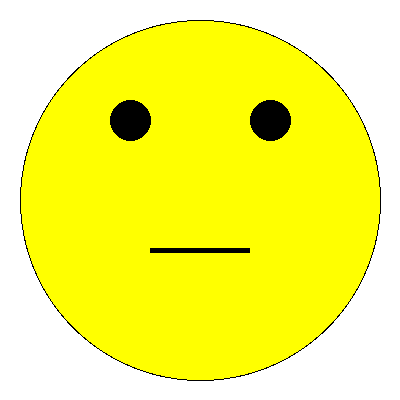
gw = GWindow(400, 400)

head = GOval(20, 20, 360, 360)
head.set_fill_color("yellow")
head.set_filled(True)
gw.add(head)

reye = GOval(110, 100, 40, 40)
reye.set_filled(True)
gw.add(reye)

leye = GOval(250, 100, 40, 40)
leye.set_filled(True)
gw.add(leye)

mouth = GLine(150, 250, 250, 250)
mouth.set_line_width(5)
gw.add(mouth)