Stacking Parameters
Jed Rembold
September 29, 2025
Announcements
- Should have gotten PS3 feedback from me last night
- Wordle is due tonight!
- Last moment help?
- I unfortunately have a packed day, but will be around during my usual office hours
- Section Leaders may have some time, but you need to reach out to them sooner rather than later
- QUAD Center open from 6pm - 9pm tonight
- Last moment help?
- First exam on Friday!
- Study
Materials Posted!
- Learning objective checklist
- 2 practice exams with solutions
- 1 Canvas variant of the first practice exam coming tonight
- Study
Materials Posted!
- Polling: polling.jedrembold.prof
Review Question
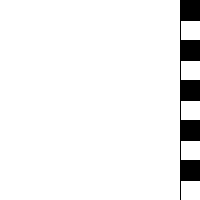
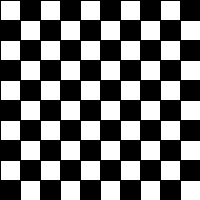
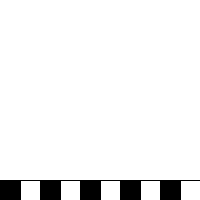
Which of the below images would be produced by the following code?
gw = GWindow(200, 200)
for c in range(0, 10):
    for r in range(0, 10):
        rect = GRect(20*c, 20*r, 20, 20)
        if (r + c) % 2 != 0:
            rect.set_filled(True)
    gw.add(rect)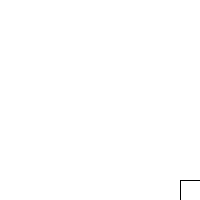
Textual Objects
Label It!
Sometimes you need to add some text to the window
Can display any string using
GLabelusing the following format:msg = GLabel(|||string to add|||, |||x location|||, |||y location|||)Here
|||string to add|||is the text you want to display, and|||x location|||and|||y location|||are the (x,y) coordinates of where you want to place the origin of the label.
Label Geometry
- The
GLabelclass relies on some geometrical concepts that are derived from classical typesetting- The baseline is the imaginary line on which the characters rest
- The origin is the point on the baseline at which the text begins
- The width is the horizontal distance from the origin to the end of the text
- The height of the font is the distance between adjacent baselines
- The ascent is the distance the characters rise above the baseline
- The descent is the distance the characters drop below the baseline
Interacting with Labels
- A
GLabelhas several special methods that you can use to interact with itYou can use:
get_width(),get_height(),get_ascent(), andget_descent()methods to obtain the geometric propertiesYou can set a special font for the label using
labelname.set_font(font)Where
fontis a string comprised of the following elements:- The font style, which is usually blank or
italic - The font weight, which is usually blank or
bold - The font size, which is a number followed by the units
(typically
pt,px, orem) - The font family, which is the name of the font. Because what fonts are available can differ from machine to machine, the family is usually a sequence of fonts separated by commas
- The font family sequence usually ends with a standard family
(
serif,sans-serif, ormonospace) to ensure that the label can display
- The font style, which is usually blank or
Label Example
gw = GWindow(500, 200)
msg = GLabel("hello world!", 50, 100)
msg.set_font("italic bold 80px 'times new roman'")
gw.add(msg)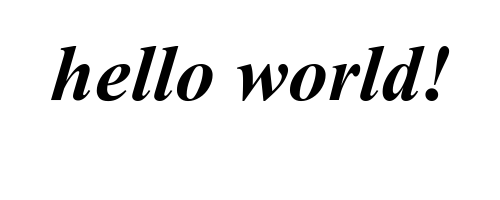
Centering a GLabel
- Frequently useful to center within the window or some shape
- To center properly, you need to know the label dimensions, but you can’t determine the dimensions until after you’ve created the label!
- The main idea then is to:
- Create a
GLabelwithout setting its location - Call the
.set_font()method to set the desired font (which could change the size) - Determine the horizontal position of the origin by subtracting half the width from the desired location x
- Determine the vertical position of the baseline by adding half the ascent to the desired location y
- Add the
GLabelat the newly calculated position
- Create a
Centering Example
gw = GWindow(500, 200)
msg = GLabel("hello world!")
msg.set_font("italic bold 20px 'times new roman'")
x = gw.get_width()  / 2 - msg.get_width()  / 2
y = gw.get_height() / 2 + msg.get_ascent() / 2
gw.add(msg, x, y)
Returning to Functions
Function Review
- A function is just a sequence of statements that have been
collected together and given a name
- Makes it possible to execute the statements multiple times much more easily
- Some reminders about vocabulary:
- Invoking or running a function by name is known as calling that function.
- The caller passes information to a function using arguments.
- When a function completes its block of code, it returns to its caller.
- The function gives information back to the caller by returning a result
def |||function_name|||( |||parameter_list||| ):
  |||body of the function|||
Predicate Functions
Functions that return a Boolean value are called predicate functions
def is_divisible_by(x, y):
  return x % y == 0
Once you have defined a predicate function, you can use it in any conditional expression!
for i in range(1, 100):
  if is_divisible_by(i, 7):
      print(i)
Predicate No-nos
Don’t complicate your code for no reason!
Work directly with the boolean values when possible
Try not to code patterns like the following:
def is_divisible_by(x, y):
  if x % y == 0:
      return True
  else:
      return False
for i in range(1, 100): if is_divisible_by(i,7) == True: print(i)
Parameter Purposes
- Often functions need some sort of outside input in order to be useful
- It is necessary for them to know enough details so that they can
carry out the requested task, but not so many that the function becomes
annoying to use
- Imagine you were trying to accomplish the task yourself!
- What is the minimum amount of information you would need to know?
- The minimum necessary information needed for the function to accomplish its task is generally the information conveyed in the parameters
- There is always a balance
- More parameters makes your function more general, to be used elsewhere
- More parameters are tedious and potentially error-prone to enter if unnecessary
Jockeying for Position
So far we have used a positional way to assign arguments to parameters
>>> def func( first, second, third ): print( first, second, third ) >>> func(1,2,3) 1 2 3 >>> func(2,6,4) 2 6 4- First argument to first parameter, second to second parameter, etc
The Word is Key
Arguments may also be specified by a keyword, in which the caller precedes the argument with a parameter name and equals sign
Always stores the argument value in the specified parameter
>>> def func( first, second, third ):
        print( first, second, third )
>>> func(third=4, first=2, second=6)
2 6 4
Keyword arguments can appear in any order
- You can mix and match positional and keyword
arguments, but…
- All keyword arguments must come after any positional arguments!
Default Slide Title
Python allows you to specify a default value for a parameter, which it will use if an argument is not directly supplied
Do so by adding an equals sign and a value after the parameter name (in the function definition)
def introduction(name='Jed', age=40): print(f'My name is {name} and I am {age}')- So you define default values when you define the function
If providing any arguments after a default parameter, you must indicate them through keywords
Default Example
>>> introduction()
My name is Jed and I am 40
>>> introduction('Bob', 25)
My name is Bob and I am 25
>>> introduction('Larry')
My name is Larry and I am 40
>>> introduction(age=68)
My name is Jed and I am 68
A Visual Aside
Returning Graphics
You can
returnany type of variable from a function, includingGObjectgraphical objectsCan be useful to write simple functions that bundle together common tasks
For instance, to create a filled circle centered at some location:
def make_filled_circ(x_cent, y_cent, radius, color='black'):
  circle = GOval( x_cent-radius, y_cent-radius,
                  2*radius, 2*radius)
  circle.set_color(color)
  circle.set_filled(True)
  return circle
A Visual Library
- Can create our own Python library by constructing a collection of constants or functions
- All code not in functions gets executed as soon as we
importso generally don’t want extraneous print statements or to be running any code directly - Want the library to be in the same location as any code we want to
importthe library in - When importing the library, we leave off the
.pypart of the extension
PGL Help Library
from pgl import GRect, GLabel
import random

def create_filled_rect(
    x_cent, y_cent, width, height, fill_col='black', border_col=None
):
    """
    Creates a GRect object with the desired fill color.
    If a border color is specified, also draws the
    border in the desired color.
    """
    rect = GRect(x_cent-width/2, y_cent-height/2, width, height)
    rect.set_filled(True)
    if border_col is None:
        rect.set_color(fill_col)
    else:
        rect.set_color(border_col)
        rect.set_fill_color(fill_col)
    return rect


def random_color():
    """
    Returns a random opaque color as a hex string.
    """
    color = "#"
    for i in range(6):
        color += random.choice("0123456789ABCDEF")
    return color


def create_centered_label(x_cent, y_cent, text, font=None):
    """
    Creates a GLabel object and centers it on the coordinates
    x_cent and y_cent.
    """
    label = GLabel(text)
    if font is not None:
        label.set_font(font)
    label.set_location(x_cent - label.get_width() / 2,
                       y_cent + label.get_ascent() / 2 )
    return label
Peri(Scopes)
Poll!
def Vegas(x):
    y = 2
    for i in range(5):
        x += y
    return x

x = 3
z = Vegas(x)
print('z =', z)
print('x =', x)
Consider the code to the left. When the final value of
x is printed, what will its value be?
- 3
- 5
- 13
None
Stacks and Scopes
- Functions really do work as self-contained little boxes or
environments!
- “What happens in
Vegasstays inVegas…
- “What happens in
- Whenever Python enters a new function, you can envision that it gets
out a fresh new board to keep track of that function’s variables
- What happens on that board does NOT affect whatever might have been defined or happened on other boards
- Each board is commonly called a stack frame
- When Python finishes with a function and returns, the board or stack frame for that function is thrown away!
Taking a Walk through Vegas
We’ll annotate the stack frames by hand as the earlier code runs:
def Vegas(x):
    y = 2
    for i in range(5):
        x += y
    return x

x = 3
z = Vegas(x)
print('z =', z)
print('x =', x)
Summary of a Function Call
- Evaluate the arguments in the context of the caller
- Reserve space for the function in a new stack frame
- Copy each positional argument to the corresponding parameter variable
- Copy each keyword argument to the parameter with that name
- For parameters with default values, if not already assigned, assign those values
- Evaluate statements in the function body, using current stack frame to look up values of local variables
- On encountering a
return, compute the return value and substitute that value in place of the function call - Remove the stack frame
- Return to the caller, continuing from just after the function call
Understanding Check
Riddle me this. What would be the printed value of z at the end of the code to the right?
- 27
- 25
- 19
- None of the above
def f(x,y):
    z = (x + 3) ** 2
    return y + z

x = 1
z = x + f(y=x,x=2)
print(z)
Name Resolution and Scope
- When Python encounters a variable name in a program, it looks for
where the variable was defined in an expanding search:
- Local - The local context is all the variables defined within the current function. This includes variables appearing as a parameter!
- Enclosing - The enclosing context consists of the names defined in a function enclosing the current one.
- Global - The global context consists of names defined outside of any function or imported into the current module.
- Built-in - The last place Python looks is in the
names of any built-in functions, like
abs,str,print, etc.
- The part of a program in which a name is defined in called its scope
Scoping Example
def func1(x,y):
    return z + func2(x,y)

def func2(x,y):
    def func3(x):
        return (y + x) ** 2

    z = x - func3(y)
    return z - y


z = 1
print(func1(2,z))
Local Variables
In Python, assigning any value to a variable means that the variable is assumed to be local
- This generally makes sense, as you would not want more specific functions overriding variables in other areas
Can lead to issues though:
def increment():
    x = x + 1

x = 0
increment()
There are a few ways to address this, but we’ll focus on one in particular when it comes to PGL