Complex Shapes

Jed Rembold

February 27, 2026

Halfway through the week!

Quick Announcements

  • I apologize I couldn’t get through all the exam scoring before today. I’ll have things ready by Monday
  • PS4 is due on Monday
  • Make sure you are using the available resources as you need them!
    • Myself
    • Section leaders
    • QUAD Center
  • Project 2 is next week! PLan accordingly, especially if Project 1 did not go great

Group Problems

Problem 1: Tracing Understanding

Which of the below blocks of code will create the image to the right? The window measures 500 x 200 pixels and the value of d is 150.
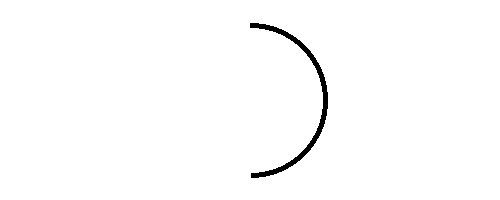
 
x, y = 250 - d / 2, 100 - d / 2
a1 = GArc(x, y, d, d, 90, -180)
gw.add(a1)
x, y = 250 - d, 100 - d
a1 = GArc(x, y, d, d, -180, 90)
gw.add(a1)
x, y = 250 - d / 2, 100 - d / 2
a1 = GArc(x, y, d, d, 90, 180)
gw.add(a1)
x, y = 250 - d / 2, 100 - d / 2
a1 = GArc(x, y, d, 180, -90)
gw.add(a1)

Problem 2: An Arrowhead

  • This is a coding problem, work in pairs or trios on a single computer
  • In arrow.py, I’ve drawn the initial shaft of an arrow for you (you are welcome)
  • Your task is to add an arrow head to the right end of the arrow, which should look as shown below:

Problem 2b: The Fletchings

  • Switch who is typing!
  • No arrow will fly straight without its fletchings. Now add two parallelograms on the left end of the arrow.

  • Mimic the dimensions and angles as closely as possible!

Problem 2c: The Flight

  • Switch who is typing!
  • Up until this point, everything has just been added to the GWindow
  • Change that, creating a GCompound and add everything to that instead
  • Add the GCompound to the left edge of the window, and animate it flying to the right
  • BONUS: stop the animation when the tip of the arrow hits the right side of the screen

Live Coding

Time It!

  • Suppose we wanted to make a stopwatch
  • Let’s aim for a narrow diamond for the hand
  • Circle around outside, with red arc between 12 and 2 to indicate “almost done”
  • Hand initially points towards current mouse position
  • When we click, it instead starts animating, rotating towards 12, where it stops

// reveal.js plugins