Formatting English Wordle
Jed Rembold
September 22, 2025
Announcements
- Problem Set 3 due tonight!
- QUAD Center hours from 4:30-9pm if you need late help
- Wordle Guide is posted! If you are still working on PSet 3, get a
start tomorrow!
- Project weeks are always a bit heavier of a lift that Problem Sets. Don’t wait until the last minute to start
- A good target is to have Milestone 3 done by the end of Friday
- Polling: polling.jedrembold.prof
PSet 2 Feedback Comments
- PS2 feedback went out last night
- A surprising amount of missing content given that it was the second assignment. Check after you upload! If you failed up upload something on accident, you can still do so in this case (just this once) for half credit. Email me after you have done so, so that I have it in my records that I need to go back and revisit it.
- A surprising amount of similar solutions on Problem 2 using tools we did not introduce in class (and some with very similar code), with no metadata provided about who was worked with or what AI tools were consulted.
- If you are struggling with a problem, reach out to someone for help! Myself, a section leader, a QUAD center tutor…someone!
Questioning Strings
Classifying Character Methods
| Method | Description |
|---|---|
|||char|||.isalpha() |
Returns True if
|||char||| is a letter |
|||char|||.isdigit() |
Returns True if
|||char||| is a digit |
|||char|||.isalnum() |
Returns True if
|||char||| is letter or a digit |
|||char|||.islower() |
Returns True if
|||char||| is a lowercase letter |
|||char|||.isupper() |
Returns True if
|||char||| is an uppercase letter |
|||char|||.isspace() |
Returns True if
|||char||| is a whitespace character (space,
tab, or newline) |
|||char|||.isidentifier() |
Returns True if
|||char||| is a legal Python identifier |
Understanding Check!
What would be the evaluated value of
revq("Jed1s!") given the definition to the
right?
"J2s!""r3d 1 s ""r2 d2 s""r2d2s"
def revq(word):
    out = ""
    for char in word:
        if (char.isalnum() and
            char.islower() ):
            out += " " + char
        elif char.isdigit():
            out += str(int(char)+1)
        elif not char.isalnum():
            out = out.replace("e", "r2")
    return out.strip()
Methods to find string patterns
| Method | Description |
|---|---|
|||string|||.find(|||pattern|||) |
Returns the first index of |||pattern|||
in |||string|||, or
-1 if it does not appear |
|||string|||.find(|||pattern|||, |||k|||) |
Same as the one-argument version, but starts searching at index
|||k||| |
|||string|||.rfind(|||pattern|||) |
Returns the last index of |||pattern|||
is |||string|||, or
-1 if missing |
|||string|||.rfind(|||pattern|||, |||k|||) |
Same as the one-argument version, but searches backwards from index
|||k||| |
|||string|||.startswith(|||prefix|||) |
Returns True if the string starts with
|||prefix||| |
|||string|||.endswith(|||suffix|||) |
Returns True if the string ends with
|||suffix||| |
Working with English
The english.py Library
- To facilitate working with English words, we can take advantage of
the pre-written
englishmodule- This will be highly useful in the Wordle project!
- The
englishmodule exports two resources:ENGLISH_WORDS: a constant sequence which contains all the valid English words in alphabetical orderis_english_word(): a predicate function which takes a string as input and returnsTrueorFalsedepending on if that string is a valid English word
Biggest No-vowel Word
Suppose we wanted to determine the longest word in the English language without vowels:
from english import ENGLISH_WORDS

def contains_vowels(word):
    for letter in word:
        if letter in "aeiou":
            return True
    return False

def find_longest_no_vowels():
    best_length = 0
    for word in ENGLISH_WORDS:
        if ( not contains_vowels(word) and
             len(word) > best_length ):
            best_length = len(word)
            print(word)


if __name__ == '__main__':
    find_longest_no_vowels()
Pig Latin Example
Igpay Atinlay
- Suppose we wanted to write a script that converted English to Pig Latin
- Rules of Pig Latin:
- If the word begins with a consonant, move everything up to the first
vowel to the end and append on “ay” at the end
fleet⟶eetflay - If the word starts with a vowel, just append “way” to the end
orange⟶orangeway - If the word has no vowels, do nothing
- If the word begins with a consonant, move everything up to the first
vowel to the end and append on “ay” at the end
- Our decomposition:
- Find first vowel location
- Convert a single word
Indingfay Owelsvay
def find_first_vowel_index(word):
    """
    Find the first vowel in a word and return its index,
    or return None if no vowels found.
    """
    for i in range(len(word)):
        index = "aeiou".find(word[i].lower())
        if index != -1:
            return i
    return None
Onvertcay Oneway Ordway
def word_2_pig_latin(word):
    """
    Convert a single word with no special characters from
    English to Pig Latin.
    """
    vowel = find_first_vowel_index(word)
    if vowel is None:
        return word
    elif vowel == 0:
        return word + "way"
    else:
        return word[vowel:] + word[:vowel] + "ay"
When Pig Latin = English?
- What about when the Pig Latin version of a word is a different, but valid, English word?
def pig_latin_equals_english():
    count = 0
    for word in ENGLISH_WORDS:
        piglatin = word_2_pig_latin(word)
        if is_english_word(piglatin) and word != piglatin:
            print(word, ":", piglatin)
            count += 1
    return count
Wordle Time
Introduction to Wordle
- Our first project is recreating Wordle
- Milestone guide was posted over the weekend
- Due next Monday (Sept 29)
- Section questions will relate to common Wordle issues this week
- Aiming to be done with Milestone 3 by end-of-day Friday would be a good target
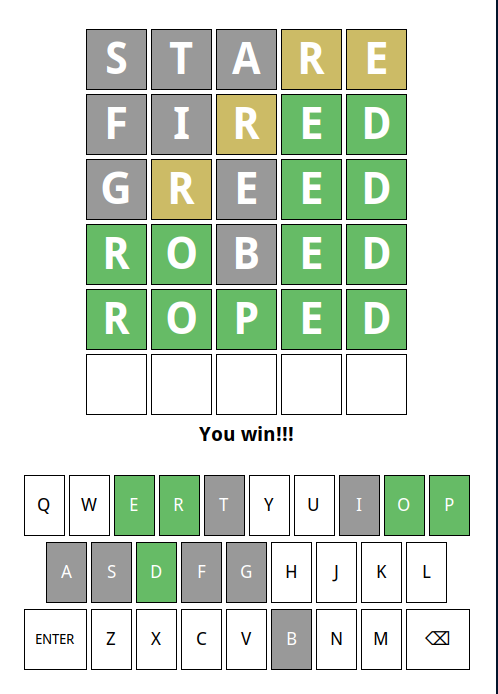
Your Responsibilities
- We provide you with a custom data type that handles all the graphics
and user interaction
- Don’t worry, you’ll have a chance to implement your own GUIs later in the semester!
- Your responsibilities will include:
- Displaying and reading letters from boxes
- Evaluating whether a word is valid
- Determining what color each letter of a word should be
- Selecting a secret five letter word for guessing
- Determining when victory or defeat occurs
- Coloring the keys according to the guesses so far
Your Toolbox
- Special functions provided by the provided graphics data type:
WordleGWindow- These are documented in the guide, and include, but are not limited
to, things like
- Getting or setting a letter in a particular box
- Getting or changing the color of a given box
- Changing which row is used when characters are typed in
- These are documented in the guide, and include, but are not limited
to, things like
- Variables and functions
- Control statements
- Good use of loops and if statements will be very useful
- Basic string functions
An Approach to Success
- Each project is accompanied by a highly detailed guide: read
it!
- Explains background ideas so that you can understand the big picture of what you are needing to do
- Also included a breakdown of individual milestones
- A milestone is a discrete checkpoint that you should ensure is working (and that you understand!) before moving on
- Whenever you complete a milestone, you should upload your current code to GitHub.
- Projects are all about managing complexity. If you start trying to implement milestones out of order, you are asking for disaster
- Don’t let yourself get overwhelmed by scale. Focus on one particular milestone at a time, which should involve focusing only on a small part of your overall code
String I/O
Getting some input
We’ve seen how to display information to a user, but to retrieve data from a user, we can use Python’s built-in
input()functionThe form will generally look like:
|||variable||| = input(|||prompt_text|||)|||variable|||is the variable name you want to assign the user’s typed input to|||prompt_text|||is the string that will be displayed on the screen to communicate to the user what they should be doing
The
input()function always returns a stringIf you want to get an integer from the user, you will need to convert it yourself after retrieving it
num = int(input('Pick a number between 1 and 10: '))
F not G
Constructing text or sentences by interleaving strings and other objects comes up a lot in communicating code results to a user
For any Python version past 3.6, the nicest and easiest way to do this is with what are called f-strings:
A = 10
print(f"The value of A is: {A}!")
You can define an f-string anytime you would normally define a string, just be aware that the substitution happens with the values of variable at that point
A = 10
s = f"The value of A is {A}"
A = 12
print(s)
Formatting Strings
- F-strings allow up to easily substitute in values, but what if we
want those values to have a particular format?
- Rounded to the nearest two decimal places, for example
- One option would be to handle all this before the substitution manually
- Python gives a more streamlined method, using a format spec
- A format spec will be given inside the
{}placeholder- Comes after the variable/value itself
- There is a colon between the variable/value and the format spec
A = 10.234
print(f"The value of A is {A:0.2f}")
Shaping your format
- A format spec is a special string that determines the desired format
- Lots we can do, but we rarely need to do it all at once
- The basic building blocks (square brackets just to group):
[[fill]align]>[sign][width][,][.precision][type]
- Type
- How you want the object represented as a string
- “d” - base-10 integer
- “f” - float or decimal
- “e” - scientific notation
- More on next slide
- Precision
- How many digits to display after a decimal point
- Details can vary a little by conversion type
- Grouping?
- A comma here indicates that numbers should be grouped in sets of 3 and separated with a comma
- Width
- The minimum number of characters you want the formatted value to have
- If not otherwise specified, pads the value with space characters
- Sign?
- If the sign of the number should be specified
- A
+sign ensures all numbers will have either a+or-sign in front - A space just adds a space before positive numbers (negatives would
have a
-sign in front)
- Fill and Align
- How you want the text aligned if it is shorter than the minium width
- Can be
<,>, or^for left, right, or center justified
- Can be
- Any fill characters you want to fill the empty space come before
- Default is space
- How you want the text aligned if it is shorter than the minium width
Output Conversion Types
| Code | Description |
|---|---|
b |
Inserts an integer using its binary representation |
d |
Inserts an integer using its decimal representation |
e or E |
Inserts a number using scientific notation |
f or F |
Inserts a number using a decimal point format |
g or G |
Choose e or
f to get the best fit |
o |
Inserts an integer using its octal representation |
s |
Inserts a string value |
x or X |
Inserts an integer using its hexadecimal representation |
- Uppercase conversion types use capital characters where possible in output