Lists of Polygons and Arcs

Jed Rembold

October 15, 2025

Announcements

  • Project 2: Breakout due on Monday! Be working on it!!
  • Grade Reports almost out
    • So sorry for the delay, I’m waiting for the last Wordle scores to be posted and a few attendance fixes
  • The Graphics Contest instructions are coming!
  • TechBytes tomorrow at noon in here!
    • Discussing how data roles evolve as companies scale
  • Attend your sections today/tomorrow! They will help with your Breakout milestones!
  • Polling: polling.jedrembold.prof

Arcs

Something to smile about

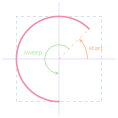
  • The GArc class represents an arc formed by taking a section of the perimeter of an oval.
  • 3 things necessary:
    • The bounding rectangle geometry (upper left corner and width and height)
    • The starting angle (in degrees)
    • The sweep angle (in degrees) which is how far the arc extends
  • Negative angles move in the clockwise direction
Fillable Arcs

  • The GArc class is a GFillableObject, and so you can call .set_filled() on a GArc object
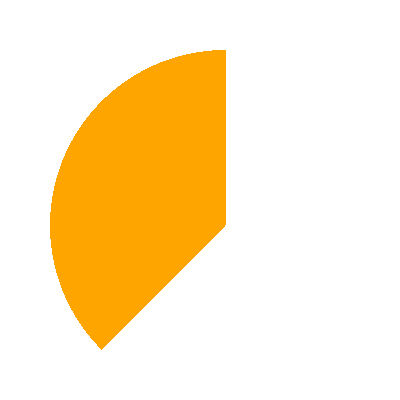
  • Filled like a pie-shaped wedge formed between the center of the bounding box and the starting and end points of the arc
def filled_arc():
    gw = GWindow(400, 400)
    arc = GArc(50, 50, 
               350, 350, 
               90, 135)
    arc.set_color("orange")
    arc.set_filled(True)
    gw.add(arc)
Understanding Check

Which of the below blocks of code will create the image to the right? The window measures 500 x 200 pixels and the value of d is 150.
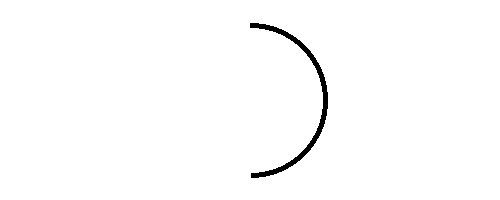
 
x, y = 250 - d / 2, 100 - d / 2
a1 = GArc(x, y, d, d, 90, -180)
gw.add(a1)
x, y = 250 - d, 100 - d
a1 = GArc(x, y, d, d, -180, 90)
gw.add(a1)
x, y = 250 - d / 2, 100 - d / 2
a1 = GArc(x, y, d, d, 90, 180)
gw.add(a1)
x, y = 250 - d / 2, 100 - d / 2
a1 = GArc(x, y, d, 180, -90)
gw.add(a1)

Polygons

The GPolygon class

  • Used to represent graphical objects bounded by line segments
    • Polygons consist of several vertices bounded by edges
image/svg+xml
 
  • Location not fixed in upper left, but at some convenient reference point
  • Often a convenient reference point is near the center of the object, but it doesn’t need to be
  • GPolygons are GFillableObjects, so they can be filled

Polygonal Construction

  • The GPolygon function creates an empty polygon, to which you then can add vertexes
  • Can create a vertex by calling .add_vertex(|||x|||,|||y|||) on the GPolygon object
    • x and y measured relative to the reference point
  • Vertexes past the first can be defined in a few ways:
    • |||polygon|||.add_vertex(|||x|||,|||y|||) adds another new vertex relative to the reference point
    • |||polygon|||.add_edge(|||dx|||,|||dy|||) adds a new vertex relative to the preceding vertex
    • |||polygon|||.add_polar_edge(|||r|||, |||theta|||) adds a new vertex relative to the previous using polar coordinates

Understanding Coordinates

  • The coordinates you use/specify when creating your polygon are different from the coordinates of the GWindow
  • When you place a polygon into the GWindow, you specify the coordinates of where in the GWindow you want the origin of the polygon coordinates system to be placed
  • You have essentially an infinite number of options of how you could do this, so choose an approach that makes sense and makes your life easy

Triangle By Vertex

def triangle_by_vertex():
    def create_triangle(b, h):
        tri = GPolygon()
        tri.add_vertex(-b / 2, h / 2)
        tri.add_vertex(b / 2, h / 2)
        tri.add_vertex(0, -h / 2)
        return tri

    gw = GWindow(500, 500)
    triangle = create_triangle(200, 200)
    triangle.set_filled(True)
    triangle.set_color("red")
    gw.add(triangle, 250, 250)

Triangle by Polar Edge

def triangle_by_polar_edge():
    def create_eq_triangle(side):
        tri = GPolygon()
        tri.add_vertex(0, 0)
        for i in range(0, 360, 120):
            tri.add_polar_edge(side, i)
        return tri

    gw = GWindow(500, 500)
    triangle = create_eq_triangle(100)
    triangle.set_filled(True)
    triangle.set_color("green")
    gw.add(triangle, 250, 250)

Compound It

Compound Objects

  • The GCompound class makes it possible to combine several graphical objects so that the entire structure behaves as a single object
  • Can be thought of as a combination of GWindow and GObject
    • You can add objects to it, but then you can also add it (and everything in it) to a window as a single unit
  • Uses its own coordinate system relative to a reference point
    • When adding objects to the GCompound, you place them relative to the reference point
    • When adding the GCompound to a canvas, you set the location of the reference point

And my Axe!

def my_axe():
    def create_axe():
        axe = GCompound()
        shaft = GRect(-15, 0, 30, 300)
        shaft.set_filled(True)
        shaft.set_color("brown")
        axe.add(shaft)

        blade = GPolygon()
        blade.add_vertex(0, 0)
        blade.add_vertex(200, -50)
        blade.add_vertex(200, 50)
        blade.set_filled(True)
        blade.set_color("gray")
        axe.add(blade, -80, 50)
        return axe

    gw = GWindow(500, 500)
    axe = create_axe()
    gw.add(axe, 250, 100)

List it Out

Arrays and Lists

  • From the earliest days, programming languages have supported the idea of an array, or an ordered sequence of values.
  • Individual values in an array are called elements, and the number of elements is the length of the array.
  • Each element’s position in the array is given by its index, with index numbers starting at 0 and extending up to 1 less than the length of the array
  • Python implements the array concept in a bit more general form called a list.

Lists

  • A list in Python represents a sequence of any type of data
  • Denote by bordering with square brackets ([, ]) with commas separating each element of the sequence
    • Each element could be any data type (even mixing from element to element!)
    • ['This', 'is', 'a', 'list']
    • ['Great', 4, 'storing', 5 * 10]
  • There should be no confusion with the square brackets used in selection or slicing because:
    • Selection or slicing square brackets come after a specified sequence
    • Commas do not appear in selection or slicing

List Representation

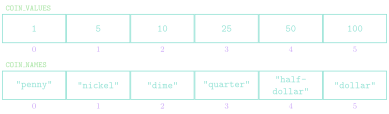
  • Lists are commonly represented visually or conceptually as a series of numbered boxes:

    COIN_VALUES = [1, 5, 10, 25, 50, 100]
    COIN_NAMES = [ "penny", "nickle", "dime",
                   "quarter", "half-dollar", "dollar" ]

Sequences

  • Lists are a bit like more flexible strings in many ways!
  • Strings and lists are examples of a more general class of object in Python called a sequence
  • Many of the basic string operations are actually sequence operations, and thus also apply to lists!
  • The len function
  • Index numbering starting at 0
  • Concatenation using + or +=
  • Selection of an individual element using square brackets
  • Looping over elements
  • Negative index numbering counting backwards from the end
  • Slicing in all forms
  • Comparing sequences
  • Repetition using *
  • Inclusion testing using in operator

Mutants

  • The most important difference between strings and lists is one of mutability
    • Strings we have already identified as being immutable: you can not change the individual elements
    • Lists, in contrast, are mutable, which means that we can change or assign new values to the elements of a list
  • Immutable objects have many advantages in programming:
    • You don’t have to worry about if the values will change
    • Immutable values can be more easily shared
    • Immutable objects are easier to use with concurrent programs
  • In some situations though, mutable objects are the perfect tool for the job

A Tutorial on Lists

  • Thinking about mutable objects requires a shift in how we visualize our code interacting with the objects in memory
  • [Link here](https://pythontutor.com/render.html#code=cool%20%3D%20%5B’blue’,%20’violet’%5D%0Awarm%20%3D%20%5B’red’,%20’orange’%5D%0A%0Acolors%20%3D%20%5Bcool,%20warm%5D%0Aother_colors%20%3D%20%5B%5B’blue’,%20’violet’%5D,%0A%20%20%20%20%20%20%20%20%20%20%20%20%20%20%20%20%5B’red’,%20’orange’%5D%5D%0A%0Aprint%28colors%20%3D%3D%20other_colors%29%0Aprint%28colors%20is%20other_colors%29%0A%0Acool%5B0%5D%20%3D%20’indigo’%0Awarm%20%3D%20%5B’orange’,%20’yellow’%5D%0A%0Aprint%28colors%29%0Aprint%28other_colors%29&cumulative=false&curInstr=0&heapPrimitives=false&mode=display&origin=opt-frontend.js&py=3&rawInputLstJSON=%5B%5D&textReferences=false)
cool = ['blue', 'violet']
warm = ['red', 'orange']

colors = [cool, warm]
other_colors = [['blue', 'violet'],
                ['red', 'orange']]

print(colors == other_colors)
print(colors is other_colors)

cool[0] = 'indigo'
warm = ['orange', 'yellow']

print(colors)
print(other_colors)

For Reference

  • When working with mutable objects, it is better to think of the variable as holding a reference to the object, rather than the actual contents of the object
  • I find it useful to think of a reference as the “address” in memory where that object’s contents can be found
  • This undeniably complicates things, as referencing a mutable object lets you change it, which will immediately be reflected in anything else that referenced that object
  • Mutable objects can be terrific to work with, as their mutability makes them very flexible, but be wary of unexpected behavior
// reveal.js plugins