Introducing Lists

Jed Rembold

March 2, 2026

Happy Monday!

Quick Announcements

  • Exam scoring is done! We’ll talk more about it in just a moment
  • PS4 is due tonight
  • Project 2 goes live today! Guide will be up before the end of the day.
    • You have everything you need to complete it already!

Midterm 1 Debrief

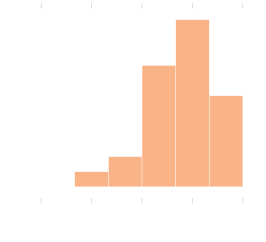
  • Final breakdown:
    • Average: 78.4%
    • Median: 80.7%
    • St Dev: 15.6%

Group Problems

Problem 1: Tracing Understanding

What would the below expression evaluate to? Or would it error out?

['One', 2, True][-1:1:-1][0]

Problem 2: Airline Boarding

  • This is a coding problem, work in pairs or trios on a single computer

  • In manifest.py, I’ve created a list of passenger information for an airline

  • The list has passenger information in a “name”, “age”, “seat” ordering

  • So, for example, the first few passengers look like:

    MANIFEST = [
      "Anthony Hutchinson", 77, "24A",
      "Carol Turner", 37, "8F",
      ...etc...
    ]

Problem 2b: Seat Taken?

  • In Prob2.py, you can add your code
  • Imagine a passenger would like to switch seats. It would be nice to have an easy function to check a potential seat assignment and determine if it is available
  • Complete the function is_seat_available to check to see if a particular seat is available (not currently assigned)
  • BONUS: Sometimes robots will ride the plane with names like ‘2F’. Make sure your function still would work properly in that case

Problem 2c: New Family

  • Switch who is typing!
  • A new family purchased tickets late! Add their information to the manifest.
    • Bill Yu, age 43, in seat 15C
    • Jackie Yu, age 39, in seat 15B
    • Hayden Yu, age 12, in seat 15A
  • Then, complete the function avg_age_window_seats, which returns the average age of all passengers riding in a window seat (“A” and “F” seats)

Breakout

Project 2: Breakout!

  • Project 2 is recreating the classic arcade game Breakout!
  • Guide is posted now, due next Monday
  • Get an early start! Finish up PS4 tonight as needed, but start Breakout tomorrow!

Breakout History

  • The popular Breakout arcade game was released by Atari in 1976
  • Atari founder Nolan Bushnell wanted a new game that would build on the success of the earlier game Pong. He assigned Steve Jobs to develop the game, promising a bonus if the game required a small number of chips.
  • As Wikipedia tells the story, “Jobs had little specialized knowledge of circuit board design but knew [his friend Steve] Wozniak was capable of producing chip efficient designs. He convinced Wozniak to work with him, promising to split the fee evenly between them.”
  • Wozniak completed the game design in four days, but Jobs never told him about the bonus offer. Jobs was paid \(\$5,000\), but Wozniak received only \(\$350\).
  • Jobs and Wozniak co-founded Apple Computer the following year, which has grown to be the largest corporation in the world by market capitalization.

Breakout Basics

  • Breakout is a game in which the player attempts to break all the colored bricks by causing a bouncing ball to collide with them
  • The player controls a paddle at the bottom of the screen which the ball will bounce off
    • The paddle can only move left and right
  • If the ball makes it past the paddle to the bottom of the screen, the player loses a life
    • Lose 3 lives and it is game over!

Breakout Milestones

  • Breakout is broken up over 5 milestones
  • You have already seen or written pieces of similar code to many of the milestones!
    • Milestone 0: PS4 brick pyramid
    • Milestone 1: Section stamping problem (last week)
    • Milestone 2: Section bouncy Pacman problem (this week)
    • Milestone 3: Section Hungry Pacman problem (this week)

Milestone 0

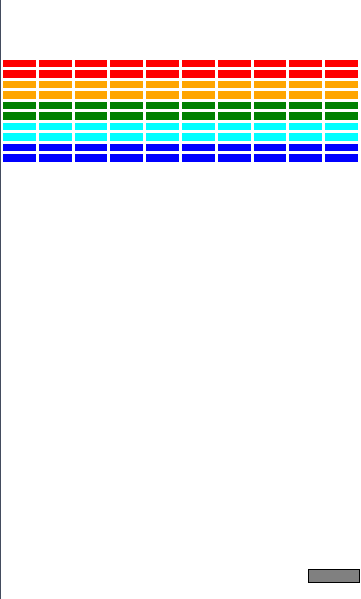
  • Goals is to lay out all the bricks
  • Choose a brick color as a function of row number
  • Play with the provided constants to make sure your program reacts!

Milestone 1

  • Display paddle near bottom of screen
  • Add mouse event listener for whenever the mouse moves
  • Update x-position of paddle to stay centered on mouse
  • Don’t let any part of the paddle move beyond the edges of the screen
Milestone 2
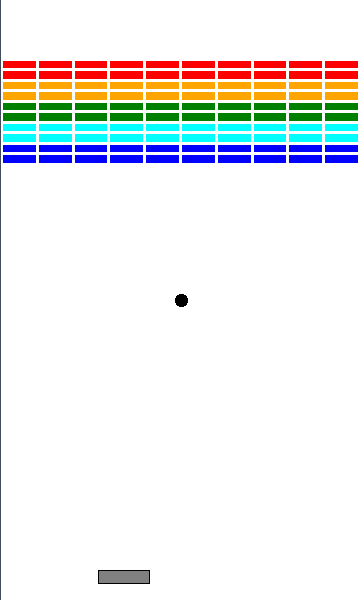
  • Add ball to center of screen
  • Make it start moving when clicking the mouse
  • Ball bounces off walls, ignores all bricks and paddle

Milestone 3

  • Time to get things colliding!
  • Check for collisions
    • If collision with paddle, bounce ball upwards
    • If collision with brick, bounce ball and remove brick
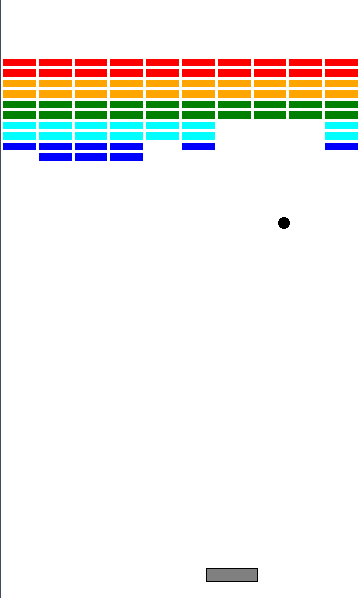
Milestone 4

  • Lose a life when going off the bottom of the world
  • Track lives, and reset ball after losing a life
  • Check for win condition
  • Test, test, test!

General Recommendations

  • As always, do not go on to the next milestone until 100% sure your current milestone is perfect
  • Get an early start, and chip away at a milestone or so each day
  • Section problems mostly deal with milestones 2 and 3
  • Reach out for help if you are struggling
    • Remember: stuck for more than 30 minutes on a single problem. Put it away and reach out to someone.
// reveal.js plugins