Comprehending Images
Jed Rembold
October 20, 2025
Announcements
- Project 2: Breakout due tonight!
- Problem Set 5 released by the end of today
- Updated grade reports will go out this next weekend
- Graphics contest actually posted!
- Polling: polling.jedrembold.prof
Cloning
- What can we do in these sorts of instances to not let mutability trip us up?
- Clone the list instead of just assigning a reference
- Creates a new object in memory
- Several ways you can make a shallow clone (in code)
- Using the
.copy()list method - Any slice always returns a new object
- Using the
list()function will return a new object
- Using the
List Methods
Common Useful List Methods
| Method | Description |
|---|---|
|||list|||.copy() |
Returns a new list whose elements are the same as the original |
|||list|||.append(|||value|||) |
Adds |||value||| to the end of the
list |
|||list|||.insert(|||idx|||, |||val|||) |
Inserts |||val||| before the specified
|||idx||| |
|||list|||.remove(|||value|||) |
Removes the first instance of
|||value||| from the list, or errors |
|||list|||.reverse() |
Reverses the order of the elements in the list |
|||list|||.sort() |
Sorts the elements of the list. Can take an optional argument
|||key||| to specify how to sort |
Functions on Iterators
- The
.sortand.reversemethods reorder the list in place and do not return anything - Commonly, you might want to loop through a list in a particular order, but not change the original list
- Python gives you two matching functions to do this, which return a
new ordered version of the list, without changing the
original
- The
reversed()function creates a new iterable object that returns its elements in the opposite order - The
sorted()function creates a new iterable object that returns its elements in ascending order
- The
Understanding Check
Given the code to the right, what would be the printed value of
A?
['Fox', 'Giraffe', 'Hippo', 'Iguana']['Fox', 'Hippo', 'Iguana']['Iguana', 'Fox']['Fox', 'Iguana']
A = [
     'Fox',
     'Giraffe',
     'Hippo'
    ]
A.append('Iguana')
A[:].reverse()
B = A
for anim in B:
    if anim[1] == 'i':
        B.remove(anim)
print(A)
Comprehending Lists
List building with loops
For simple lists, we will commonly explicitly write out the elements:
even_digits = [ 2, 4, 6, 8 ]But in many cases, it is easier to specify the elements of a list using a sequence of values generated by a
forloop. For instanceeven_digits = [ ] for i in range(0, 10, 2): even_digits.append(i)Python gives us a shorthand notation to achieve this:
even_digits = [ i for i in range(0, 10, 2) ]- Called list comprehension
Comprehending Lists
The simplest list comprehension syntax is:
[ |||expression||| |||iterator||| ]where
|||expression|||is any Python expression and|||iterator|||is aforloop headerThe iterator component can be followed by any number of additional modifiers
- More
forloop headers for nested loops - or
ifstatements to only include specific values
- More
Example: all even numbers to 20 not also visible by 3
[i for i in range(0,2,20) if i % 3 != 0]
Comprehension Examples
List of valid 5 letter words
from english import ENGLISH_WORDS
a = [word for word in ENGLISH_WORDS if len(word) == 5]
List of first 20 positive squares
a = [i ** 2 for i in range(1, 21)]List of non-alphabetical characters in string
s = "Jack & Jill's Story Time!"
a = [char for char in s if not char.isalpha()]
Alternative List Uses: Tabulation
Tabulation
- Arrays can also be useful when you have a set of values and you need
to count how many values fall into a different ranges
- Process is called tabulation
- The idea is that for each piece of data we encounter, we figure out a corresponding index in our tabulation array and then increment the value of that element
- Requires that we have an array of length equal to the number of things we want to count
- Sometimes the things we are counting will equal the index, but often we will just assign an index to different values or bins
Demo Examples
- For a random list of percentages, how many students got each main letter grade?
- For a given string, how many times does each letter appear?
- For a list of numbers between 0 and some known maximum, how often does each number appear?
Alternative List Uses: Images
Multidimensional Arrays
We know that elements of a list can be lists in and of themselves. If the lengths of all the lists making up the elements of a list remain fixed, then the list of lists is called a multidimensional array
In Python, we can create multidimensional arrays just by creating lists of constant length as the elements to another list
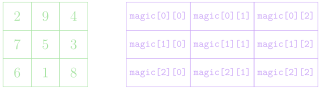
magic = [ [2, 9, 4], [7, 5, 3], [6, 1, 8] ]We can always get the individual element of one of the inner lists by using two indices.
- One to select the sublist, and then one to select the element within
that sublist
magic[1][1] = 5magic[-1][0] = 6
- One to select the sublist, and then one to select the element within
that sublist
Picturing Multidimensional Arrays
- Multidimensional arrays are commonly pictured as each inner list being stacked beneath the previous
- In such a representation, the outermost/first elements/indices represent the row, and the inner/second elements/indices represent the column
[ [2, 9, 4], [7, 5, 3], [6, 1, 8] ]
Initialize a Chessboard
Initialize a Chessboard
Initialize a Chessboard
The GImage Class
- You can display an image from a file in PGL using the
GImageclass.GImage(|||filename|||, |||x|||, |||y|||)|||filename|||is the string containing the name of the file which contains the image|||x|||and|||y|||are the coordinates of the upper left corner of the image
- Best to use one of the common image formats
- Graphical Interchange Format (GIF):
fish.gif - Joint Photographic Experts Group (JPEG):
fish.jpg - Portable Network Graphics (PNG):
fish.png
- Graphical Interchange Format (GIF):
Images and Copyrights
- Most images that you might find on the web are protected by copyright under international law.
- Ensure you have the necessary permissions before using an image
- On the web, the image hosting site will often specify what rules
apply to that image
- Example: Images from
www.nasa.govcan be freely used as long as you add an attribution line
- Example: Images from
- Non-commercial use of an image can sometimes fall under “fair use” doctrine, but academic integrity and common courtesy both demand you cite or acknowledge any material you have obtained from others.
- On the web, the image hosting site will often specify what rules
apply to that image
Example: VLA Moonset
from pgl import GImage, GWindow, GLabel

def image_example():
    gw = GWindow(800, 550)
    image = GImage("VLA_Moonset.jpg")
    image.scale(gw.get_width() / image.get_width())
    gw.add(image)

    citation = GLabel("Image Credit: Jeff Hellermann, NRAO / AUI / NSF")
    citation.set_font("15px 'Sans-Serif'")
    x = gw.get_width() - citation.get_width() - 10
    y = image.get_height() + citation.get_ascent()
    gw.add(citation, x, y)
2D Arrays → Images
Image data is commonly stored in two-dimensional arrays
Each element stores information about the pixel that exists at that location
The
GImageclass lets you convert between the image itself and the array representing the image contents by using theget_pixel_arraymethod, which returns a two-dimensional array of integers.We could get the pixels from our example image using:
image = GImage("VLA_Moonset.jpg")
pixels = image.get_pixel_array()
The first index of the pixel array gets you the row, the second index gets you the column
Pixel Contents
- Each element in a pixel array is an integer in which the 32 bits are interpreted as:

- The first byte (8 bits) is the transparency or alpha
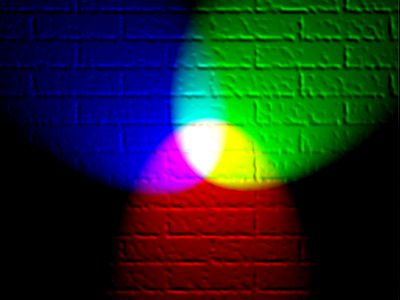
- The next three bytes indicate the amount of red, green, and blue in
the pixel, where each value varies from 0 to 255
- Form the RGB of a color, generally expressed in hexadecimal form
10010101→0x9500111001→0x3901100011→0x63
- Overall color:
#953963or
- Form the RGB of a color, generally expressed in hexadecimal form
Combining Light Colors
Transparency
- The first byte (8 bits) of the pixel value gives the transparency, which indicates how much of the background is allowed to show through
- Often denoted with the Greek letter alpha: \(\alpha\)
- Varies from 0 to 255 like the other 8 bit values:
- 0 is entirely transparent
- 255 is entirely opaque
Breaking out the Colors
- You do not need to convert the pixel values yourself! PGL has built-in ways to extract the various colors
| Function | Description |
|---|---|
GImage.get_red(|||pixel|||) |
Returns the integer (0-255) corresponding to the red portion of the pixel |
GImage.get_green(|||pixel|||) |
Returns the integer (0-255) corresponding to the green portion of the pixel |
GImage.get_blue(|||pixel|||) |
Returns the integer (0-255) corresponding to the blue portion of the pixel |
GImage.get_alpha(|||pixel|||) |
Returns the integer (0-255) corresponding to the alpha portion of the pixel |
GImage.create_rgb_pixel(|||r|||,|||g|||,|||b|||) |
Returns a 32-bit integer corresponding to the desired color |