Image Counting

Jed Rembold

October 22, 2025

Announcements

  • We are still in this room on Friday!
  • Problem Set 5 due on Monday!
    • Just 2 problems, of which you already have everything you need
    • Remember that we have another project coming next week, so having PS5 done in a timely manner sets you up well for a good start on that project
  • Attend your small sections today or tomorrow! All questions built around understanding and using lists.
  • Midterm 2 is two weeks from Friday
  • Polling: polling.jedrembold.prof

Tabulation Continued

Demo Examples

  • For a random list of percentages, how many students got each main letter grade?
  • For a given string, how many times does each letter appear?
  • For a list of numbers between 0 and some known maximum, how often does each number appear?

Alternative List Uses: Higher Dimensional Data

Multidimensional Arrays

  • We know that elements of a list can be lists in and of themselves. If the lengths of all the lists making up the elements of a list remain fixed, then the list of lists is called a multidimensional array

  • In Python, we can create multidimensional arrays just by creating lists of constant length as the elements to another list

    magic = [ [2, 9, 4], [7, 5, 3], [6, 1, 8] ]
  • We can always get the individual element of one of the inner lists by using two indices.

    • One to select the sublist, and then one to select the element within that sublist
      • magic[1][1] = 5
      • magic[-1][0] = 6

Picturing Multidimensional Arrays

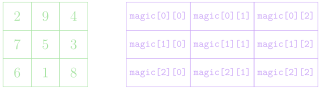
  • Multidimensional arrays are commonly pictured as each inner list being stacked beneath the previous
  • In such a representation, the outermost/first elements/indices represent the row, and the inner/second elements/indices represent the column

[ [2, 9, 4], [7, 5, 3], [6, 1, 8] ]

Initialize a Chessboard

image/svg+xml
 

Initialize a Chessboard

image/svg+xml r n b q k r n b p p p p p p p p R N B Q K R N B P P P P P P P P 0 1 2 3 4 5 6 7 0 1 2 3 4 5 6 7
 

Initialize a Chessboard

image/svg+xml r n b q k r n b p p p p p p p p R N B Q K R N B P P P P P P P P 0 1 2 3 4 5 6 7 0 1 2 3 4 5 6 7 [ ] , , , , , , , [ ] , , , , , , , [ ] , , , , , , , [ ] , , , , , , , [ ] , , , , , , , [ ] , , , , , , , [ ] , , , , , , , [ ] , , , , , , , [ ]
 

Understanding Check!

Suppose I construct the below 2D array using list comprehension:

A = [[i+j for i in range(3)] for j in range(4)]

What would be the output of:

print([A[i][2] for i in range(len(A))])


  1. [0,1,2]
  2. [2,3,4]
  3. [2,3,4,5]
  4. [2,2,2,2]

Images

The GImage Class

  • You can display an image from a file in PGL using the GImage class. GImage(|||filename|||, |||x|||, |||y|||)
    • |||filename||| is the string containing the name of the file which contains the image
    • |||x||| and |||y||| are the coordinates of the upper left corner of the image
  • Best to use one of the common image formats
    • Graphical Interchange Format (GIF): fish.gif
    • Joint Photographic Experts Group (JPEG): fish.jpg
    • Portable Network Graphics (PNG): fish.png

Images and Copyrights

  • Most images that you might find on the web are protected by copyright under international law.
  • Ensure you have the necessary permissions before using an image
    • On the web, the image hosting site will often specify what rules apply to that image
      • Example: Images from www.nasa.gov can be freely used as long as you add an attribution line
    • Non-commercial use of an image can sometimes fall under “fair use” doctrine, but academic integrity and common courtesy both demand you cite or acknowledge any material you have obtained from others.

Example: VLA Moonset

from pgl import GImage, GWindow, GLabel

def image_example():
    gw = GWindow(800, 550)
    image = GImage("VLA_Moonset.jpg")
    image.scale(gw.get_width() / image.get_width())
    gw.add(image)

    citation = GLabel("Image Credit: Jeff Hellermann, NRAO / AUI / NSF")
    citation.set_font("15px 'Sans-Serif'")
    x = gw.get_width() - citation.get_width() - 10
    y = image.get_height() + citation.get_ascent()
    gw.add(citation, x, y)

Arrays to Images

2D Arrays → Images

  • Image data is commonly stored in two-dimensional arrays

  • Each element stores information about the pixel that exists at that location

  • The GImage class lets you convert between the image itself and the array representing the image contents by using the get_pixel_array method, which returns a two-dimensional array of integers.

  • We could get the pixels from our example image using:

    image = GImage("VLA_Moonset.jpg")
    pixels = image.get_pixel_array()
  • The first index of the pixel array gets you the row, the second index gets you the column

Pixel Contents

  • Each element in a pixel array is an integer in which the 32 bits are interpreted as:

  • The first byte (8 bits) is the transparency or alpha
  • The next three bytes indicate the amount of red, green, and blue in the pixel, where each value varies from 0 to 255
    • Form the RGB of a color, generally expressed in hexadecimal form
      • 100101010x95
      • 001110010x39
      • 011000110x63
    • Overall color: #953963 or

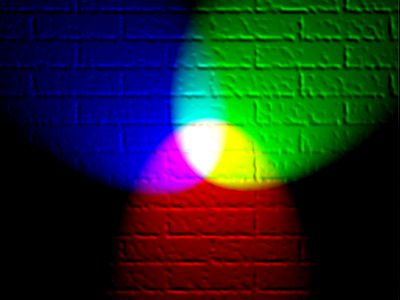
Combining Light Colors

Additive Colors

Transparency

  • The first byte (8 bits) of the pixel value gives the transparency, which indicates how much of the background is allowed to show through
  • Often denoted with the Greek letter alpha: \(\alpha\)
  • Varies from 0 to 255 like the other 8 bit values:
    • 0 is entirely transparent
    • 255 is entirely opaque

Breaking out the Colors

  • You do not need to convert the pixel values yourself! PGL has built-in ways to extract the various colors
Function Description
GImage.get_red(|||pixel|||) Returns the integer (0-255) corresponding to the red portion of the pixel
GImage.get_green(|||pixel|||) Returns the integer (0-255) corresponding to the green portion of the pixel
GImage.get_blue(|||pixel|||) Returns the integer (0-255) corresponding to the blue portion of the pixel
GImage.get_alpha(|||pixel|||) Returns the integer (0-255) corresponding to the alpha portion of the pixel
GImage.create_rgb_pixel(|||r|||,|||g|||,|||b|||) Returns a 32-bit integer corresponding to the desired color

Image Thresholding

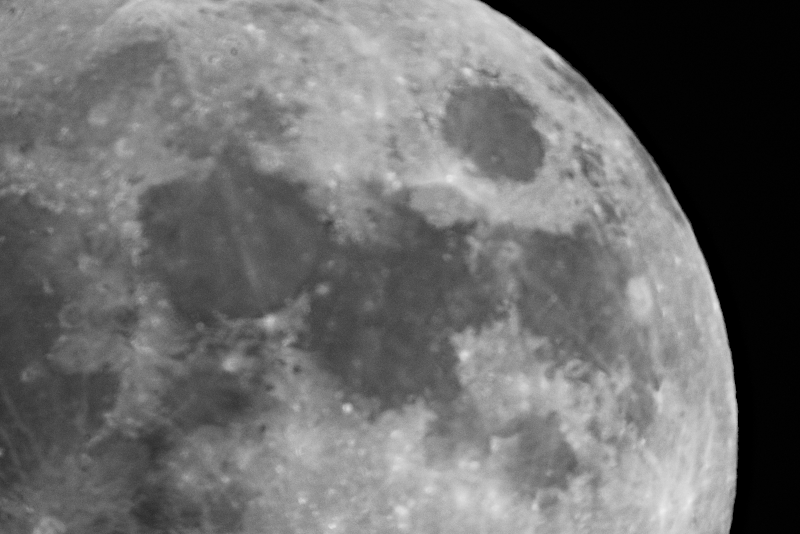
  • As an example of reading and manipulating pixel values, lets look at how we could threshold the image to the right
  • Thresholding is when you take a grayscale image and convert it to a black and white image, where a pixel is set to be white if it is above a certain threshold in brightness
  • Grayscale, so each RGB component is the same
  • Lets threshold at a value of 30
Blurry Moon by Jed Rembold

Thresholding Code

from pgl import GWindow, GImage

def threshold(e):
    thresh_value = 30
    height = len(pixels)
    width = len(pixels[0])
    new_array = [[0 for i in range(width)] for i in range(height)]
    for r in range(height):
        for c in range(width):
            if GImage.get_red(pixels[r][c]) > thresh_value:
                new_array[r][c] = GImage.create_rgb_pixel(0, 255, 0)
            else:
                new_array[r][c] = GImage.create_rgb_pixel(0, 0, 0)
    new_image = GImage(new_array)
    gw.add(new_image)

gw = GWindow(800, 525)
image = GImage("Moon.png")
gw.add(image)
pixels = image.get_pixel_array()
gw.add_event_listener("click", threshold)
// reveal.js plugins