Look at all Debugs!
Jed Rembold
March 22, 2023
Announcements
- Problem Set 5 due Friday night
- In case you saw the version of the PDF before I fixed it, there is no potential EC problem
- The deadline to withdraw from the class is today at 5pm
- ImageShop guide is posted!
- Polling: rembold-class.ddns.net
Review Question
After running the below code, how would you access the
"ninja" element in list
D?
A = ['pirate', 'ninja']
B = ['samurai'] + A
C = [B, ['ship', 'rope', 'horse']]
D = C[::-1]D[1][2]D[1][0]D[0][2]D[0][1]
Debugging
If debugging is the process of removing software bugs, then programming must be the process of putting them in.
Edsger W. Dijkstra
- Everyone makes mistakes when writing code
- A core skill then is in efficiently finding the bugs that you introduce
- We’ll spend the first part of today looking at some
good practices
- As always though, practice makes perfect
Strategy #1
Concentrate on what your program IS doing, instead of what it SHOULD be doing.
- It is impossible to find code that is missing
- Instead focus on determining what your program is doing, or why it is behaving a certain way
- Only once you understand what it is currently doing can you entertain thinking about how to change it productively
Strategy #2
Let Python help you: print or log the state of different variables.
- Many errors are caused by you expecting a variable to have some content that it doesn’t have
- Get Python to help you by adding print statements to print those variables out
- Add print statements in blocks of code that you aren’t sure are being accessed to see if you see a message
Strategy #3
Stop and read. The documentation. The error messages.
Parsing Error Messages
- Start at the bottom! That is where the general type of error and a short description will show up.
- Want to know where it happened? Look one line up from that.
- Will show a copy of the line where the error occurred
- One line up from that will include the line number
- Want nicer error messages?
The
richlibrary offers some very pretty error messages: install withpip install richAt the top of your code, then include:
from rich.traceback import install
install(show_locals=True)
Strategy #4
Use PythonTutor or a debugger to track EXACTLY what is happening in your program.
Strategy #5
Don’t make random changes to your code in the hopes that it will miraculously start working.
- Making random changes is easy, fast, and doesn’t require a lot of thought
- Unfortunately it is, at best, a wildly inefficient method of debugging, and at worst, actively detrimental
- If you don’t know what you need to fix yet, you either
haven’t:
- Defined what you are attempting to do clearly enough, or
- Understood / tracked your program well enough to know what it is currently doing
Strategy #6
Test your code as you go! Either manually or automatically.
- Know that everyone makes mistakes. The longer you go without testing that something in your program works, the harder it is to find where the mistake eventually is.
- Write code that you test in small pieces as you go
- Decomposition into smaller functions is great for this: test each function individually as you go
- In the projects we have tried to set up Milestones for this exact same purpose
Strategy #7
Talk it out.
- Explaining things verbally, in plain English, uncovers a shocking amount of misconceptions or mistakes
- Find someone to talk at about your programming issues
- It isn’t even important that they understand how to code, or even can talk back to you (though that might help in some cases)
- Rubber Duck Debugging is where a software developer explains an issue out loud to an inanimate rubber duck
An Object’s Purpose
- Python uses the concepts of objects and classes to achieve at least
three different goals:
- Aggregation. Objects make it possible to represent collections of independent data as a single unit. Such collections are traditionally called records.
- Encapsulation. Classes make it possible to store
data together with the operations that manipulate that data.
- In Python the data values are called attributes and the operations are called methods
- Inheritance. Class hierarchies make it possible for a class that shares some attributes and methods with a previously defined class to inherit those definitions without rewriting them all
- We’ll introduce many of these concepts in this course, but for more exposure and practice you’ll want to take CS 152 (Data Structures)
Old Records
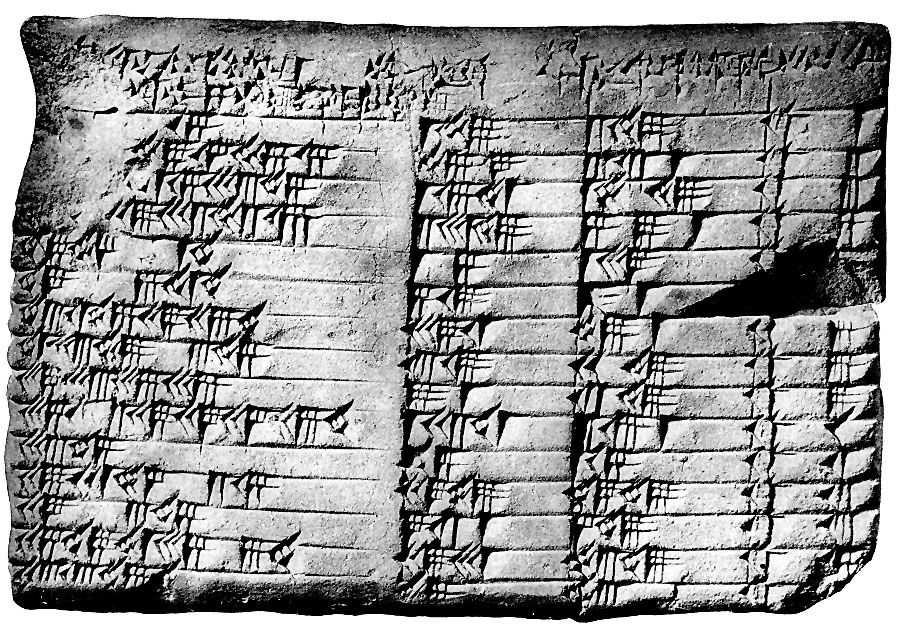
- Records are a very old idea, dating back to the 19th century BCE
- Frequently pressed into clay
- In 2017, researchers established that the below tablet records Pythagorean triples!
Recording Dickens
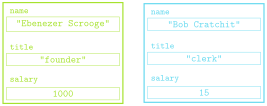
- Suppose we had some records from the two-employee firm Scrooge and Marley
- Each contains the employee name, their title, and their salary
Tuple Time
- In Python, simplest strategy for representing a record uses the
built-in type tuple
- An ordered, immutable sequence of values
- Feel similar to lists, except immutable, and used very differently
- Think of tuples as more like records than lists
- Created by enclosing a collection of elements in parentheses
employee = ("Bob Cratchit", "clerk", 15) - Ordered, so each element has a corresponding index
Tuple Usage
- Can largely envision tuples as sitting between strings and lists
- Immutable, like strings
- Elements can be anything, like lists
- Common operations mimic that of strings
- Can concatenate with addition
- Can duplicate by multiplying by an integer
- Can index and slice them
- Can loop over them directly or via index
- A tuple of a single value needs a comma still in order to be a tuple
Tuple Selection
- You can select or slice elements from a tuple just like you can with
lists
- Unfortunately, records are not usually ordered in a particular way. Rather, it is the name that is usually important
- If using tuples, you can make programs more readable by using a destructuring assignment, which breaks a tuple into named components:
name, title, salary = employee
- While modern versions of Python have such thing as a named
tuple, we will not look at them here.
- The more general strategy is to define a new class to better represent the objects in question
Classes vs Objects
- When we introduced PGL early in the semester, we stressed the
difference between types/classes and objects
- A class is the pattern or template that defines the structure and behavior of values with that particular type (the species of ant)
- An object is an individual value that belongs to a class
(an individual ant)
- A single class can be used to create any number of objects, each of which is said to be an instance of that class
- PGL defines the
GRectclass.- In Breakout, you used that class to create many
different rectangles, each of which was an instance of the
GRectclass
- In Breakout, you used that class to create many
different rectangles, each of which was an instance of the