Classy Tuples
Jed Rembold
October 29, 2025
Announcements
- ImageShop due on Monday!
- Attend your section today or tomorrow!
- Examples that can be used as mini-extensions and that will specifically apply to other milestones!
- I’m working on PS5 feedback
- Exam 2 is a week from Friday
- I’ll be getting study materials out on Friday
- Sections next week will be about studying
- Polling: polling.jedrembold.prof
Review Question
Suppose you had the file contents to the left and wanted to turn it into the contents on the right. Which code snippet below would accomplish this?
123451234554321with open('OG.txt') as fh:
data = fh.read()
with open('OG.txt', 'w') as fh:
fh.write(data[::-1])with open('OG.txt', 'rw') as fh:
data = fh.read()
fh.write(data[::-1])with open('OG.txt') as fh:
data = fh.read()
with open('OG.txt', 'a') as fh:
fh.write(data[::-1])with open('OG.txt') as fh:
data = fh.read()
with open('OG.txt', 'a') as fh:
fh.write(data[-2::-1])Busting out the Vinyl
It’s a Record!
- A record is a collection of related fields treated as a single unit
- Imagine a row in a spreadsheet or database
- Or a single observation
- A record stores what the state of something was, and thus generally doesn’t change
Old Records
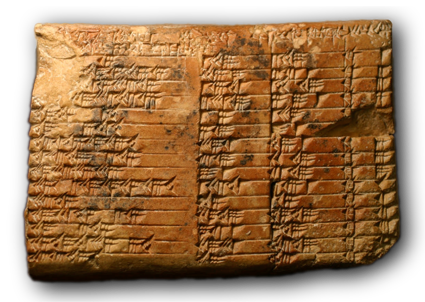
- Records are a very old idea, dating back to the 19th century BCE
- In 2017, researchers established that the below tablet, called the Plimpton 322 tablet, records Pythagorean triples!
Recording Dickens
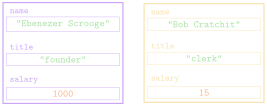
- Suppose we had some records from the two-employee firm Scrooge and Marley
- Each contains the employee name, their title, and their salary
| name | title | salary |
|---|---|---|
"Ebenezer Scrooge" |
"founder" |
1000 |
"Bob Cratchit" |
"clerk" |
15 |
Tuple Time
- In Python, the simplest strategy for representing a record uses the
built-in type called a tuple
- Comes from terms like quintuple or sextuple, that denote fixed-size collections
- An ordered, immutable sequence of values
- Feel similar to lists, except immutable, and thus used very
differently
- Think of tuples as records, recording the state of something at some time
- Created by enclosing a collection of elements in parentheses
employee = ("Bob Cratchit", "clerk", 15) - An ordered collection, so each element has a corresponding index
Tuple Usage
- Can largely envision tuples as sitting between strings and lists
- Immutable, like strings
- Elements can be anything, like lists
- Common operations mimic that of strings
- Can concatenate with addition
- Can duplicate by multiplying by an integer
- Can index and slice them
- Can loop over them directly or via index
- A tuple of a single value needs a comma at the end
in order to be a tuple
- Otherwise just a set of parentheses around a value
Tuple Selection
You can select or slice elements from a tuple just like you can with lists
- Unfortunately, records are not usually ordered in a particular way. Rather, it is the field name that is usually important
If using tuples, you can make programs more readable by using a destructuring assignment, which breaks a tuple into named components:
name, title, salary = employeeWhile modern versions of Python have such thing as a named tuple, we will not look at them here.
- The more general strategy is to define a new data type (class) to better represent the objects in question
A Tangled Example
Pointy Tuples!
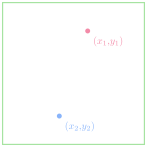
One of the most simple examples of tuple usage would be storing location information in 2d space
By storing both \(x\) and \(y\) coordinates in a tuple, it makes that information easier to store and pass around your program
When you need to use the points, best to destructure:
x,y = pt
Yarn Tuples
- Points often show up in graphical applications, where you may want to store a host of locations in a list
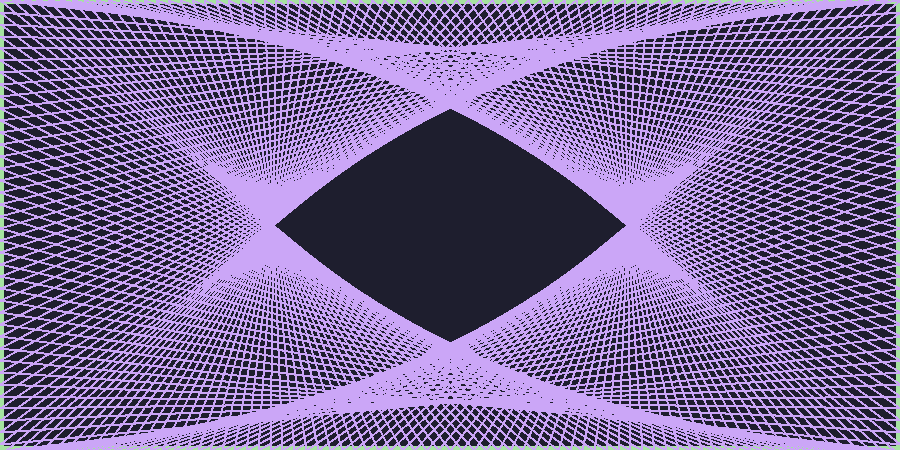
- A pretty example of points involves making some yarn art, where we:
- Place a set of “pegs” at regular intervals around a border
- Tie a piece of “yarn” around one peg
- Loop the yarn around the peg a distance
DELTAahead - Continue until we return to where we started
Expanding…
In Code
from pgl import GWindow, GLine, GRect

PEG_SEP = 3
PEG_ACROSS = 300
PEG_DOWN = 150
DELTA = 332

GWIDTH = PEG_ACROSS * PEG_SEP
GHEIGHT = PEG_DOWN * PEG_SEP

def place_pegs():
    """ Returns a list of points, where the points are tuples. """
    list_pts = []
    for i in range(PEG_ACROSS):
        list_pts.append((i * PEG_SEP, 0))
    for i in range(PEG_DOWN):
        list_pts.append((GWIDTH, i * PEG_SEP))
    for i in range(PEG_ACROSS):
        list_pts.append((GWIDTH - i * PEG_SEP, GHEIGHT))
    for i in range(PEG_DOWN):
        list_pts.append((0, GHEIGHT - i * PEG_SEP))
    return list_pts

def draw_pattern(list_pts, color='black'):
    """ Creates a window and draws in the necessary yarn. """
    gw = GWindow(GWIDTH, GHEIGHT)
    current_i = 0
    finished = False
    while not finished:
        next_i = (current_i + DELTA) % len(list_pts)
        x1, y1 = list_pts[current_i]
        x2, y2 = list_pts[next_i]
        line = GLine(x1, y1, x2, y2)
        line.set_line_width(2)
        line.set_color(color)
        gw.add(line)
        current_i = next_i
        if current_i == 0:
            finished = True

if __name__ == '__main__':
    pegs = place_pegs()
    draw_pattern(pegs, 'green')
Special Tuple Functions
Returning Tuples
- Tuples give us a convenient way to return multiple objects from a
function
return x, yis the same asreturn (x,y)
- Several Python built-in functions return tuples, of which a few are
particularly useful
enumeratezip
Enumerating
We have multiple ways to iterate through a string or list:
By element:
for ch in string:
    |||body of loop using ch|||
By index:
for i in range(len(string)):
    |||body of loop using i|||
Using
enumeratelets us get both!for i, ch in enumerate(string): |||body of loop using both ch and i|||
Zipping
Sometimes you have multiple lists that you want to loop over in a “synced” fashion
The
zipfunction iterates through tuples of pairs of elementsFor example
zip([1,2,3], ["one", "two", "three"])would yield
(1, "one"), then(2, "two"), and then(3, "three")Can unpack or destructure as part of a
forloop:for x,y in zip([1,2,3],[4,5,6]): |||body of loop using paired x and y|||
Crafting Objects
Classes vs Objects
- When we introduced PGL early in the semester, we stressed the
difference between types/classes and objects
- A class is the pattern or template that defines the structure and behavior of values with that particular type (e.g. the species of ant)
- An object is an individual entity that belongs to a class
(e.g. an individual ant)
- A single class can be used to create any number of objects, each of which is said to be an instance of that class
- PGL defines the
GRectclass.- In Breakout, you used that class to create many
different rectangles, each of which was an instance of the
GRectclass
- In Breakout, you used that class to create many
different rectangles, each of which was an instance of the
Thinking about Objects
An Object’s Purpose
- Python uses the concepts of objects and classes to achieve at least
three different goals:
- Aggregation. Objects make it possible to represent collections of independent data as a single unit. Such collections are traditionally called records.
- Encapsulation. Classes make it possible to store
data together with the operations that manipulate that data.
- In Python the data values are called attributes and the operations are called methods
- Inheritance. Class hierarchies make it possible for a class that shares some attributes and methods with a previously defined class to inherit those definitions without rewriting them all
- We’ll introduce many of these concepts in this course, but for more exposure and practice you’ll want to take CS 152 (Data Structures)
Classes as Record Templates
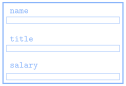
- Since they share the same attributes, it is natural to regard the two employees at Scrooge and Marley as two instances of the same class
- Could view the class as a template or empty form:
![]()
- Can help initially to just start with an empty template and then fill in the necessary fields
Starting Empty
Class definitions in Python start with a header line consisting of the keyword
classand then the class nameThe body of the class will later contain definitions, but initially can just leave blank
- Almost. Python does not allow an empty body, so need to include a
docstring or use the
passkeyword
class Employee: """This class is currently empty!"""- Almost. Python does not allow an empty body, so need to include a
docstring or use the
Once the class is defined, you can create an object of this class type by calling the class as if it were a function:
clerk = Employee()
More References
- Instances of custom Python classes are mutable
- Thus custom class instances are stored as references to that information in memory
- Any code with access to this reference can manipulate the object
- Can get or set the contents of any attributes or create new ones
- Can get or set the contents of any attributes or create new ones

Selecting Object Attributes
You can select an attribute from an object by writing out the object name, followed by a dot and then the attribute name.
As an example
clerk.namewould select the
nameattribute for theclerkobject
Attributes are assignable, so
clerk.salary *= 2would double the clerk’s current salary
You can create a new attribute in Python by simply assigning a name and a value, just like you’d define a new variable
Assigning Clerk Attributes
We could, for instance, create a
clerkin the following fashion:def create_clerk(): clerk = Employee() clerk.name = "Bob Cratchit" clerk.title = "clerk" clerk.salary = 15 return clerkNote that none of these assigned attributes affect the
Employeeclass in any way
More Generally
We could accomplish this more generally by passing arguments to our function:
def create_employee(name, title, salary):
  emp = Employee()
  emp.name = name
  emp.title = title
  emp.salary = salary
  return emp
We could then use that as:
clerk = create_employee('Bob Cratchit', 'clerk', 15)
boss = create_employee(
          'Ebeneezer Scrooge', 'founder', 1000
          )
Constructors
- While the previous method works, it is not ideal
- Forces the client to tinker with the internal workings of the Employee
- Details of the data structure are the property of the implementation, not the client
- Better to add a method to the
Employeeclass called a constructor, which is responsible for initializing attributes to a newly created object- In Python, a constructor is created by defining a special function
named
__init__ - The constructor function is called automatically whenever a new object of that type is created
- In Python, a constructor is created by defining a special function
named
Know Thy self
- Moving the function into the Employee class has a
problem:
- When we set attributes, they are specific to a given object
- The class itself though is just a template, and not linked to a specific object
- We need a general way within the class to refer to
whatever object is being created
- The overwhelming convention in Python is to call
this variable
self - Whenever a new object is created, you could imagine
that, for that object, Python replaces all of the
selfs in the class with that object’s name- This isn’t quite the order of what is happening,
but it can help envision what
selfis doing
- This isn’t quite the order of what is happening,
but it can help envision what
- The overwhelming convention in Python is to call
this variable
selfis always the first parameter to the__init__constructor- Any other arguments provided are passed in as additional parameters afterwards
An Employee Constructor
class Employee:
    def __init__(self, name, title, salary):
        self.name = name
        self.title = title
        self.salary = salary


clerk = Employee('Bob Cratchit', 'clerk', 15)- Note that you do not need to provide an argument for
selfwhen creating the object, Python supplies this reference automatically - Viewing in PythonTutor can be helpful, as is shown here