Geometries and Geographies
Jed Rembold
Monday, November 10, 2025
Announcements
- Homework 9 due on Wednesday
- Needed bits on the last problem covered today
- Only 1 more hw assignment past this one!
- Exam status?
- Scores will go out tonight
- Handed back on Wednesday
- Projects coming up!
- Poll sent out tonight asking for any partner preferences
- We’ll discuss some in just a moment
- Polling today: polling.jedrembold.prof
Project
Project Basics
- Two primary goals:
- Aggregate and create a database pulling information from at least
two different sources
- Databases should be as polished as possible given what we have
learned this semester
- Normalized tables
- Good naming
- Reasonable constraints created
- Reasonable indexes created
- Databases should be as polished as possible given what we have
learned this semester
- Write a homework problem that would utilize your database to answer
a question
- Question might be multiple parts, and should clearly address specific learning objectives
- Question should be written up in its entirety, such that it could be presented to someone else in the class and they could complete it
- Provide an answer key solution to your question
- Database dump should be utilized to transfer data
- Aggregate and create a database pulling information from at least
two different sources
Deliverables
- Presentation
- Last 2 days of class: I’ll randomly assign orders
- About 8 minutes long, with 2 minutes for questions
- Should focus mostly on the data used and database creation (think maybe a 66/33 split between talking about the database and talking about your question)
- The homework problem itself
- A database dump of your created database
Back to Strings!
Review Question
What would the output of the below query look like?
SELECT regexp_split_to_table(
  '01-13-2021, 04-24-2022', '[,-]\s*') AS rev;
rev 01 13 2021 04 24 2022 rev 01-13-2021 04-24-2022 rev 01 13 2021, 04 24 2022 rev 01 13 2021 “” 04 24 2022
Ranking
- Sometimes a query might return many results, such that you would want a method to rank or compare them and only select the “best”
- Ranking by relevancy is vague and tends to be very application specific, but it can be useful
ts_rankwill give an arbitrary rank based on how many times your query words appear in the text- This might mean that longer texts will always receive a higher rank! You can normalize by the text length by providing an extra numeric code as a third argument (2 or 8 probably best)
ts_rank_cddoes similar, but also considers the proximity of searched lexemes- Both functions take 2 required arguments:
- a tsvector of the contents to be ranked
- a tsquery determining how they will be ranked
Your Turn!
The file here contains the
SQL commands to generate and populate a simple table
alice which hold the raw chapter contents of
the book: Alice in Wonderland. You will need to set up your own
tsvector column and index. With your
neighbors, see if you can use the data to answer the following:
- In what chapters does the “Cheshire cat” appear?
- In what chapter does the term “mushroom” appear the most? How many times does it appear?
Space: The Final Frontier
Positional Data
- Location information can be a fundamental aspect of stored data
- Currently, we could store such data, but Postgres has no intelligent methods of working with or analyzing that data
- We’ll focus the next few days on how we can utilize Postgres’s PostGIS extension to unlock the power of location based data
- Don’t overlook the official PostGIS documentation, which can be a helpful resource to accompany these slides and the text
PostGIS
Unlike the
tablefuncextension,PostGISdoes not generally come with plain Postgres by default- On Windows and Mac however, if you installed Postgres as indicated at the start of the semester, you should already have it on your system
- If you are missing it in Windows, you can launch the Stack Builder and should be able to add the extension from there
The PostGIS extension will bring in a lot of extra functions and data types, so you might consider creating a new database to contain GIS type data (maybe
analysis_gis)Adding the extension to the database is the same as with other extensions:
CREATE EXTENSION postgis;
Geometries
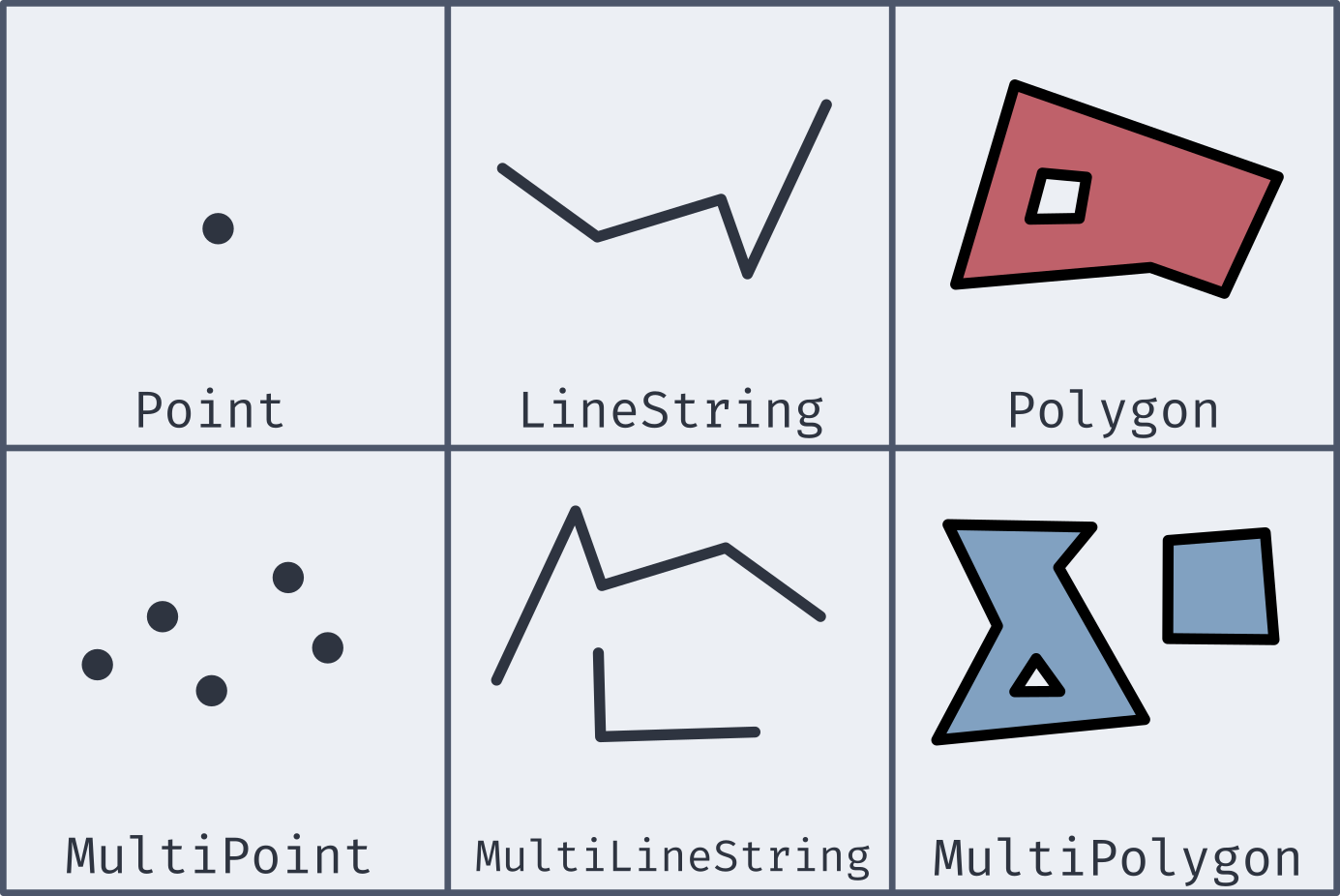
Well-Known Text
- Most of the new geometries will be constructed by passing in a well-known text string (or WKT)
| Type | Format | Comments |
|---|---|---|
Point |
'POINT (-74.9 42.7)' |
No comma separating, and longitude comes first! |
LineString |
'LINESTRING (-74.9 42.7, -75.1 42.7)' |
Comma separates coordinate pairs |
Polygon |
'POLYGON((74 42, 75 42, 76 43, 74 42))' |
Double parentheses, initial point repeated to close |
MultiPoint |
'MULTIPOINT(75 42, 74 43)' |
Comma separates coordinate pairs |
MultiLineString |
'MULTILINESTRING((76 43, 77 43), (78 43, 77 43))' |
Parentheses group individual lines |
MultiPolygon |
'MULTIPOLYGON(((74 43, 75 44, 74 45, 74 43), (81 40, 81 39, 82 39, 81 40)))' |
Still double parentheses to start and end, with 3rd parentheses grouping polygons |
Coordinate Systems
- To be able to relate and compare locations to one another, a
consistent coordinate system needs to be used
- This covers everything from the mapping projection to whether or not you are working in curved space
- PostGIS (and most GIS applications) let you specify the coordinate system with a Spatial Reference System Identifier, or SRID
- Most commonly used for us will be the most recent World Geodetic
System: WGS 84
- This corresponds to an SRID of 4326
- If grabbing geospatial data from an online source, always check its coordinate system
- All coordinate system information stored in
spatial_ref_systable, so you can query to find necessary SRIDs
New Data Types
- While PostGIS introduces many new spatial geometries, only a few new data types are added to Postgres.
geography- Based on spherical curvature, all calculations take place on a globe
- More complicated math means fewer functions work, but distances are more precise, especially over large spans
- Results expressed in meters
geometry- Based on a flat map, where all calculations take place on a plane (the mathematical sort)
- Math is simpler, but distances are less precise if across large spans
- Results expressed in units dependent on chosen coordinate system
- Both types can hold all of the spatial geometries mentioned earlier
Creating Spatial Types
Two main methods of creating geography or geometry types:
ST_GeomFromText(WKT, SRID)creates a geometry object to hold the spatial object given by the WKT with the optional given SRID- If no SRID is given, it is assumed to be 0 (no SRID at all)
ST_GeogFromText(WKT, SRID)creates a geography object to hold the spatial object given by the WKT with the optional given SRID- If no SRID is given, WGS 84 (SRID 4326) is the assumed default
If you look at the output of one of these data types, it is not human-readable
SELECT ST_GeogFromText('POINT(-75 42)');
>> 0101000020E61000000000000000C052C00000000000004540
SELECT ST_GeomFromText('POINT(-75 42)', 4326);
Making Spatial Objects
- Using a WKT to create spatial objects can be clunky if you already have latitude and longitude values in your table as numbers
- PostGIS offers a number of constructor functions for various objects
that return geometry data types with no inherent SRID
ST_MakePoint(|||long|||, |||lat|||, [|||z|||,|||m|||])will create a geometric point with optional 3rd or 4th dimensions as wellST_MakeLine(|||point1|||, |||point2|||)will create a line from the first point to the second. There is an array option as well.ST_MakePolygon(|||geometry_linestring|||, [|||cutout_linestring|||])will create a geometric polygon using the provided linestring with optional cutouts- These can have an SRID attached to them and be cast to geography
data types as desired
ST_SetSRID(|||object|||, |||SRID|||)will attach the given SRID metadata to the object
Adding an Index
- B-Trees are not well suited for indexing coordinate information
- Which would be “bigger”: (2,0) or (0,2)?
- Instead, PostGIS recommends using the Generalized Search Tree (GiST) index type
CREATE INDEX |||index_name|||
ON |||table|||
USING GIST (|||column|||);
Actual Analysis!
- Now that we’ve gone to all this effort to get the spatial data into a format that Postgres can understand, we can actually do some analysis!
- Two of the most common functions deal with distances:
ST_DWithin(|||point1|||, |||point2|||, |||distance|||)returns a True or False depending on whether the two points are within the given distance from one another- Remember that geography distances are in meters, whereas geometry distance units depend on the SRID
ST_Distance(|||point1|||, |||point2|||)computes the distance between the two points- This will be along a curve in geography, or on the flat plane in geometry
Your Turn!
- Alongside your neighbors, import in the data here, which is a collection
of the small liberal art NW colleges along with their latitude and
longitudes. See if you can add a new column with the necessary data
type, add an index, and then answer the following questions:
- What other schools are within 100km of Willamette?
- What two schools are the closest together?