The Shape of Things
Jed Rembold
Wednesday, November 12, 2025
Announcements
- Homework 9 due on Friday
- Project partner assignments guidelines going today!
- We’ll chat briefly about the test in a moment
- You can add 2 points to your listed score
- Polling today: polling.jedrembold.prof
Exam 2
Test Results
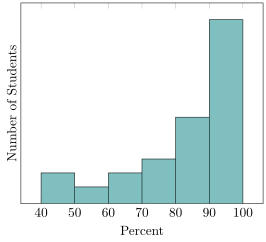
- Average: 81.15%
- Median: 85.58%
- St Dev: 18.46%
Actual Analysis!
- Now that we’ve gone to all this effort to get the spatial data into a format that Postgres can understand, we can actually do some analysis!
- Two of the most common functions deal with distances:
ST_DWithin(|||point₁|||, |||point₂|||, |||distance|||)returns a True or False depending on whether the two points are within the given distance from one another- Remember that geography distances are in meters, whereas geometry distance units depend on the SRID
ST_Distance(|||point₁|||, |||point₂|||)computes the distance between the two points- This will be along a curve in geography, or on the flat plane in geometry
Your Turn!
- Alongside your neighbors, import in the data here, which is a collection
of the small liberal art NW colleges along with their latitude and
longitudes. See if you can add a new column with the necessary data
type, add an index, and then answer the following questions:
- What other schools are within 100km of Willamette?
- What two schools are the closest together?
The Shape of It
Shapefiles
- Life would be very painstaking if you had to recreate complex polygons point by point
- Instead, most sources of spatial information that is more than a
single point distribute that information in what is commonly called a
shapefile
- Shapefiles are technically the data format developed for the ArcGIS platform
- Basically a zip which includes several files that contain the necessary information (.shp, .shx, and .dbf, at least)
- The shapefile contains all the same information as we want, concerning lines, polygons, points, etc, as well as extra explanatory information or annotations
- The general plan is to import the shapefile information into its own table within our database
shp2pgsql
- PostGIS comes with a command line utility called
shp2pgsqlon all operating systems- Windows users can run a graphical version of the same program, but
it is not available on Mac and Linux
- If you want to run the graphical version, I’ll direct you to the book’s explanation, which is covered in depth
- Windows users can run a graphical version of the same program, but
it is not available on Mac and Linux
- Like many command line utilities,
shp2pgsqlutilizes several flags to control its behavior-I→ sets up a GIST index on the geometry column-s→ specifies a specific SRID-W→ specifies a particular encoding if needed (sometimes necessary for location names)
shp2pgsql -I -s |||SRID||| -W |||ENCODING||| |||SHAPEFILE.SHP||| |||TABLE_NAME|||
Bringing Into PGSQL
By itself,
shp2pgsqlwill just generate SQLYou could save or copy that output and then run it in your database, but it can be more useful to pass that SQL directly into your database as it is created
This can be done with the
|(pipe) operatorAll together then, the command would look like below (all on one line)
shp2pgsql -I -s |||SRID||| -W |||ENCODING||| |||SHAPEFILE.SHP||| |||TABLE_NAME||| | psql -d |||DATABASE||| -U postgresShapefiles will usually create geometry objects, which you could then cast to geography as needed
Back to Text
- Since the shapefile spatial information will be encoded directly to a geometry type, it can be tricky to know what exactly you are working with at times
- You can call the
ST_AsText()function on any geometry (or geography) object to output its WKT representation- This can also be useful if you need to get it into a text form to copy into another location
SELECT ST_AsText(|||geom|||)
FROM |||table_name|||
LIMIT 1;
Visualization
- In general, you would need to take your information to another program for visualization purposes
- For a quick view though, this site will let you enter in a WKT which it will then display
- Can be used in conjunction with
ST_AsTextto grab results for quick visualization - You can use
ST_Collectto aggregate an entire column of singular geometries into one Multi-geometry object for each of representation
PostGIS Polygon Functions
- Working with shapefiles gives an easy way to gain access to complex polygonal spatial information
- PostGIS has several useful functions to interact with polygons:
ST_Area(|||poly|||)will return the area of the provided polygon. This will be in SRID specified units if geometry or square meters if geographyST_Within(|||point|||, |||poly|||)will return a True/False as to whether the given point lies within the provided polygon- Make sure your SRID values match for point and poly! Or you could get bizarre results!
Crossings
- PostGIS can also determine information about intersections between various geometries
ST_Intersects(|||geom₁|||, |||geom₂|||)will return a True/False if there exists an intersection between the two geometriesST_Intersection(|||geom₁|||, |||geom₂|||)will return a new geometry representing the intersection between the two geometries- This might be a point for the intersection between two lines or a line for the intersection between a line and a polygon, or a polygon for the intersection between two polygons