Calculated
Jed Rembold
Wednesday, September 10, 2025
Announcements
- HW2 is due tonight
- Don’t forget to upload the necessary CSVs!
- We’ll get through much of Ch 6 today, but will finish with it on Monday and do some larger examples
- You should have most of what you need to tackle HW3 after today (HW3 will come out later this evening)
- Polling today: polling.jedrembold.prof
Making Calculations
- Just like your favorite spreadsheet program, SQL can perform a wide
variety of calculations on data within tables
- Basic arithmetic
- Calculations between columns
- Calculations within columns
- Applying functions to columns
- We’ll initially focus on how to do the first several, and save things like writing custom functions until a bit later in the semester
Testing in SQL
- When testing or troubleshooting, it can be useful to not have to
work with entire tables
- Keeps things simple
- You don’t have to worry about generating a “test” table to work with
- You can run
SELECTstatements on values directly if needed, omitting a reference to a table!- Just leave off the
FROMportion of the statement
SELECT CAST('Jan 25, 2022' AS DATE); SELECT 'aardvark' > 'Zebra'; - Just leave off the
- This can be particularly useful as we begin to look at how SQL handles basic calculations
Common Operations
Fundamental Arithmetic
- SQL understands all the basic arithmetic symbols and operations you learned in grade school
| Operator | Description | Example |
|---|---|---|
+ |
Addition | 4 + 5 |
- |
Subtraction | 10 - 5 |
* |
Multiplication | 2 * 4 |
/ |
Division | 20 / 5 |
- All are part of the SQL standard, available in any variant
- All of these can be used and computed directly in whatever portion of an SQL command you might need (selects, filters, ordering, etc.)
Further Operation Symbols
- Additionally, Postgres supports a handful of other common mathematical symbolic operations
| Operator | Description | Example |
|---|---|---|
% |
Modulo (remainder) | 7 % 5 |
^ |
Exponentiation | 3 ^ 2 |
|/ |
Square root | |/9 |
||/ |
Cube root | ||/27 |
! |
Factorial | 5! |
@ |
Absolute value | @ -42 |
- I prefer the functional counterparts (coming soon!) instead of some of these symbols
Resulting Data Types
- The types of objects involved in an operation determine the resulting type
- Basic arithmetic and modulo:
- Two integers → an integer
- Numeric on either side → numeric (not necessarily with the same precision/scale)
- Any float → double precision
- Be most wary of dividing two integers!
- The exponentiation and root operations will mostly return floats or numeric, regardless of if an integer is entered
- You may need to cast a value to a different data type to get the desired output at times!
- The
pg_typeof()function can be useful at times if you need to check a data type
There Must be Order
SQL follows your standard order of operations
- Exponents and roots
- Multiplication, division, and modulo
- Addition and subtraction
If you want some other ordering, you need to use parentheses to group things accordingly, as operations in parentheses happen first
SELECT 4 ^ (9 % 2 + 1);
Understanding Check
What would be the output of the below selection?
SELECT (1 + 2) ^ (9 % (10 - 4) / 2) * 2::REAL;- 10.3923
- 6
- 8.4821
- 2
Common Mathematical Functions
- Postgres supports many common mathematical functions as well
| Function | Description |
|---|---|
sqrt(num) |
Square root |
abs(num) |
Absolute value |
factorial(num) |
Factorial of a number |
sin(num) |
Sine of radians |
sind(num) |
Sine of degrees |
asin(num) |
Inverse sine in radians |
degrees(num) |
Convert radians to degrees |
log(num) |
Base 10 logarithm |
ln(num) |
Base e logarithm |
round(num,scale) |
Round number to scale decimal places |
Calculations Across Columns
Renaming Columns
You may have noticed that the default column names when selecting a calculation can be nonsensical
SQL provides a way for you to name a column on the fly, using the
ASkeywordTechnically forms what is commonly called an alias
Syntax:
SELECT (|||calculation|||) AS |||alias name|||;You can then refer to that column name later in your command if you want or need
- In particular, in
ORDER BYor (later)GROUP BY - You can not use the alias in
WHEREor (later)HAVING
- In particular, in
Column Operations
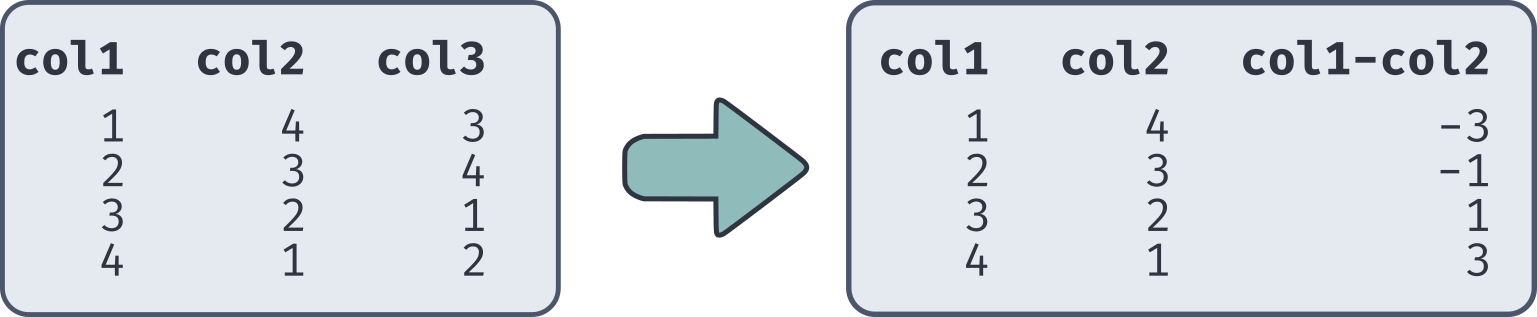
- You can do operations on entire columns at a time
- Just use the column name in the calculation expression
- Calculations are done on a row by row basis
- Can use anywhere else you would use a calculation (selections, filters, ordering, etc.)
SELECT |||column 1|||, |||column 2|||, |||column 1 - column 2||| FROM |||tablename|||;
Calculations Within Columns
Bulk Column Operations
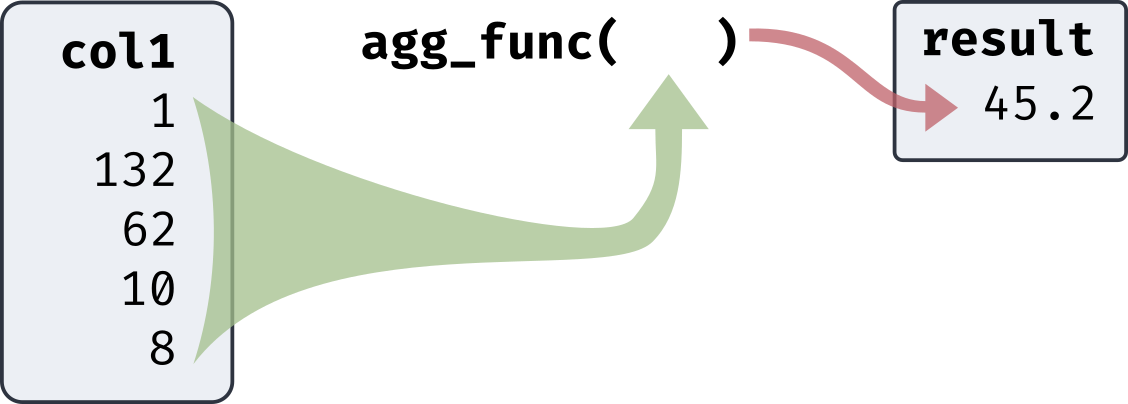
- SQL also gives you an easy method to perform calculations between all the numbers in a column
- Commonly called aggregate functions as they return only a
single output from many inputs
- All the rows in the specified column are treated as the inputs
- Because aggregate functions just return a single value, you
can’t generally mix them with selections that would return multiple
rows
- SQL selections return actual table objects, so row and column numbers need to remain equal
- Called on a specific column by placing the column name inside the parentheses
Aggregates
Common Basic Aggregates
- Many common aggregate functions are geared around determining descriptive statistics
- Unless otherwise specified,
NULLvalues are ignored in the calculations
| Function | Description |
|---|---|
avg(col) |
Finds the average or mean of a column |
sum(col) |
Computes the sum of a column |
count(*) |
Computes the number of input rows in the table |
count(col) |
Computes the number of non-null input rows in that column |
max(col) |
Finds the maximum value in a column |
min(col) |
Finds the minimum value in a column |
- Note: You can not filter in
WHEREdirectly off of aggregated values
Aggregate Types
- Like other calculations, the output type of your aggregate function will depend on the type of the original column
| Function | Output Type |
|---|---|
avg(col) |
int or numeric → numeric |
| float of any type → double precision | |
sum(col) |
smallint or int → bigint |
| bigint or numeric → numeric | |
| float → corresponding float | |
count(*) |
bigint |
count(col) |
bigint |
max(col) |
same as input |
min(col) |
same as input |
Medians and Percentiles
The median is commonly desired as it is a measure of the distribution center less affected by outliers
Postgres (and most other SQL variants) do not have a
median()functionInstead they offer more general percentile functions
- Allow you to find the values in the data where X percent of the data is less than or equal to that value
- The median just corresponds to the 50th percentile
Ordering matters here, so the syntax needs to be a bit different:
SELECT
  |||percentile_func|||(|||percent|||) WITHIN GROUP (ORDER BY |||column|||)
FROM |||tablename|||;
WITHIN GROUP Functions
- All
WITHIN GROUPfunctions entirely ignoreNULLvalues - Postgres offers you two options for determining percentile
locations:
percentile_contis best used for continuous values- Should the percentile land between two data points, they will be averaged
percentile_discis best used for discrete values- Will return the last actual bit of data before the percentile split
SELECT
  percentile_cont(0.5) WITHIN GROUP (ORDER BY |||column|||)
FROM |||tablename|||;
À la Mode
- Postgres also offers a function to find the mode of a distribution
(not in standard SQL)
mode()- No value needs to go within the parentheses
- If multiple values have the same count, the first encountered in the table is chosen (so the ordering still matters)
SELECT
  mode() WITHIN GROUP (ORDER BY |||column|||)
FROM |||tablename|||;
WITHIN GROUP Types
- The types of the WITHIN GROUP aggregate functions are fairly straightforward
| Function | Output Type |
|---|---|
percentile_cont(f) |
double precision |
percentile_disc(f) |
Same as ordered column |
mode() |
Same as ordered column |