Join Me

Jed Rembold

Wednesday, September 17, 2025

Announcements

  • HW3 due tonight!
    • HW2 feedback went out!
  • Still in Ch 7 on Monday
  • First test is a week from today!
    • Study materials posted on website! (Study guide and old test)
  • Do you want the cereal data to follow along with some examples? You can find it here
  • Polling today: polling.jedrembold.prof

Understanding Check

Suppose you have a table of items with the schema shown below and wanted to find the most common difference between Price A and Price B. You are looking for bargains, so in the case of a tie, you’d like to know the biggest. Which query will deliver on your wish?

CREATE TABLE rev (
  "name" TEXT,
  "pa" NUMERIC(4,2),
  "pb" NUMERIC(4,2)
);
SELECT mode(pb) - mode(pa) AS com_dif
FROM rev
ORDER BY com_dif;
SELECT
  mode() WITHIN GROUP (ORDER BY pb) -
  mode() WITHIN GROUP (ORDER BY pa)
FROM rev;
SELECT
  mode() WITHIN GROUP (ORDER BY (pb-pa))
FROM rev;
SELECT
  mode() WITHIN GROUP (ORDER BY (pb-pa) DESC)
FROM rev;

Joinery

Linking Tables

  • Our whole idea of breaking apart data across multiple tables was prefaced on the fact that we could pull it back together when needed
  • There is nothing special about the linkages: we can link any columns that we want
  • The act of collecting data from multiple tables based on particular rows and columns is called a join in SQL

Creating the Join

  • A join pulls information from multiple tables into a new table (since all queries return a table)
  • The columns that are matched across tables are called keys
  • The general idea is then to:
    • Set up your selection as usual from a single table
    • Join to that table another table
    • Specifying what columns in each table will act as keys along with a conditional relating them
      • Most common condition is equality, but anything is allowed
SELECT * FROM |||table A|||
JOIN |||table B|||
ON |||table a|||.|||key column||| = |||table b|||.|||key column|||;

Column Names

  • When you start refering to multiple table names in your query, you might get overlapping column names
    • Columns names must be unique within a table but might be the same across tables
  • To avoid ambiguity, you can preface a column name with the table it is coming from, separated by a period
  • This is useful both for selecting the join key columns, but also for selecting particular columns you want out of the joined table
SELECT tab1.name, tab1.age, tab2.name
FROM tab1
JOIN tab2 ON tab1.age = tab2.age;

Join Types

(Inner) Join

  • The basic join only keeps rows from table 1 and table 2 that matched on the given column keys
    • This is also called an inner join
  • Any row in table 1 that had no counterpart in table 2 is left out
    • Identically for any row in table 2 that had no counterpart in table 1
  • The key take-away is that it keeps what was in both tables
  • If a value appears twice in one table, it will be duplicated in the joined table as well
    • One reason that many times people try to join on columns that hold unique values, but not always necesarry

Inner Join Example Query

SELECT *
FROM facebook
INNER JOIN linkedin 
  ON facebook.name = linkedin.name

Inner Join Visualized

Left and Right Join

  • Sometimes, you don’t want to include only the rows that were in both tables
  • Maybe you want all the rows from one table, but joining the other data when it is available
  • In these cases, you can use a LEFT JOIN or RIGHT JOIN
    • LEFT JOIN is decidedly the more common, and you can make any RIGHT JOIN a LEFT JOIN just by flipping the table ordering
  • Rows still need to have the same number of columns, so NULL values will be inserted for the secondary table columns if no match is found

Left Join Example Query

SELECT *
FROM facebook
LEFT JOIN linkedin 
  ON facebook.name = linkedin.name

Left Join Visualized

FULL OUTER JOIN

  • On occasion, you just want all the data from both tables
    • Matching where possible
    • But keeping data from both left or right tables if no match
  • In these cases, a FULL OUTER JOIN will do what you want
    • Essentially does a LEFT JOIN followed by a RIGHT JOIN with the existing table
  • Anything without a match is still represented with NULL values

Full Outer Join Example Query

SELECT *
FROM facebook
FULL OUTER JOIN linkedin
  ON facebook.name = linkedin.name

Outer Join Visualized

Cross Join

  • Lastly, sometimes you want to see all the possible combinations between the rows of two tables
    • Sometimes called a cartesian product
  • A CROSS JOIN will return a table of all of these possibilities
  • Could imagine cross joining all of the values with the suits to generate your standard 52 card playing deck
  • These can get very large very fast!
    • Do not run on tables of millions of rows!
  • You do not need a matching key for cross joins! They operate by row.

Cross Join Example Query

SELECT *
FROM facebook
CROSS JOIN linkedin

Cross Join Visualized

Extending Join Queries

  • Envision any joins as just creating the table that your query is acting on
    • They happen before any other part of your query
  • Thus you can still:
    • Filter the rows
    • Select specific columns
    • Order the results
    • Etc.

Practice Time

The Situation

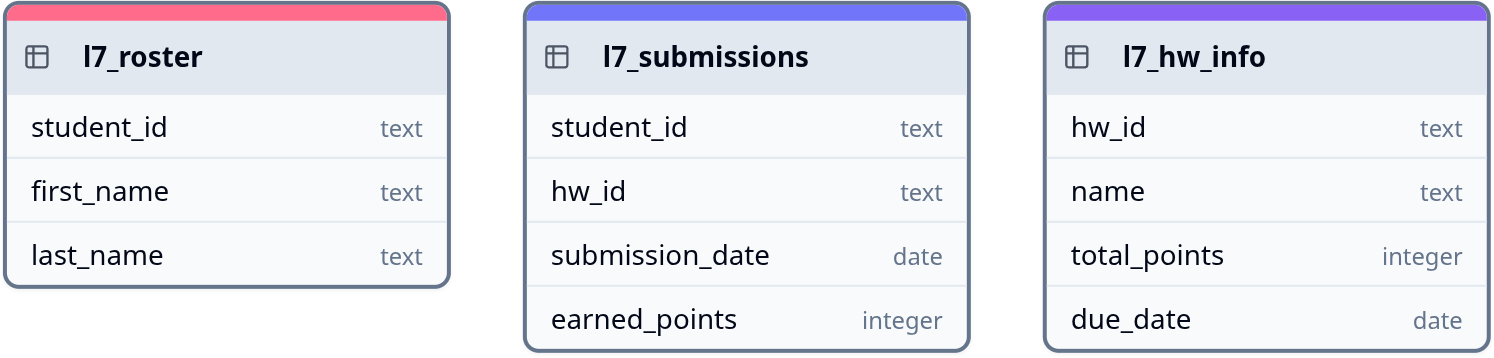
  • Suppose you have a database containing the three tables shown below
  • You can answer all of the following questions just from this image, but if you like, you can also access mock data for these tables here
Practice Question 1

Unique first names of students who have submitted any assignment?

Practice Question 2

Student ID and name of the assignment for all perfect scores?

Practice Question 3

How many students have submitted nothing? Do any assignments have no submissions?

Practice Question 4

What is the most common number of days to submit an assignment late?

Practice Question 5

If every student had turned in every assignment, how many total points would need to be graded/scored?

// reveal.js plugins // Added plugins