How Constraining
Jed Rembold
Monday, September 29, 2025
Announcements
- Homework 4 due on Wednesday
- Everything relating to joins, so you have everything you need to do all the problems
- Homework solutions live!
- Password in feedback
- Exam 1 results should be coming back Wednesday
- Apologies for the delay, but some folk still needed to take because of sickness or family emergencies
- Polling today: polling.jedrembold.prof
Review!
Given the table (named employees) to the
right and the query immediately below, what would the output table look
like?
SELECT p1.name, p2.name
FROM employees as p1
LEFT JOIN employees as p2
  ON p1.superior id > p2.id
ORDER BY p1.name LIMIT 2;| id | name | superior_id |
|---|---|---|
| 1 | Bob | NULL |
| 2 | Frank | 1 |
| 3 | Kelly | 1 |
| 4 | Anne | 3 |
| 5 | Tiffany | 2 |
| 6 | Henry | 4 |
name name Anne Kelly Bob NULL name name Anne Kelly Frank Bob name name Frank Bob Kelly Bob name name Anne Bob Anne Frank
The Art of Naming
Identifiers
- We’ve been naming tables and columns for a while now, and sometimes you’ve seen double quotes around them and other times you have not
- Double quotes around an identifier (table or column name) achieves
several things:
- The name becomes case sensitive. Otherwise, all names in SQL are case insensitive.
- The name can include special characters that otherwise are not
allowed
- Without double quotes, only letters, underscores, or digits are allowed, and the identifier must start with a letter or underscore
- The name could be the same as an SQL keyword
- If the keyword clearly would not apply where the identifier exists, SQL can figure it out, but otherwise it MUST be double quoted
- Try to limit naming identifiers after common keywords, as it just gets confusing
Guidelines
- Recommendations for good identifier naming:
- Use snake case: Using all lowercase characters and underscores to separate words
- Keep names easy to understand: As the complexity of the database increases, it might start having 100’s of tables. Given them names that actually help you immediately know what they contain!
- Use plurals for table names: Tables hold many rows worth of data, so it makes sense to refer to them in the plural.
- Keep them fairly short: Postgres limits you to 63 characters, but other systems are even less. So keep them short and sweet.
- When copying tables, use new names that assist later
management: Often you may want to copy a table to run some
calculations or alter it in a way that does not affect the original.
Consider appending the date in
YYYY-MM-DDto the table name to make it easier to find later what your latest version is.
Chains that Constrain
Why Constrain Yourself?
- Data is only useful if we can easily access it in the form we’d expect
- Specific column types already are one step in this direction
- Entering in data in another format either gets converted or an error gets output
- We can also implement a variety of other constraints on the
columns or rows of our table
- All are with the idea of further ensuring that the data in our table is of the form that we expect
- If we try to enter or change any data that would violate these constraints, SQL will return an error instead.
Constraining Details
- Postgres gives you two main locations where you can apply
constraints:
- At the column level, immediately after specifying a column type
- At the table level, after all columns have been specified
- For the most part, all the different types of contraints can be
applied in either location
- Only exception is constraints that refer to multiple columns, which should be applied as table constraints
- The anatomy of a constraint syntax looks like:
CONSTRAINT |||constraint name||| |||CONSTRAINT_TYPE||| |||CONSTRAINT_CONDITIONS|||CHECK
- The
CHECKconstraint is perhaps the most straightforward (and general), in that it just checks to see if a certain condition is true - If the condition is untrue, then an error will be raised
- Can be written in either form, but must be a table constraint if referencing multiple columns
CREATE TABLE |||example||| (
  |||col₁||| INT CHECK (|||col₁||| > 0),
  |||col₂||| INT,
  |||col₃||| INT,
  CONSTRAINT |||second_constraint_name||| CHECK (|||col₂||| > |||col₃|||)
);
NOT NULL
- Often, you may want to enforce a particular column to always have data
- To do so, you can set up a contraint on a column to not contain any null values
- The
NOT NULLconstraint is only applied to columns, not to the entire table!
CREATE TABLE |||example||| (
  |||col₁||| INT NOT NULL,
  |||col₂||| INT
);
Uniqueness
- Similarly to forcing a column to always contain data, you can also force it to have only unique data
- Requires that every row in that column have a distinct value. Any duplicates will be rejected.
- If done as a table constraint, can also require pairs of columns to be unique
CREATE TABLE |||example||| (
  |||col₁||| INT UNIQUE,
  |||col₂||| INT,
  |||col₃||| INT,
  CONSTRAINT |||uniq_pair_name||| UNIQUE (|||col₂|||, |||col₃|||)
);
Understanding Check
Given the table created as seen below, which insertion command would complete successfully?
CREATE TABLE uc (
  id_num INT UNIQUE NOT NULL,
  prod_name TEXT UNIQUE,
  price NUMERIC(5,2)
  wholesale NUMERIC(5,2),
  CHECK (price > wholesale),
  CHECK (price >= 0)
);
INSERT INTO uc VALUES
(1, 'Steak', 3.22, 5.00),
(2, 'Beans', 4.12, 2.50));INSERT INTO uc VALUES
(1, 'Steak', 3.22, 1.23),
(2, NULL, 2.65, 1.26));INSERT INTO uc VALUES
(1, 'Steak', 3.22, 2.78),
(NULL, 'Beans', 4.12, 2.50));INSERT INTO uc VALUES
(1, 'Steak', -3.22, -5.00),
(2, 'Steak', 4.12, 2.50));The Primary Directive
- Combining
UNIQUEandNOT NULLis extremely useful in having a column that gives an unambiguous way to selection a specific row from a table - Can define a single primary key for a table, that reflects this joint constraint
- If you already have a table column doing this, why declare as a
primary key?
- It clearly indicates that this column, and only this column, should be used to uniquely identify a row
- It is the default column in a table that is referenced (more on that soon!)
- It will speed of queries, as SQL uses the primary key to better optimize its searches
- Sometimes desirable to create a composite primary key based off multiple columns
Natural vs Surrogate
- Where possible, using a natural primary key is often
preferred
- Requires that a column already in your data meets the criteria of containing purely unique, non-null values
- Can sometimes combine a few columns to arrive at this requirement
- Using the existing data for the key helps give the primary key some actual meaning
- In other situations, a surrogate primary key may be
necessary
- Adds an artificial column to your table that contains purely unique,
non-null values
- The
SERIALdata types are great for this, or some people prefer to use UUIDs
- The
- The drawback is that your tables may lose some meaning without performing a bunch of joins
- Adds an artificial column to your table that contains purely unique,
non-null values
Creating Primary Keys
- You can create a primary key constraint on a single column using either syntax
- Composite primary keys must be done as a table constraint
CREATE TABLE |||example||| (
  |||col₁||| TEXT PRIMARY KEY,
  |||col₂||| INT
  );
CREATE TABLE |||example||| (
|||col₁||| TEXT,
|||col₂||| INT,
|||col₃||| INT,
CONSTRAINT |||comp_key_name||| PRIMARY KEY (|||col₁|||, |||col₂|||)
);Foreign Keys
- Columns in tables can be related to columns in other tables: foreign key constraints are a way to formalize these relationships
- Says: “the values in this column also appear in this other column in
this other table”
- Almost always refers to another primary key, though it could technically be any uniquely constrained column
- Could have many foreign key constraints in one table, as opposed to having only a single primary key constraint
- Uses the keyword
REFERENCES
CREATE TABLE |||new_example||| (
  |||col₁||| TEXT PRIMARY KEY,
  |||col₂||| INT REFERENCES |||example||| (|||col₁|||)
);
Table Foreign Constraints
- Declaring foreign constraints in the table syntax is more cumbersome, and I’d only do it if you had a composite primary key that you needed to match
CREATE TABLE |||new_example||| (
  |||col₁||| TEXT PRIMARY KEY,
  |||col₂||| INT,
  |||col₃||| INT,
  CONSTRAINT |||fkey_pair_name||| FOREIGN KEY (|||col₂|||, |||col₃|||)
    REFERENCES |||example||| (|||col₁|||, |||col₂|||)
);
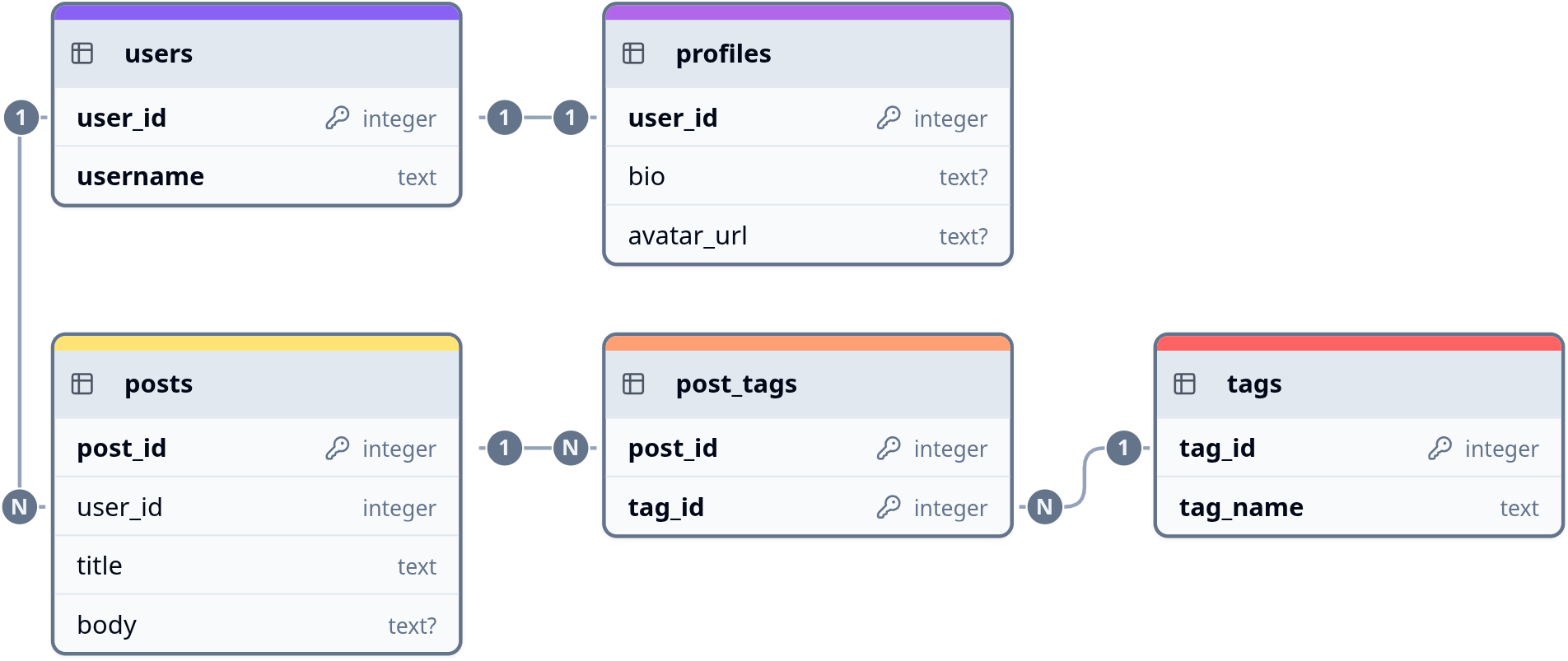
Types of Relations
- The contents of a column are generally related to the contents of
another table’s column in one of 3 main ways:
- 1-to-1: Each entry in one column only shows up once, and is
found exactly once in the referenced column. Requires adding a
UNIQUEconstraint to your foreign key. Does really show up as often in everyday usage - 1-to-N: Often times also called 1-to-many. Each entry in a column shows up exactly once in the referenced column (but could show up multiple times in the initial column). This is exactly what a normal foreign key defines.
- N-to-N: Or many-to-many. Each entry in one column can appear multiple times in the referenced column, and vice versa. Implemented with a junction table, which has two foreign keys and reference each table.
- 1-to-1: Each entry in one column only shows up once, and is
found exactly once in the referenced column. Requires adding a
Relational Example
Foreign Considerations
- Foreign keys are meant to enforce the relations between tables, so
they raise some other considerations
- You can not add a row to a table that refers to another until that other table contains the necessary primary key
- You can not delete a table that has another depending on it
- By default, you can not delete or change an individual row in a
table that is being referenced by another
- Can alter this so that any referencing rows are ALSO deleted
- Could also tweak to set those row foreign keys to be
NULLor the column default
...
|||col₂||| INT REFERENCES |||example||| ON DELETE CASCADE
|||col₃||| INT REFERENCES |||example||| ON DELETE SET NULL
...
Example
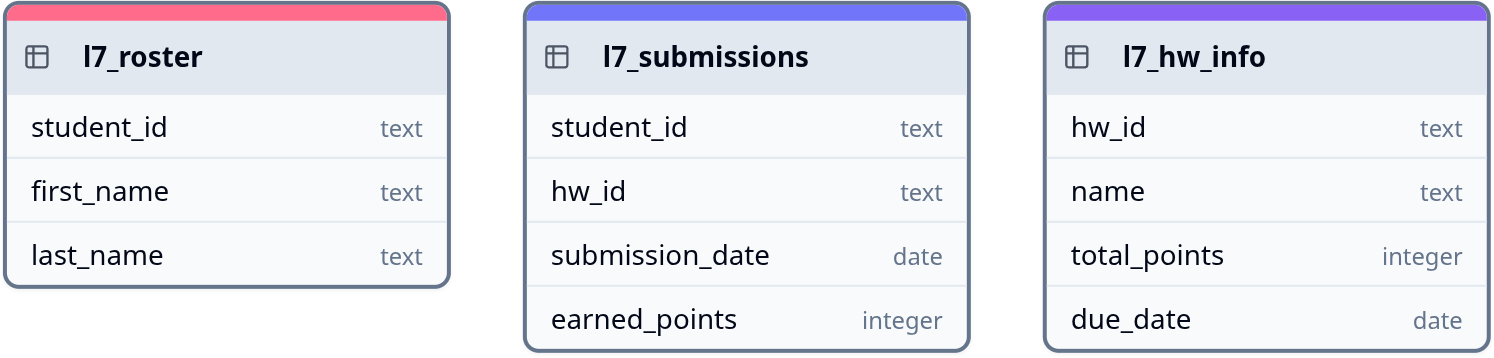
- We previously looked at joins with the roster, hw_info, and submissions tables. How would we create these with full constraints?
Your Turn
Suppose you wanted to track your Spotify playlist information in your own database. Questions you may want to be able to answer might include:
- What is the total playtime of this playlist?
- What is the most common band in a particular playlist?
- Of all the artists who perform songs in any playlist, which artists collaborate with others the most?
- Songs from how many different albums are in a particular playlist?
In groups of two or three, sketch out table diagrams similar to what we just saw in the previous example (commonly called ERD or Entity Relationship Diagrams), that would allow all these questions to be answered. Your tables should include primary keys and foreign keys where appropriate.
Online sketching resources include: drawsql, ChartDB, dbdiagram, DatabaseDiagram