Check the Index
Jed Rembold
Wednesday, October 1, 2025
Announcements
- I’ll be sending out grade reports by the end of the week so that you know where you are at in the class
- Don’t forget homework 4 due tonight!
- Homework 5 will be posted tonight
- We’ll discuss the exam in a moment
- Polling today: polling.jedrembold.prof
Exam Debrief
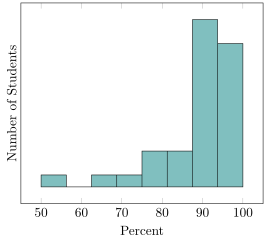
- Average: 88.5%
- Median: 91.67%
- St Dev: 12.29%
Review Question
One of the commands below to create a table is valid. Which is it?
CREATE TABLE rev_a (
  "name" TEXT UNIQUE NOT NULL,
  "year" INT,
   CHECK("year" != 2022),
  "class" TEXT
);
CREATE TABLE rev_a (
"name" TEXT PRIMARY KEY,
"year" INT PRIMARY KEY,
"class" TEXT
);CREATE TABLE rev_a (
"name" TEXT,
"year" INT,
"class" TEXT REFERENCES other,
CONSTRAINT "name" PRIMARY KEY );CREATE TABLE rev_a (
"name" TEXT,
"year" INT,
"class" TEXT,
PRIMARY KEY ("name"),
UNIQUE ("year","class"));Indexing
Consulting an Index
- Like in a book, an index is a precomputed guide to help find things faster
- We can construct similar precomputed guides for certain columns in SQL to also help find things faster!
- There are several types of indexes
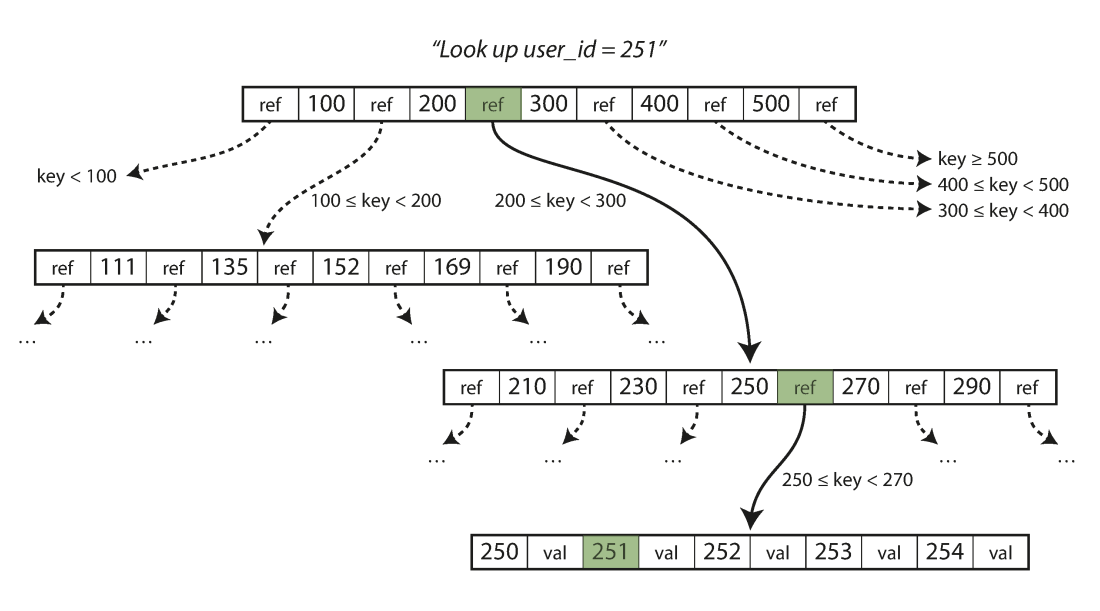
- By default, the assigned index type is a B-Tree index in Postgres
- B-Tree stands for balanced tree and work best for orderable type data
- Index types like Generalized Inverted Index (GIN) and Generalized Search Tree (GiST) will be discussed later as they come up
- Different columns in the same table can be indexed with different methods
- By default, the assigned index type is a B-Tree index in Postgres
Climbing a B-Tree
Creating Indexes
Postgres will automatically index any column that is a primary key or which has the
UNIQUEconstraintYou can choose to set up indexes on other columns as well, but do so outside of the table creation
CREATE INDEX |||index_name||| ON |||table_name||| (|||col_name|||);If you decide you want to remove an index, you do so using the index name:
DROP INDEX |||index_name|||;
Benchmarking
- One of the prime reasons for creating an index is to speed up access or manipulation of the data later
- How can we objectively test this?
- Postgres has the
EXPLAINkeyword to give you information about what the database is doing in the background - Using
EXPLAIN ANALYZEwill also give you timing information about how long it took a query to run
- Postgres has the
EXPLAINalways comes at the start of your query- Other SQL variants have their own versions, but most have some method of getting information back about execution time or what is being done under the hood
Benchmarking Caveats
EXPLAIN ANALYZEreports to you the time it took the server to process the query, not necessarily the time it took your client to finish getting and rendering the response!- Especially for queries that return a huge number of rows, you might see a significant difference
- Indexes are optimized for certain types of operations. Just because
you index a column doesn’t mean that Postgres will use
that index if you are doing an incompatible operation!
- Check more than just the timings from
EXPLAIN ANALYZE- See comments about Bitmaps and Heaps? Then the index was used.
- See comments about Parallel or Seq scans? Then the index was not used.
- Check more than just the timings from
Costs
- Indexes always have a cost associated with them, both in initial
setup and in every time new data is added to the column
- Also, they are stored information, so they can also inflate your database size
- Consider indexing only those columns that receive the heaviest of use in filters or in joining
- You never need to worry about indexing primary keys or unique columns, as those are done automatically
- When in doubt, benchmark your queries before and after adding an index to see if you are really gaining much from it!
Benchmarking Activity
- Most likely, you already (still) have the NYC Taxi Rides data on your computer
- Benchmark that data set under three different queries, for each
getting an execution time before creating an index and then after
creating an index over the desired column (you’ll create 2 different
indices total)
- Select all the columns for the row where the ride id = 56789
- Select all the columns for the rows where the total amount charged was greater than $90
- Select all the columns for the rows where the total amount charged was greater than $10
- Enter your values into the shared spreadsheet here (Just choose an unused trial number)
Normal Modeling
Data Modeling
- Data Modeling is the act of best deciding how to represent and store data such that it relates to the real world
- As much as possible, it is generally desirable to:
- ensure the model can easily help answer the types of questions you will want to ask
- operate at as low a level of granularity as possible
- remove redundancy
- ensure referential integrity
Normalization
- First introduced by Edgar Codd in the early 1970s
- Codd outlined the following goals:
- to free the collection of relations from undesirable insertion, update, and deletion dependencies
- To reduce the need for restructuring the collection of relations as new types of data are introduced
- To make the relational model more informative to users
- To make the collection of relations neutral to what queries are being run on them
- To assist in these efforts, Codd introduced the idea of normal forms
What is normal?
- Each normal form builds on those before
- The primary normal forms are:
- Denormalized
- No normalization. Nested and redundant data is allowed
- First normal form (1NF)
- Each column is unique and has a single value. The table has a unique primary key.
- Second normal form (2NF)
- Partial dependencies are removed (only necessary if compound primary key)
- Third normal form (3NF)
- Each table contains fields only relevant to its primary key, and has no transitive dependencies
Denormalized
- APIs will commonly give denormalized data, since they tend to return JSON type entries
- Consider the entry to the right about a particular order
{ "OrderID": 100,
  "OrderItems": [
    {
      "sku": 1,
      "price": 10,
      "quantity": 1,
      "name": "Thingmajig"
    },
    {
      "sku": 2,
      "price": 25,
      "quantity": 2,
      "name": "Whatchamacalit"
    }],
  "CustomerID": 5,
  "CustomerName": "Jed Rembold",
  "OrderDate": "2022-11-09" }
Initial Attempt
| OrderID | OrderItems | CustomerID | CustomerName | OrderDate |
|---|---|---|---|---|
| 100 |
|
5 | Jed Rembold | 2022-11-09 |
1st Normal Form
| OrderID | Sku | Price | Quantity | ProductName | CustomerID | CustomerName | OrderDate |
|---|---|---|---|---|---|---|---|
| 100 | 1 | 50 | 1 | Thingmajig | 5 | Jed Rembold | 2022-11-09 |
| 100 | 2 | 25 | 2 | Whatchamacalit | 5 | Jed Rembold | 2022-11-09 |
1st Normal Form (PK)
| OrderID | ItemNum | Sku | Price | Quantity | ProductName | CustomerID | CustomerName | OrderDate |
|---|---|---|---|---|---|---|---|---|
| 100 | 1 | 1 | 50 | 1 | Thingmajig | 5 | Jed Rembold | 2022-11-09 |
| 100 | 2 | 2 | 25 | 2 | Whatchamacalit | 5 | Jed Rembold | 2022-11-09 |
Evaluating 2NF
- To be in second normal form, there can be no partial dependencies, where columns depend on only one of the compound keys
- Here though the last 3 columns all depend only on OrderID
- Solution: Split to new tables!
2nd Normal Form
| OrderID | CustomerID | CustomerName | OrderDate |
|---|---|---|---|
| 100 | 5 | Jed Rembold | 2022-11-09 |
| OrderID | ItemNum | Sku | Price | Quantity | ProductName |
|---|---|---|---|---|---|
| 100 | 1 | 1 | 50 | 1 | Thingmajig |
| 100 | 2 | 2 | 25 | 2 | Whatchamacalit |
Evaluating 3NF
- The third normal form prohibits transitive dependencies, where a column depends on another (that depends on the primary key), instead of depending directly on the primary key
- Here we have 2! One in each table:
ProductNamedepends onSkuCustomerNamedepends onCustomerID
- Solution? More tables!
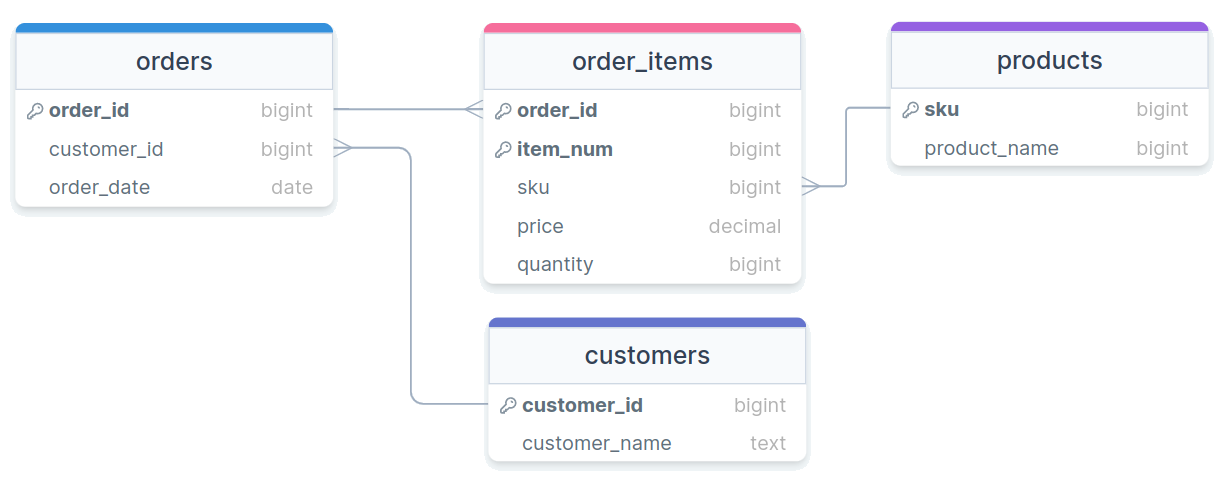
3rd Normal Form
| Sku | ProductName |
|---|---|
| 1 | Thingmajig |
| 2 | Whatchamacalit |
| CustomerID | CustomerName |
|---|---|
| 5 | Jed Rembold |
| OrderID | ItemNum | Sku | Price | Quantity |
|---|---|---|---|---|
| 100 | 1 | 1 | 50 | 1 |
| 100 | 2 | 2 | 25 | 2 |
| OrderID | CustomerID | OrderDate |
|---|---|---|
| 100 | 5 | 2022-11-09 |
Visually
Beyond
- Other normal forms exist (up to 6NF in the Boyce-Codd system)
- Most people only care about the first 3 to get data in a “normalized” state
- Unless you have specific performance reasons for wanting otherwise, you really should strive for normalized tables in your relational database, as they make maintaining, adding, updating, and adjusting your database and tables much easier
Activity
Suppose you wanted to track your Spotify playlist information in your own database. Questions you may want to be able to answer might include:
- What is the total playtime of this playlist?
- What is the most common band in a particular playlist?
- Of all the artists who perform songs in any playlist, which artists collaborate with others the most?
- Songs from how many different albums are in a particular playlist?
In groups of two or three, sketch out ER diagrams that would allow all these questions to be answered. Your tables should include primary keys and foreign keys where appropriate, and be normalized as best as you are able.
Online sketching resources include: drawsql, ChartDB, dbdiagram, DatabaseDiagram