Some Slight Alterations
Jed Rembold
Wednesday, October 8, 2025
Announcements
- Homework 4 feedback is coming! Sorry, exam grading has demanded my attention.
- Homework 5 due tonight
- Homework 6 will be posted tonight
The Showdown Returns
The GROUP BY Gauntlet!
- Divide into groups based on the next slide. It is time for another SQL showdown!
- Each group should have:
- one person designated as the answer submitter
- one person designated as the SQL typer (must rotate each question)
- one computer that has the superheroes tables from HW4 on it
- Navigate to pollev.com/jedrembold441 and come up with a fun group name
- You’ll have about 5 minutes to answer each question. Submitting an answer faster gets you more points!
Groups
- Group 1: Cecil, Emma S, Kara, Julia
- Group 2: Jose, Catalina, Jimmy
- Group 3: Beyla, Emma M, Greg, Thomas
- Group 4: Addison, Nico, Sophie
- Group 5: Meghla, Connor, Finn, Evyn
- Group 6: Michael, Tegan, Cody, Jackson
- Group 7: KJ, Evan, Talia
- Group 8: Farley, Oliver, Jude, Dominic
- Group 9: Salvador, Aaron, Saul
- Group 10: Lola, Judah, Mia
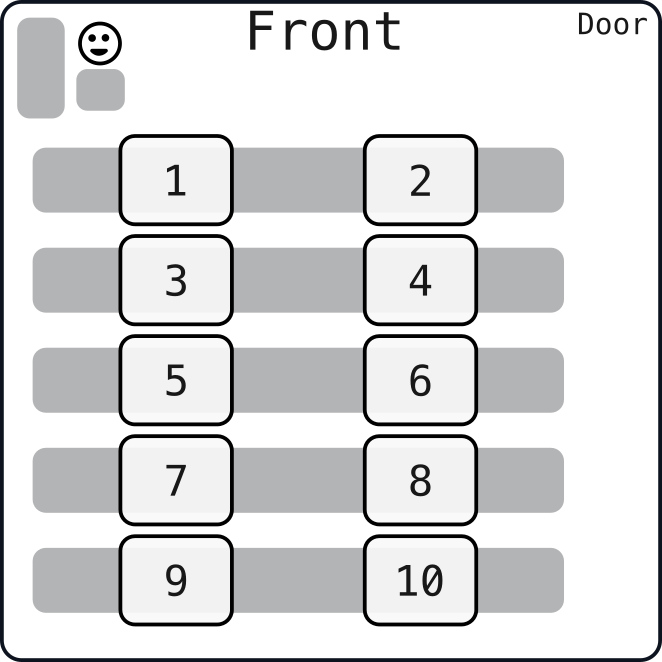
Locations!
Chapter 10
Overview
- Chapter 10 is essentially a tale in two parts, which are closely
entwined
- Data is likely going to be messy. How do you go about cleaning up data for further analysis. What sorts of anomolies should you keep an eye out for?
- Tables are usually not static entities, but stores of data that might be changing. How you can make adjustments not only to the contents of a table but to the design of the table itself?
Data Cleaning
Cleaning: Checking for Duplicates
- We’ve already seen in homework sample sets that there are sometimes duplicate row entries
- Duplicate entries across many columns is usually the sign
GROUP BYandHAVINGcan be very useful here!GROUP BYall the columns that you want to check for repetition- Use
HAVINGto only grab those groups that have more than one element (and thus a repetition)
SELECT |||col1|||, |||col2|||, |||col3|||, |||col4|||, COUNT(*)
FROM |||table_name|||
GROUP BY |||col1|||, |||col2|||, |||col3|||, |||col4|||
HAVING COUNT(*) > 1;
Cleaning: Checking for Missing
- Data sets can sometimes (often even) be missing data that really should be present
- Fixing this generally requires some knowledge of what the data is representing
- Finding missing values can still tell you important things about the quality of your data though
- A nice way to count the number of nulls in different columns is:
SELECT
  COUNT(*) - COUNT(|||col1|||) as |||col1|||,
  COUNT(*) - COUNT(|||col2|||) as |||col2|||
FROM |||table_name|||;
Cleaning: Inconsistent Data
- Especially for textual fields, there can be variation in how data is
entered
- Typos happen, or people just refer to the same thing in different ways
- To use
GROUP BYeffectively, you really need categories to be consistently named across the data set - Several possible approaches to identify:
- Scanning over a distinct column for quasi-duplications: phrases that
are just a bit distinct
GROUP BYcould do similar but add counts
- Use pattern matching to look for duplicates matching a single approximate pattern
- Use the fuzzystrmatch module to check Levershtein distances
- Scanning over a distinct column for quasi-duplications: phrases that
are just a bit distinct
Cleaning: Checking Text Length
- For certain fields, you’d expect text of a certain number of
characters
- 2 for state abbreviations
- 5 for zip codes
- 13 for isbn13
- Can be a good idea to check these using the
LENGTHstring functionLENGTH(str)just returns the number of characters in said string
SELECT *
FROM |||table_name|||
WHERE LENGTH(|||col1|||) != 5;
Damage Control
- It can be a lot of work to clean up a table
- Evaluate whether it is worth it!
- Maybe a better, cleaner data set exists?
- Sometimes, data will be missing that you simply can’t fill in
- Can your analysis work around those columns?
Table Tweaking
Making Adjustments
- Changing existing tables can generally be broken down into two
categories:
- Changing the structure of the table itself
- Uses keywords
ALTER TABLE
- Uses keywords
- Changing the row content within the table
- Uses keyword
UPDATE
- Uses keyword
- Changing the structure of the table itself
Table Altering: Part 1
ALTER TABLEis generally followed by the table name and then another keyword command, depending on what you want to do
ALTER TABLE |||table_name||| ...Adding columns:
... ADD COLUMN |||col_name||| |||data_type|||;Removing columns
... DROP COLUMN |||col_name|||;
Table Altering: Part 2
ALTER TABLE |||table_name||| ...Changing columns
... ALTER COLUMN |||col_name||| SET DATA TYPE |||data_type|||;
... ALTER COLUMN |||col_name||| SET NOT NULL;
Renaming columns
... RENAME |||col_name||| TO |||new_col_name|||;Rename entire table
... RENAME TO |||new_table_name|||;
Updating Tables
- If you want to change the values in a particular row (or many rows),
you don’t want to alter the table, you want to
UPDATEit UPDATEsets particular columns to a particular value- BE CAREFUL! If you do not specify which
rows, then ALL of the rows will have that column
changed to that value
- This is partly why having primary keys is so nice: it gives you a method to update just a single row should you need
UPDATE |||table_name|||
SET |||col_name||| = |||new_value|||;
- BE CAREFUL! If you do not specify which
rows, then ALL of the rows will have that column
changed to that value
- You can specify which rows should be changed by filtering with
WHERE
Table to Table
- In some cases, you’ll want to update information across tables
- Maybe one table has newer values that you want to use to update the original table
- In core SQL, you’d need to use subqueries, which we’ll be talking about in a few chapters
- In Postgres, you can use
FROM:
UPDATE |||table_name|||
SET |||col_name||| = |||table_name₂|||.|||col_name|||
FROM |||table_name₂|||
WHERE |||table_name|||.|||col_name₂||| = |||table_name₂|||.|||col_name₂|||