Docking Constraints
Jed Rembold
February 12, 2025
Announcements
- Homework
- HW4 due
- I had 10+ hrs of grading this weekend for another class, so I’m still playing catch-up on HW3 feedback. Sorry, it is coming soon.
- I’ll include passwords to HW1 and HW2 solutions when I score HW3
- Fill out the form that Hillary sent about desired summer courses!
- There are many constraints, so we are trying to figure out how to best ensure the most people are well served
On the Dock of the Bay…
Docker Overview
- Docker is just one method (though the most popular) to run applications in what are called containers
- A container is an isolated environment that can run basically anything.
- Examples:
- A webpage server
- A Postgres database
- An R or Python program
A Case for Containers
- Why are containers useful?
- Development environments can be difficult to replicate
- Your environment has been tailored to you!
- Your OS, your software dependencies, your installed R libraries
- Development environments are not static
- Libraries get new updates or patches
- Some software gets abandoned or features discontinued
- Development environments can be difficult to replicate
- Containers contain a working copy of an exact development environment with specific versioning
- All that is needed to share with 100% reliability is software to run the container
Alternatives?
- Why not include a list of dependencies and let people install them?
- This can work, but can get very muddled when working on multiple projects (what if I need both Python 3.6 and Python 3.10 installed simultaneously on my system?)
- Different operating systems also just do things differently or can have different libraries available
- Why not use Virtual Machines to replicate the development
environment?
- They can, but VMs run independent of your machine’s natural OS, interfacing directly with the hardware
- This can make them potentially more performant, but it also means a lot more overhead each time something needs to be run (they are running their own entire OS)
The Container Way
- Containers run on top of your natural operating system
- Requests to use hardware go through your host OS
- Your natural OS acts as a sort of translator between the application and the hardware
- Operating systems are amazingly flexible, and so your system OS can handle this easily despite needing to translate for a potentially wide variety of container types
- There may be a slight raw performance hit, but it is much faster and easier on system resources to start up, work with, and run multiple containers at the same time
- Requests to use hardware go through your host OS
Using Docker
Installing Docker
- Getting Docker on your system is easy:
- In MacOS: install Docker
Desktop
- Simply drag and drop into your Applications folder
- In Windows: still install Docker
Desktop
- Technically uses WSL2 in the background, but you already have that installed (or it is proving to be a bit better than GitBash, so you might consider it)
- In Linux: you could install Docker Desktop, but easier to just install Docker from system repos
- In MacOS: install Docker
Desktop
- Running Docker Desktop will launch both a GUI and the service itself
- The service must be running for your system to understand Docker containers
Images
- Docker uses what it calls an image whenever it needs to create a new container
- An image is basically a blueprint or compilation of all the things
that the container will need to function
- Basic OS
- Any runtime environment (R, Python, etc.)
- The application code itself
- Any dependencies necessary
- Extra configuration options, usually in the form of environment variables
- The actual commands to run when the container is launched
- Images are read only. If any of the above changes, the image needs to be rebuilt
Image Layering
- Images are constructed with a layering system, which helps when
rebuilding
- Only layers at or above where a change happened need to be
reconstructed
- This means ordering does matter!
- Layers generally mimic the same basic blueprint requirements that we just listed
- Only layers at or above where a change happened need to be
reconstructed
Base Images
You will almost always start from an initial basic image
A collection of universally accessible images is hosted on DockerHub
These are all images in themselves, but also serve as excellent starting points for more custom images that you might want to build
To download an image to your system for use, from a terminal:
docker pull image_name:possible_tagTo see images currently on your system:
docker images
Containers from Images
To actually run a container, you can use the GUI, or, from a terminal:
docker run --flags container_nameruncreates and starts the container--flagscould be any number of options or boolean flags. Common ones include:-itto launch interactively--rmto remove the container once the command or interactive session finishes-dto run the container detached
- The container name is the name and (optionally) tag of the container
you want to launch.
- If the container is not already on your system, Docker will download it from DockerHub
Working with Containers
To get a view of currently running containers:
docker ps- Add a
-aflag at the end to see all containers
- Add a
To remove old containers:
docker container rm container_name_or_idCan start or stop exist containers with:
docker start/stop container_name
Customizing Images
Generally, you will want to customize a base image by adding your own layers on top
The schematic of what comprises an image is all contained in a special text file, named
Dockerfile- Note the lack of extension at the end!
A Dockerfile is a simple text file with some special instructions that dictate what layers comprise your image
A Dockerfile is used to build the image
docker build -t img_name path/to/dockerfile
Adding Layers in the Dockerfile
- Dockerfiles use a syntax with only a few keywords
FROMspecifies the base image you are starting withRUNspecifies a command to run. Often to satisfy dependencies or get librariesCOPYwill copy file from your local system into the imageCMDspecifies the default command to be run when the image is launched
FROM python:3

WORKDIR /app

COPY image.py .

RUN pip install numpy matplotlib

CMD ["python", "image.py"]- Layers are built from the “bottom up”
Isolation
- Containers run as isolated systems, which is usually a good thing
- Ensures that nothing on your local system affects the container system
- Sometimes though we need holes “broken” in the isolation
- A web server is available at a certain port, but we can’t access that port in the isolated container
- A program might generate a file, but that is in the container filesystem, which we can not access
Poking Holes
- When running a container, you can poke holes in the container to
connect certain internal parts of the container with particular parts of
your outside system
Connecting ports
docker run -p localport:containerport cont_nameConnecting folders
docker run -v /local/folder:/container/folder cont_name
Challenge
- I have uploaded an image of my own to DockerHub, which you can find
at
jrembold/dockerdemo - On your own time, see if you can:
- Download the image
- Run the image interactively
- Find further instructions inside
- I’ll give you some extra HW points if you can email me with the answer to the further instructions :)
Break!
Break Time!

Identify Yourself
Review!
Given the table (named employees) to the
right and the query immediately below, what would the output table look
like?
SELECT p1.name, p2.name
FROM employees as p1
LEFT JOIN employees as p2
  ON p1.superior id > p2.id
ORDER BY p1.name LIMIT 2;| id | name | superior_id |
|---|---|---|
| 1 | Bob | NULL |
| 2 | Frank | 1 |
| 3 | Kelly | 1 |
| 4 | Anne | 3 |
| 5 | Tiffany | 2 |
| 6 | Henry | 4 |
name name Anne Kelly Bob NULL name name Anne Kelly Frank Bob name name Frank Bob Kelly Bob name name Anne Bob Anne Frank
Identifiers
- We’ve been naming tables and columns for a while now, and sometimes you’ve seen double quotes around them and other times you have not
- Double quotes around an identifier (table or column name) achieves
several things:
- The name becomes case sensitive. Otherwise, all names in SQL are case insensitive.
- The name can include special characters that otherwise are not
allowed
- Without double quotes, only letters, underscores, or digits are allowed, and the identifier must start with a letter or underscore
- The name could be the same as an SQL keyword
- If the keyword clearly would not apply where the identifier exists, SQL can figure it out, but otherwise it MUST be double quoted
- Try to limit naming identifiers after common keywords, as it just gets confusing
Guidelines
- Recommendations for good identifier naming:
- Use snake case: Using all lowercase characters and underscores to separate words
- Keep names easy to understand: As the complexity of the database increases, it might start having 100’s of tables. Given them names that actually help you immediately know what they contain!
- Use plurals for table names: Tables hold many rows worth of data, so it makes sense to refer to them in the plural.
- Keep them fairly short: Postgres limits you to 63 characters, but other systems are even less. So keep them short and sweet.
- When copying tables, use new names that assist later
management: Often you may want to copy a table to run some
calculations or alter it in a way that does not affect the original.
Consider appending the date in
YYYY-MM-DDto the table name to make it easier to find later what your latest version is.
Encoding Constraints
Why Constrain Yourself?
- Data is only useful if we can easily access it in the form we’d expect
- Specific column types already are one step in this direction
- Entering in data in another format either gets converted or an error gets output
- We can also import a variety of other constraints on the
columns or rows of our table
- All are with the idea of further ensuring that the data in our table is of the form that we expect
- If we try to enter or change any data that would violate these constraints, SQL will return an error instead.
Constraining Details
Postgres gives you two main locations where you can apply constraints:
- At the column level, immediately after specifying a column type
- At the table level, after all columns have been specified
For the most part, all the different types of contraints can be applied in either location
- Only exception is constraints that refer to multiple columns, which should be applied as table constraints
The anatomy of a constraint syntax looks like:
CONSTRAINT |||constraint name||| |||CONSTRAINT_TYPE||| |||CONSTRAINT_CONDITIONS|||
CHECK
- The
CHECKconstraint is perhaps the most straightforward, in that it just checks to see if a certain condition is true - If the condition is untrue, then an error will be raised
- Can be written in either form, but must be a table constrain if referencing multiple columns
CREATE TABLE |||tablename||| (
  |||col₁||| INT CHECK (|||col₁||| > 0),
  |||col₂||| INT,
  |||col₃||| INT,
  CONSTRAINT |||constraint_name||| CHECK (|||col₂||| > |||col₃|||)
);
NOT NULL
- Often, you may want to enforce a particular column to always have data
- To do so, you can set up a contraint on a column to not contain any null values
- The
NOT NULLconstraint is only applied to columns, not to the entire table!
CREATE TABLE |||tablename||| (
  |||col₁||| INT NOT NULL,
  |||col₂||| INT
);
Uniqueness
- Similarly to forcing a column to always contain data, you can also force it to have only unique data
- Requires that every row in that column have a distinct value. Any duplicates will be rejected.
- If done as a table constraint, can also require pairs of columns to be unique
CREATE TABLE |||tablename||| (
  |||col₁||| INT UNIQUE,
  |||col₂||| INT,
  |||col₃||| INT,
  CONSTRAINT |||constraint_name||| UNIQUE (|||col₂|||, |||col₃|||)
);
Understanding Check
Given the table created as seen below, which insertion command would complete successfully?
CREATE TABLE uc (
  id_num INT UNIQUE NOT NULL,
  prod_name TEXT UNIQUE,
  price NUMERIC(5,2)
  wholesale NUMERIC(5,2),
  CHECK (price > wholesale),
  CHECK (price >= 0)
);
INSERT INTO uc VALUES
(1, 'Steak', 3.22, 5.00),
(2, 'Beans', 4.12, 2.50));INSERT INTO uc VALUES
(1, 'Steak', 3.22, 1.23),
(2, NULL, 2.65, 1.26));INSERT INTO uc VALUES
(1, 'Steak', 3.22, 2.78),
(NULL, 'Beans', 4.12, 2.50));INSERT INTO uc VALUES
(1, 'Steak', -3.22, -5.00),
(2, 'Steak', 4.12, 2.50));The Primary Directive
- Combining
UNIQUEandNOT NULLis so common that such a constraint gets its own name: the primary key - A primary key gives you an unambiguous way to select a specific row from a table
- If you already have a table column doing this, why declare as a
primary key?
- It enforces that entries in your column need to maintain this unique and present constraint going forward
- It can simplify joins, as the default column to join on is the primary key
- It will speed of queries, as SQL uses the primary key to better optimize its searches
- Sometimes desirable to create a composite primary key based off multiple columns
Natural vs Surrogate
- Where possible, using a natural primary key is often
preferred
- Requires that a column already in your data meets the criteria of containing purely unique, non-null values
- Can sometimes combine a few columns to arrive at this requirement
- Using the existing data for the key helps give the primary key some actual meaning
- In other situations, a surrogate primary key may be
necessary
- Adds an artificial column to your table that contains purely unique,
non-null values
- The
SERIALdata types are great for this, or some people prefer to use UUIDs
- The
- The drawback is that your tables may lose some meaning without performing a bunch of joins
- Adds an artificial column to your table that contains purely unique,
non-null values
Creating Primary Keys
- You can create a primary key constraint on a single column using either syntax
- Composite primary keys must be done as a table constraint
CREATE TABLE |||tablename||| (
  |||col₁||| TEXT PRIMARY KEY,
  |||col₂||| INT
  );
CREATE TABLE |||tablename||| (
|||col₁||| TEXT,
|||col₂||| INT,
|||col₃||| INT,
CONSTRAINT |||constraint_name||| PRIMARY KEY (|||col₁|||, |||col₂|||)
);Foreign Keys
Tables can be related to other tables: foreign key constraints are a way to formalize these relationships
Says: “the values in this column are related to this other column in this other table”
- Almost always refers to another primary key, though it could technically be any uniquely constrained column
Could have many foreign key constraints in one table, as opposed to having only a single primary key constraint
Uses the keyword
REFERENCESCREATE TABLE |||table₂||| ( |||col₁||| TEXT PRIMARY KEY, |||col₂||| INT REFERENCES |||table₁||| (|||col₁|||) );
Table Foreign Constraints
- Declaring foreign constraints in the table syntax is a bit more cumbersome, and I’d only do it if you had a composite primary key that you needed to match
CREATE TABLE |||table₂||| (
  |||col₁||| TEXT PRIMARY KEY,
  |||col₂||| INT,
  |||col₃||| INT,
  CONSTRAINT |||constraint_name||| FOREIGN KEY (|||col₂|||, |||col₃|||)
    REFERENCES |||table₁||| (|||col₁|||, |||col₂|||)
);
Foreign Considerations
- Foreign keys are meant to enforce the relations between tables, so
they raise some other considerations
- You can not add a row to a table that refers to another until that other table contains the necessary referenced key
- You can not delete a table that has another depending on it
- By default, you can not delete or change an individual row in a
table that is being referenced by another
- Can alter this so that any referencing rows are ALSO deleted
- Could also tweak to set those row foreign keys to be
NULLor the column default
...
|||col₂||| INT REFERENCES |||table₁||| ON DELETE CASCADE
|||col₃||| INT REFERENCES |||table₁||| ON DELETE SET NULL
...
Example
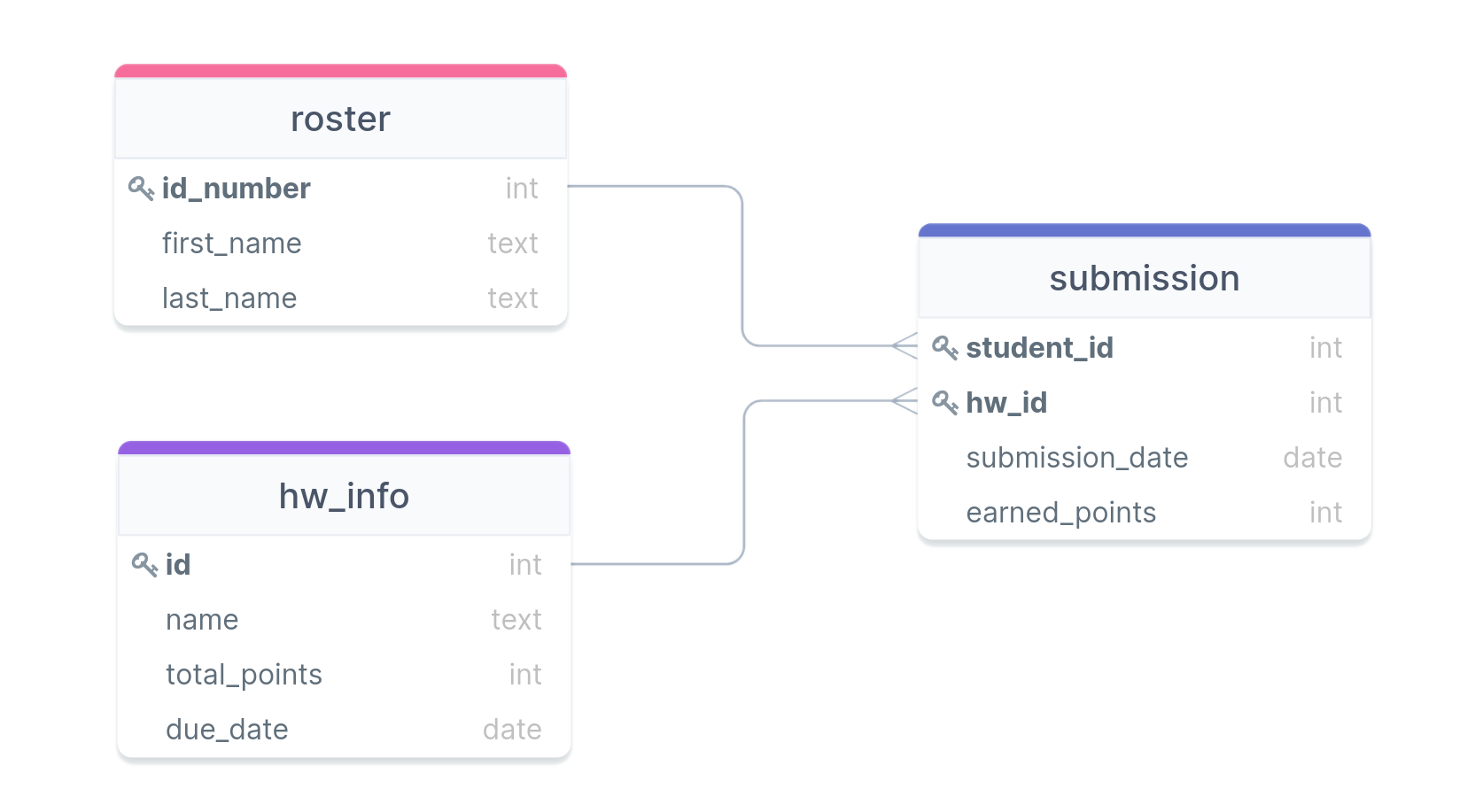
- We previously looked at joins with the roster, hw_info, and submissions tables. How would we create these with full constraints?
Activity
Suppose you wanted to track your Spotify playlist information in your own database. Questions you may want to be able to answer might include:
- What is the total playtime of this playlist?
- What is the most common band in a particular playlist?
- Of all the artists who perform songs in any playlist, which artists collaborate with others the most?
- Songs from how many different albums are in a particular playlist?
In groups of two or three, sketch out table diagrams similar to what we just saw in the previous example (commonly called ERD or Entity Relationship Diagrams), that would allow all these questions to be answered. Your tables should include primary keys and foreign keys where appropriate.
Online sketching resources include: drawsql, visual-paradigm, or DrawIO
The Quest for Efficiency
Creating Indexes
- We’ve talked previously about indexes from a theoretical view, now to put them into practice
- Postgres will automatically index any column that is a primary key
or which has the
UNIQUEconstraint - You can choose to set up indexes on other columns as well though
- By default, the assigned index type is a B-Tree index in Postgres
- B-Trees work best for orderable type data
- You can assign other types of indexes to columns though, so
you can somewhat customize to what will work best
- Index types like Generalized Inverted Index (GIN) and Generalized Search Tree (GiST) will be discussed later as they come up
CREATE INDEX |||index_name||| ON |||table||| (|||column|||);Benchmarking
- One of the prime reasons for creating an index is to speed up access or manipulation of the data later
- How can we objectively test this?
- Postgres has the
EXPLAINkeyword to give you information about what the database is doing in the background - Using
EXPLAIN ANALYZEwill also give you timing information about how long it took a query to run
- Postgres has the
EXPLAINalways comes at the start of your query- Other SQL variants have their own versions, but most have some method of getting information back about execution time or what is being done under the hood
Costs
- Indexes always have a cost associated with them, both in initial
setup and in every time new data is added to the column
- Also, they are stored information, so they can also inflate your database size
- Consider indexing only those columns that receive the heaviest of use in filters or in joining
- You never need to worry about indexing primary keys or unique columns, as those are done automatically
- When in doubt, benchmark your queries before and after adding an index to see if you are really gaining much from it!