DB Interfaces and Data Work
Jed Rembold
June 3, 2025
Announcements
- Project proposal feedback will be out by the end of the week
- You have Paper Critique #2 due next Monday night
- Live on Canvas after class
- Due at the end of the month: Data Summary
Connecting DB to Scripts
An Interface
- SQL is brilliant for working within a relational database
- It is not generally as flexible to handle other common scripting tasks
- You may at times need an interface between a common scripting language (say R or Python) and SQL
- These interfaces generally allow two major things to happen:
- You can trigger certain SQL commands to happen in the database from within your other script
- You can query results out of a database using SQL and bring them directly into your scripting language, ready for use
The Triad
- In my experience, there are 2 fundamental “pieces” to connecting a
scripting language to a database
- A library to facilitate the interactions with the database (the main scripting tool)
- A library to facilitate the connection to the database type (the database driver)
- Then you have the individual commands to interact with the database
Fundamental Database Libraries
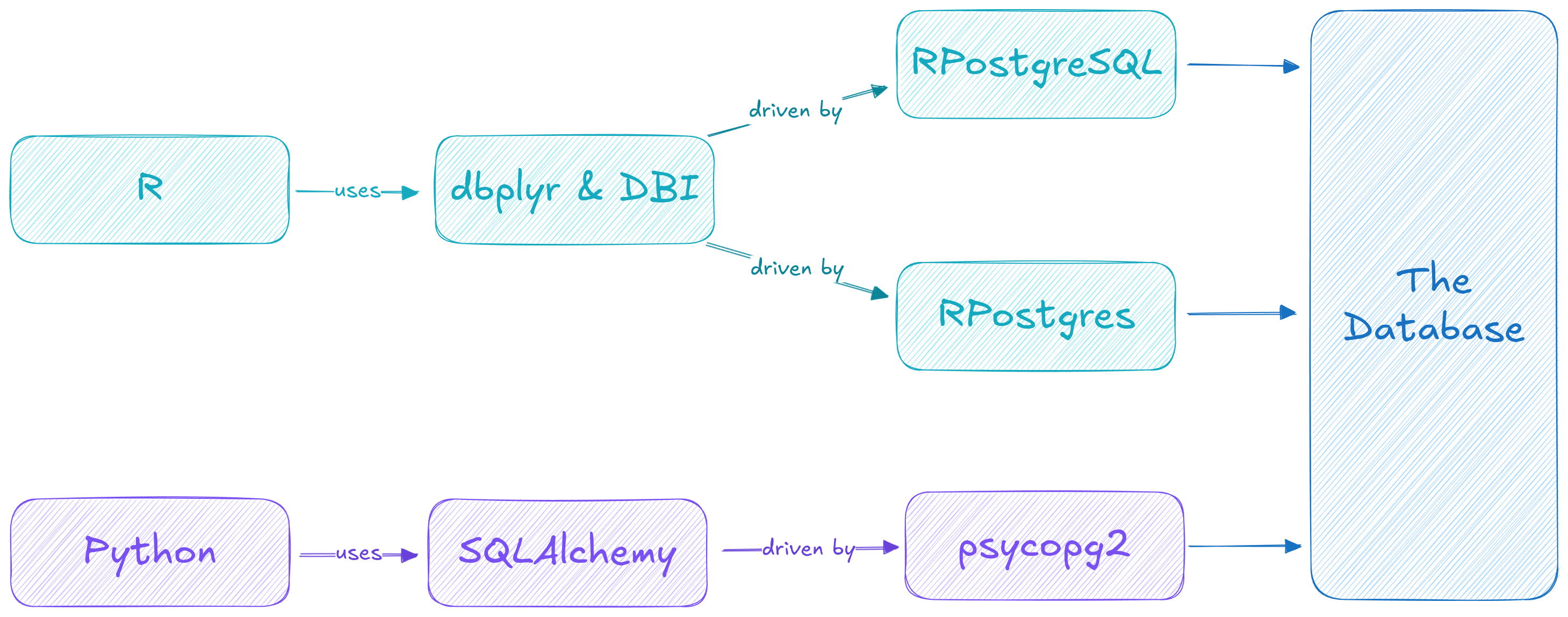
- In R:
DBIhandles much of the general interaction and background processingdbplyrusesDBIto seamlessly mesh database tables with R dataframes
- In Python:
SQLAlchemyis my favorite (and generally seems like the most popular) for handling database interactionPandasprovides the dataframes and meshes smoothly with SQLAlchemy to query your database tables
Driving the Connection
- Regardless of the scripting language, an interface is generally built around an initial connection object that gets defined in the chosen language
- These connection objects are often tailored to different types of
databases, and thus a particular library might be needed to provide a
driver to your database type of choice
- In R:
RPostgresorRPostgreSQL - In Python:
psycopg2
- In R:
Visually
Making the Connection
- The connection object is initially formed by requiring information
about the database you desire to connect to
- IP address / Port
- Database name
- User you’ll be connecting as
- User password
- All other commands will use the connection object as a method to communicate with the database
- Frequently will form one connecting at the start and then maintain it, but you could connect and disconnect as needed
Making a connection: R
- The
dBConnectcommand fromDBIis used to create a connection object - Needs at least one input, corresponding to a DBI object representing
the type of database to connect to, provided by your driver
- For Postgres, that can be
RPostgres::Postgres()orRPostgreSQL::PostgreSQL()
- For Postgres, that can be
- Further parameters can customize aspects of what database is
connected to
dbnamefor the database namehostfor the IP address (or localhost if on same system)portfor a specific portuserfor the connecting usernamepasswordfor the corresponding password
- Save the connection object as something! You will need it!
Making a connection: Python
- You use the
create_enginecommand from SQLAlchemy to create the connection object - While you won’t need to specify the driver, it does need to be installed or SQLAlchemy will fail to make the connection
- You still need to specify all the same pieces of information to make
the connection, but you can do so with either a connection string or
have SQLAlchemy assemble the pieces for you
- Connection string:
'postgresql://username:password@host:port/dbname' - Assembly from
URL.create('postgresql', username=, password= , etc)
- Connection string:
- Still save the connection object as something! You will need it!
Example Connections
Connecting to a generic Postgres database living on the same computer:
con <- dbConnect(RPostgres::Postgres(),
                 dbname = 'analysis',
                 host = 'localhost',
                 port = 5432,
                 user = 'postgres',
                 password = 'postgres')
con = create_engine(URL.create('postgres', database = 'analysis', host = 'localhost', port = 5432, username = 'postgres', password = 'postgres'))
Reading information
- Once you have a connection, you can query the database and output
native script dataframes!
Using dbplyr in R:
output <- tbl(con, sql("SELECT * FROM pokemon"))- This stores in the
outputa database table object, which is essentially a map to the information in the database - You can filter, aggregate, etc on this object as if it were a local dataframe, but it is actually still on the server!
- dplyr converts all the R commands into corresponding SQL that is run serverside
- This stores in the
Using pandas in Python:
output = pd.read_sql(text("SELECT * FROM pokemon"), con=con)- This reads the resulting table directly into a dataframe stored in local memory
Writing information
For writing information to the database, or any other SQL commands that don’t return a table, things are more straightforward (kinda)
Takes two required arguments: the connection and the SQL
For R, I would recommend using
DBI::dbExecute, as I’ve found it to be the most straightforward and convenientDBI::dbExecute(con, "INSERT INTO test VALUES ('Jed', 1985)")In Python, you need to open a transaction and then execute
with con.begin() as trans:
  trans.execute(text("INSERT INTO test VALUES ('Jed', 1985)"))
Parameterizing Information
- Often, you have gotten information from another source that you want to embed inside an SQL query
- You could do this directly through string processing, using
something like
pasteorglueor Python’s f-strings- Doing this blindly though can open you up to SQL-Injection attacks!
- A better way is through query parameterization
- Indicate placeholders in the query where you want information to be subbed in, and then supply that information when you execute
- The interface library then takes care of sanitizing the input and making sure nothing nefarious is going on before inserting the desired data
RPostgres Parameterization
Uses ordered placeholders using a dollar sign followed by a number:
$1,$2, etc- This exact syntax can vary some from library to library
Can provide a parameterization list after the query:
dbExecute(con, "INSERT INTO test VALUES ($1, $2)", list('Jed', 1985))Could also provide a 1-row tibble of the necessary length
In Python, labeled placeholders are referenced in a dictionary:
trans.execute(
  text("INSERT INTO test VALUES (:name, :year)"),
  {'name': 'Jed', 'year': 1985}
  )
The Art of Scraping
Webscraping
- Webscraping is the act of extracting information from a webpage so that it can be collected or otherwise used elsewhere
- It can take multiple forms, with varying degrees of complexity (most
of which depends on the website)
- Extracting information from a table of data
- Extracting other information on a webpage that in not necessarily formatted
- Extracting information using a provided API endpoint
- Our goal today is to touch on how you could do each of these in
either Python or R
- In Python we’ll be using the
requests,pandas,beautifulsoupandjsonlibraries - In R we’ll be using
httr,rvest(with comes as part of tidyverse), andjsonlite
- In Python we’ll be using the
Step 1: Get the HTML
Regardless of what language you are using, the first step is to grab the necessary html
This is exactly what your browser is doing when it accesses a webpage
In Python, this is done using the
requestslibrarygetfunction:html = requests.get(url).textIn R, this can be done using the
GETfunction fromhttr:html <- content(GET(url))
Step 2: Understanding Tags
- HTML is comprised by information nested within what are called
tags
- Tags can also be nested inside other tags
- Extracting information from a webpage is frequently about knowing which tags have the information you want
- Take advantage of the “Inspect” tool on most browsers, accessed by
right clicking on a web page
- Will give you the option to explore both the HTML and mouse around the webpage and highlight the corresponding HTML tags
- At the very least, you should normally try to identify the overall tag that surrounds your data of interest
Option 1: Data from Tables
One method in which data is frequently stored on a webpage is in tables
- These are surrounded by the
< table >tag
- These are surrounded by the
So long as the table is fairly simple, both Python and R have very easy ways of grabbing the table information directly into a corresponding dataframe
Language Example Python df = pandas.read_html(html)R df <- html %>% html_tableThese will automatically correct for things like cells spanning multiple rows, which is very nice
By default, both options technically return a list of dataframes for every table on the page
Option 2: Other Data on a Page
- Sometimes the data you want from a page isn’t clearly going to be
the text in a table
- Maybe it is the url from a link, or an image, or any other text or number not in a table
- In these cases you need to rely on the tag structure of the html
document to select purely what you are interested
- You may also need to access the tag attributes to get information such as link or image urls
- When selecting the tags you want, you can provide multiple separated
by spaces to provide a hierarchy of what you are looking for
- Looking for
'tr td'says you want all thetdtags that are inside atrtag
- Looking for
- Gathering the data in this way may generate a list of content, but it won’t generally create more complicated tables of information, so you would need to craft those yourself
Option 2: Selecting the desired tags
In Python, when parsing an html document by tag, it helps greatly to parse the raw html using the BeautifulSoup library
- Beautiful soup then gives you each methods to select only certain tags from the larger structure
soup = bs4.BeautifulSoup(html)
links = soup.select('td a')
In R, if you are using the
rvestlibrary, you just need to pass the html into the proper function:html_elementslinks <- html %>% html_elements('td a')
Option 2: Information from tags
Generally, you then want some information from those tags, either the enclosed text or some attribute
To get the text associated with a tag:
Language Example Python link_text = [tag.text for tag in links]R link_text <- only_links %>% html_textTo get an attribute value of a tag (content inside the
<>parts of the tag)Language Example Python link_url = [tag['href'] for tag in links]R link_url <- only_links %>% html_attr('href')
Dynamic Pages
- Many modern webpages utilize Javascript to make calls to a database when the page loads, populating the page dynamically
- When you first access the page then, none of the desired information is present, and thus standard scraping will not work
- What you need is a programmatic way to “mimic” a web browser: allowing javascript and the page to dynamically populate before you access it.
Enter Selenium
- Selenium is software to accomplish exactly this
- Libraries available for both R and Python
- Usually requires downloading an external driver as well: what browser do you want to spoof?
- Commands to simulate user interactions: typing something in a space, or clicking on a button
- Still need to understand tags and the structure of the page to grab the information you want
- Selenium is more advanced that normal webscraping, but it is also extremely powerful. Getting some experience with it, should you choose, is a great skill to develop.
Break Time!
Team Data Work
Team work
- The rest of the evening is set aside for you to start to planning
for your data acquisition and organization.
- Do you need to be scraping? How will you do that?
- Where will you be storing your data? Keep in mind you want it frequently synched across at least two computers!
- How do you want to model the data? Just because you may have accessed it in a certain form does often not mean it is the best for your purposes
- Work out a monthly timeline and add it to your project planning on GH