An Eventful Time
Jed Rembold
July 23, 2025
Announcements
- Lots of feedback went out!
- The second transfer happened!
- You’ll have lots of time later tonight to start familiarizing yourself with things
- Peer documentation feedback form will go out in about a week
- Slight deviation from schedule/syllabus for the last weeks
- Only 1 more graded milestone: Milestone 5, due in two weeks
- One last optional milestone due on the last day, whose score will replace your lower other milestone grade
- Don’t forget your weekly reflections today (if you haven’t already for this week)!
Tonight
- Introducing Events
- What are they and how do they differ?
- Kafka
- What is it?
- How do we snapshot it?
- Familiarizing with your new project
Introducing Events
Currently
- So far, all our data ingestion this semester has been based on a pull paradigm
- Our code goes out, on a schedule, to retrieve information from other sources
- The responsibility of getting the data lies entirely in our hands
- Analogy: You go to the store to get your weekly loaf of bread
Pushing Data
- An alternative paradigm, the push paradigm, shifts the responsibility of data transportation to the data source itself
- Data sources send data, either on a schedule or some other method,
directly to some data consumer
- The data consumer is responsible for listening for this data arriving, but otherwise needs to do nothing
- This is not new technology or terminology
- Web pages manage push/pull methods between servers and clients all the time
- Webhooks
- Analogy: The store ships a loaf of bread to you weekly
No one home
- Pushing data to a consumer does incur some risks, as the data source
may get no knowledge of if the data was actually received
- Can be “blind” in some ways
- What to do then if the data consumer is not currently active? Is the data lost?
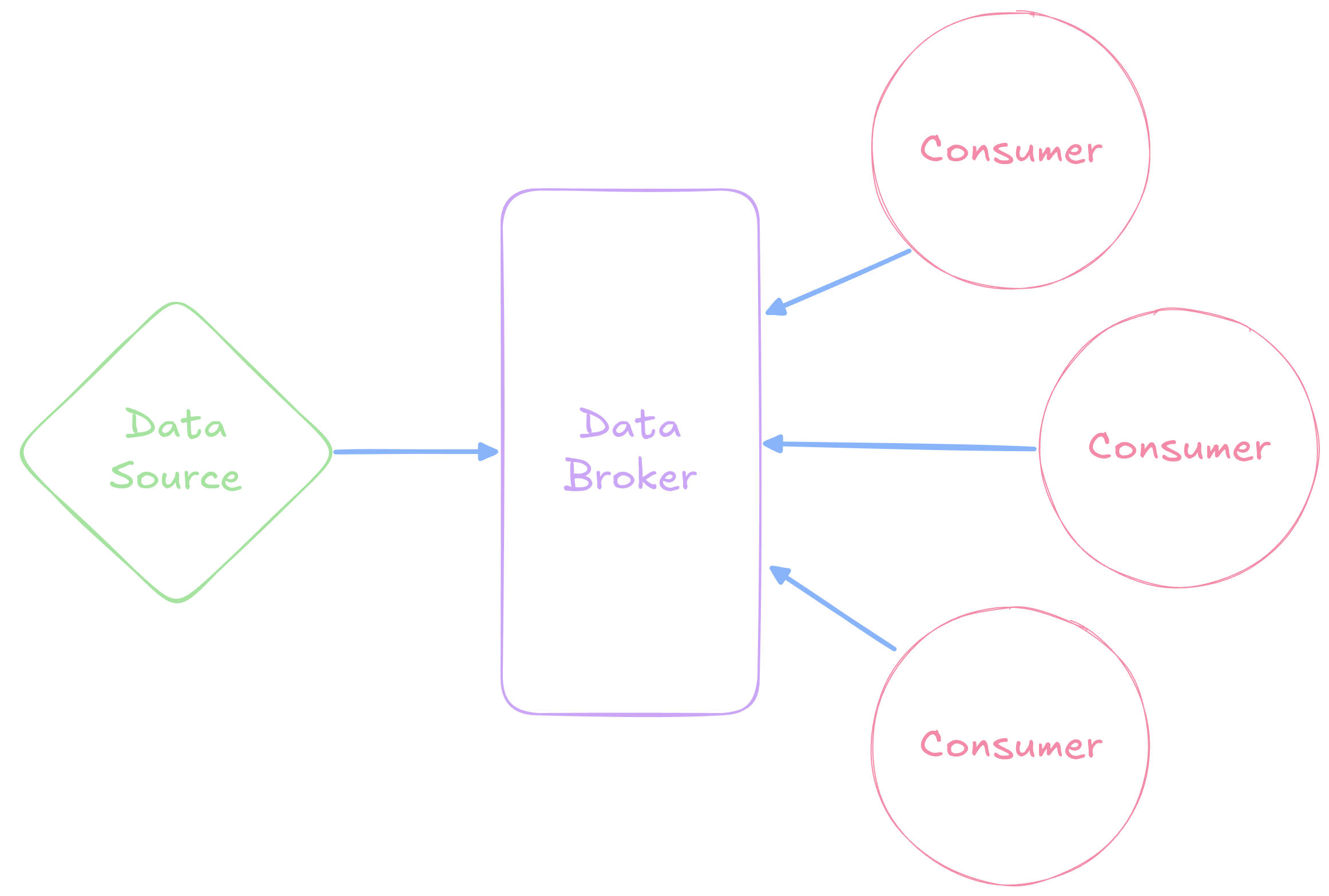
- Motivation behind brokers, which serve as a sort of
middleman between the data source and the consumer
- Data source sends data to the broker, with an intended receipient
- Consumer contacts the broker and asks “What do you have for me?”
- Predicated on the broker having a more stable availability than the consumer
Multi-Consumers
- Brokers are also excellent when multiple consumers are interested in the same data
Events
- While push data transition methods can still work with batches of data, it is more common that they operate on single events
- An event is a simple notice of something that has happened
- Generally records:
- What happened? (Graduation)
- When it happened? (May 18, 2025 at 1:30pm)
- Who or what it happened to? (Many of you!)
- Details (On the QUAD, weather was overcast, etc.)
Events vs Records
- Many of these might feel like information that you could include in a table as well
- Events and records differ primarily on what they represent
- Events represent a single, immutable occurance of something
- Records store the current state of something
- The data pertaining to an event would commonly be used to generate a transaction that would update or create a database record
- Think of events as a log of something that happened, whereas the database record is a snapshot of the current state of things
Timing
- Events could occur at any time, and thus will generally be sent directly to the broker when they are generated
- Consumers then have a choice:
- They can wait and then consume a bunch of events all at once
- They can listen constantly and then consume the events as they arrive
- This makes possible and gives rise to the second model of ETL: stream processing
- Major benefit is real or near-realtime updates to dashboards, reports, or other downstream data outlets
Kafka
Event Streaming Options
- Like most tooling we have looked at this semester, we have no
shortages of possible software to achieve event streaming
- RedPanda
- Pulsar
- Amazon Kinesis
- RabbitMQ
- Google Cloud Pub/Sub
- The big elephant in the space though is Apache Kafka, and so, like with Airflow, it probably makes the most sense to focus our attention there
What is Kafka?
- Initially developed at LinkedIn in 2010
- Internally written in Java
- A distributed event streaming platform
- Enables systems to publish to, subscribe to, store, and process event streams of data
Key Terminology
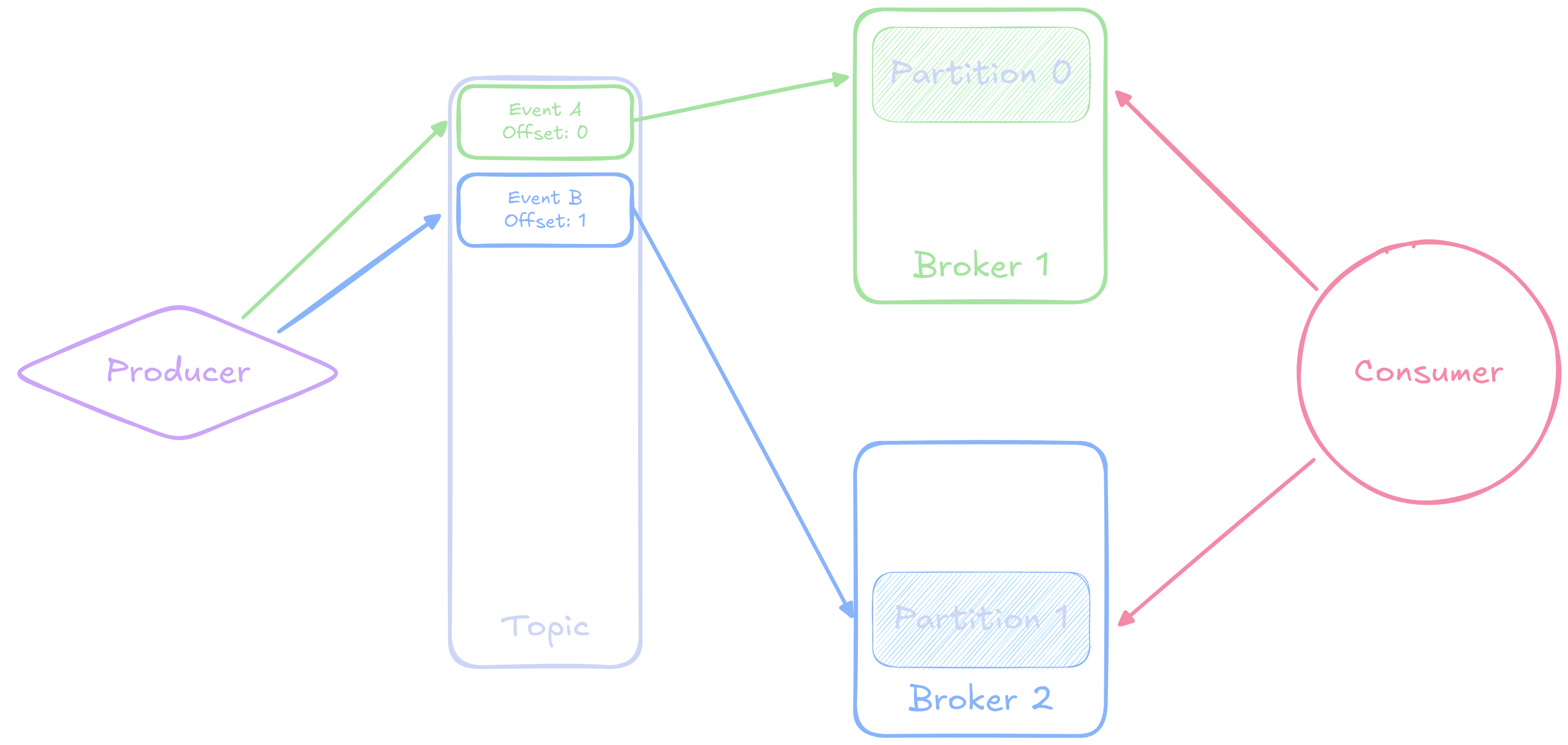
- Producer
- Sends and publishes events and messages to Kafta
- Topic
- Events and messages are categories into named topics
- Consumer
- Reads messages and events from one or more topics
- Broker
- A node of the distributed system that stores events
- Partition
- Topics are split into partitions spaces across different brokers for parallelization
- Offset
- Events in a topic have a unique offset, specifying their place in the topic
Visually
The Software
We can deploy a Kafka server using Docker Compose
- Note: Older versions of Kafka required another tool called Zookeeper to manage and coordinate the different brokers
To set up a simple, 1 node kafka server with a web ui:
services:
  broker:
    image: apache/kafka:latest
    hostname: broker
    container_name: broker
    ports:
      - 9092:9092
    environment:
      KAFKA_BROKER_ID: 1
      KAFKA_LISTENER_SECURITY_PROTOCOL_MAP: PLAINTEXT:PLAINTEXT,PLAINTEXT_HOST:PLAINTEXT,CONTROLLER:PLAINTEXT
      KAFKA_ADVERTISED_LISTENERS: PLAINTEXT://broker:29092,PLAINTEXT_HOST://localhost:9092
      KAFKA_OFFSETS_TOPIC_REPLICATION_FACTOR: 1
      KAFKA_GROUP_INITIAL_REBALANCE_DELAY_MS: 0
      KAFKA_TRANSACTION_STATE_LOG_MIN_ISR: 1
      KAFKA_TRANSACTION_STATE_LOG_REPLICATION_FACTOR: 1
      KAFKA_PROCESS_ROLES: broker,controller
      KAFKA_NODE_ID: 1
      KAFKA_CONTROLLER_QUORUM_VOTERS: 1@broker:29093
      KAFKA_LISTENERS: PLAINTEXT://broker:29092,CONTROLLER://broker:29093,PLAINTEXT_HOST://0.0.0.0:9092
      KAFKA_INTER_BROKER_LISTENER_NAME: PLAINTEXT
      KAFKA_CONTROLLER_LISTENER_NAMES: CONTROLLER
      KAFKA_LOG_DIRS: /tmp/kraft-combined-logs
      CLUSTER_ID: MkU3OEVBNTcwNTJENDM2Qk

  kafka-ui:
    image: ghcr.io/kafbat/kafka-ui:latest
    container_name: kafbat-ui
    ports:
      - "8091:8080"
    environment:
      DYNAMIC_CONFIG_ENABLED: 'true'
    depends_on:
      - broker
Producers
- We aren’t going to worry as much about producing events in here
- You can always create an event through the Web UI to test with
- In general though, when you produce a message, you can supply a
variety of information:
- When the event happened (timestamp)
- Who or what it happened to (the key)
- What happened (the event type, usually in the value)
- Details of what happened (in the value)
- What topic the event should belong to
Consumers
- Instead, we will generally be concerned with consuming events
- We can specify a specific topic to consume from
- Airflow is intrinsically a batch processing system, so we can read and process all the events from a topic on some schedule
- What events though? And how do we not double count?
Group ID
- When you create a consumer, you can specify that it belongs to a particular group: specified by a unique group id
- Kafka tracks what events have been consumed by each group id! (Up to what offset has been consumed)
- If you use the same group id next time you ask for events, you start from where you left off!
- This makes it very useful for batch processing, where we can read in all the events since we last checked
- Events don’t persist in a topic forever (most default to 1 week)
Making the Connections
- In Python, there are a few popular libraries for connecting to Kafka
servers
kafka-python: Great if working with stream processing. Very “Pythonic”confluent-kafka: Better for working with batch processing. More performant based on underlying C library
- Because of our use case, I’ll recommend and showcase
confluent-kafka - Airflow does have its own Kafka connections, but it
requires the older syntax (and X-Coms to pass data around)
- Maybe most useful for sensor tasks to trigger other DAGs
Confluent-Kafka
- Airflow will not be familiar with
confluent-kafkaby default, so you’ll need to add it - You’ll usually import
Consumerfrom the libary (orProducerif you wanted to do that) - The basic workflow will look like:
- Define your configuration dictionary
- Create the consumer from the dictionary
- Subscribe the consumer to whatever topics you want
- Grab all events until there are none left
- Close the connection
Example Connection
from confluent_kafka import Consumer

config = {
  'bootstrap.servers': 'localhost',
  'group.id': |||your group|||,
  'auto.offset.reset': 'earliest'
}

con = Consumer(config)
con.subscribe(['testing'])

try:
  more_messages = True
  while more_messages:
    msg = con.poll(timeout=1.0)
    if msg is None:
      more_messages = False
    else:
      print(msg.value().decode())
finally:
  con.close()
Important Considerations
- You must close the connection to “checkpoint” your
progress in terms of the offset of the last event consumed
- Failure to do this might result in reading in events multiple times
- If you don’t specify a timeout, it will wait forever for a new message, which is not what you want for batch processing
- Kafka stores all data is bytes, so you’ll generally need to decode
whatever results you get back to strings
- You might want to then parse the strings as JSON, since that is a common format used to store event information.
Break!
A(nother) New World!
Your Part
- All the transfer steps have gone through!
- This includes updating domain names in Airflow connections, but nothing else
- So you still need to:
- Update your access keys to Minio
- Check any other connection information to the warehouse
Learning
- You have a bunch of documentation to work through!
- The past group hopefully gave you some feedback about any ongoing issues, but you should investigate. How do past dashboards look?
- Make yourself a group checklist of things that you might have questions about so that you can return to them later for further investigation
- Are there any steps you need to take before you start in on the next milestone?
New Data!
- I am actively working on getting the new data source up and running, which will be a Kafka broker that you can subscribe to read event data from
- What events? Currently planned:
- Train arrivals at stations or other checkpoints
- Incidents (maybe)
- Once the data is live, I’ll send out an announcement so you can start snapshotting
- The milestone itself will follow
- Preliminary theme: how long are people waiting at stations before the train arrives?