Window Dimensions and Document DBs
Jed Rembold
June 25, 2025
Announcements
- The swap happened! You’ll have some time to check things out with your group later tonight
- Next Milestone deadline will be in 2 weeks, so you have some time to learn your newly inherited project
- I am aiming to have the new data source live and the milestone posted by this weekend
- Don’t forget your weekly reflections!
Tonight
- Alternative ways to create dimension/fact tables
- Introducing Document Databases
- A new data source?
- Work time
Windowing Dimensions
Lake 2 Warehouse: 2 approaches
- If your data warehouse is being populated directly from source data, you essentially always have to update it “in-place”
- But if you have a data lake of snapshots, you have some options:
- Populate the warehouse incrementally, pulling from each day’s snapshot
- Recreate the warehouse tables from scratch each time, pulling from all the snapshots enmasse
Incremental Loads
- Very efficient: only working with 1 day’s data at once
- If you are working with massive amounts of data, that could be very important
- Incremental changes “fit” easier with the concepts of Type-2 SCDs
- Non-trivial to determine what rows need to change or be updated
- Repopulating the warehouse means backfilling across each incremental daily load
Recreating from Scratch
- A single run populates the entire dimensional model
- Looking at the entire history at once, so easier to determine what rows changed when
- Requires a good understanding of window functions to achieve easily
- “Wasteful” in the sense that much of the dimension table creation is likely being duplicated work from what existed before
Recreation Requirements
- In order to regenerate a dimension (or fact) table from scratch you
need:
- The historical record of snapshots
- Knowledge of when the snapshot happened
- This could be written to a column or in the snapshot name itself
- A tool that can read in globbed files (DuckDB works very nicely for this!)
Reading in the Snapshots
DuckDB can accept BASH globs to expand out a pattern into a list of files
Usually this would utilize a wildcard character
*to represent “some amount of anything”- For example,
*.parquetwould expand to represent all of the parquet files in a given folder
- For example,
Reading in a bunch of snapshot parquet files into DuckDB is then as easy as:
SELECT *
FROM 's3://your-bucket/*.parquet'
This essentially reads in each parquet file to its own table, and then
UNIONs them all together
Reading Options
Sometimes it is useful to know what file each row came from, if you want that, then you need to use the full
read_parquetfunction, and add afilename=trueparameterSELECT * FROM read_parquet('s3://your-bucket/*.parquet', filename=true)For snapshots, your schema are likely the same, so the union is obvious. But what if your parquet files have slightly different schema?
- Likely want to add the
union_by_name=trueoption
- Likely want to add the
Steps: from history to dimension
- Once you have all your historical data read in with a column of when each snapshot happened, you can proceed to create your dimension table
- Generally looks something like:
- Filter down to only the data you want in your dimension table, if necessary
- Add a hashed column representing all of the data that might change which you want to track
- Identify when a given row changed by using
LAG, partitioning by your row identifier and ordering by the snapshot times - Filter down to only keep the original rows or the rows where a change happened
- USE
LEADto get when the next version would have started, subtracting a day to get when that rows version ended - Select out just the columns you want for your final dimension table
Hashing Rows
Often we need an easy way to compare the contents of many columns
Different approaches, but one common one is to concatenate all the data as text, and then run a hash function on the row
- DuckDB can use both the
md5()orhash()hash functions
- DuckDB can use both the
Might look something like:
SELECT pid, fname, age, hash(fname, age) AS current_hash
FROM |||mytable|||
When data changes
- To identify when data changes, we
LAGthe hash so that we can compare one rows hash to the previous- Usually call it something like
prev_hash - Same hash (
current_hash = prev_hash)? Then no change!
- Usually call it something like
- To compare the appropriate rows, we need to partition by whatever is
the unique identifier of a record in that dimension table
- This is not the primary key, which uniquely identifies every row (and which we are not concerned with at the moment)
- These are identifiers for what represents a given piece of information (pid, station_id, etc)
- Remember that ordering matters! So you want to order by the snapshot date so that lagging a row compares each row to the next snapshot
Keeping Originals and Changes
- You likely have many snapshots where little or no data actually changed
- You don’t care about those for your dimension table, you only care about the original data and whenever that data changed
- Filter your table from the last step to only include rows where:
- The previous hash is
NULL- this implies the original entry of that row - The current hash is different from the previous hash - this implies that the data changed at that point
- The previous hash is
Determining the Effective and Expiry dates
- The effective date for a given row at this point is just its snapshot date: when it entered the system
- To get the expiry date, you can
LEADthe snapshot dates to see when the next version’s snapshot began- Then subtract 1 from this to showcase that the current row expired
one day before the next version began
- If taking snapshots more often than once a day, adjust the interval to subtract accordingly
- Then subtract 1 from this to showcase that the current row expired
one day before the next version began
Trimming down and adding is_active
As a last step, you would usually just select out the columns that you want in your final dimension table (none of the hash stuff)
Technically, you could always find the current, most recent entries by filtering for where
expiry_date IS NULLIf you want something like an
is_activecolumn, you could add such a column as a boolean easily withSELECT pid, fname, age, effective_date, expiry_date, expiry_date IS NULL AS is_active FROM |||last steps table|||
Tweak as needed
- This process should work for the vast majority of ways that your data could be changing
- Think of this as a process though, not a recipe
- Important that you understand the why of each step, so that you could adapt it to a slightly different situation as necessary
- At the end of the day, you can create your dimension tables however you please: I am just trying to make you aware of options
Document Databases
Moving Beyond RDBS
- We have spent a lot of time focusing on relation databases for good reason: they are very popular and capable!
- They do have their drawbacks though, and for that reason other database models exist
- The next several weeks we are going to spend learning the basics of
how to access these models:
- Mostly focusing our efforts around access and querying, assuming that such a database has already been created
- We will not get into as much how to model or administrate these sorts of databases
- Initially we will be starting with Document Databases
The Document Model
- Sometimes referred to generally as NoSQL to highlight its differences from relational models
- Best for situations where data exists largely in self-contained documents and outside relationships are fairly rare
- Major examples: XML, JSON, MongoDB
- One-to-many relationships give rise to a tree structure
The Document Model Pros/Cons
- Strength of the document model:
- It handles one-to-many relationships very well
- More closely mimics object-oriented programming, so less impedance mismatch
- Schema are generally quite flexible: not every record has to have the exact same information
- Data is generally stored together or close to related data, so lookups can be fairly efficient
- Weaknesses of the document model
- Struggles more with many-to-many relationships
- Joins are more difficult, and possibly need to be done entirely outside the database in some cases
MongoDB
- The variant of document database that we will focus on is called MongoDB
- Pretty handily the market favorite as far as document databases go
- Open-source, with local deployment options and free cloud deployment options through MongoDB Atlas
Document DB Basics
- The equivalent of a “table” in a document database is called a collection
- Collections are populated by documents, where a document is
comprised of an assortment of keys and corresponding values
- Keys need to be unique within a document
- The corresponding values may, themself, be another document. Leading to a nested, hierarchical structure
- Documents do not need to have the exact same keys, even if they are part of the same collection
Document Syntax
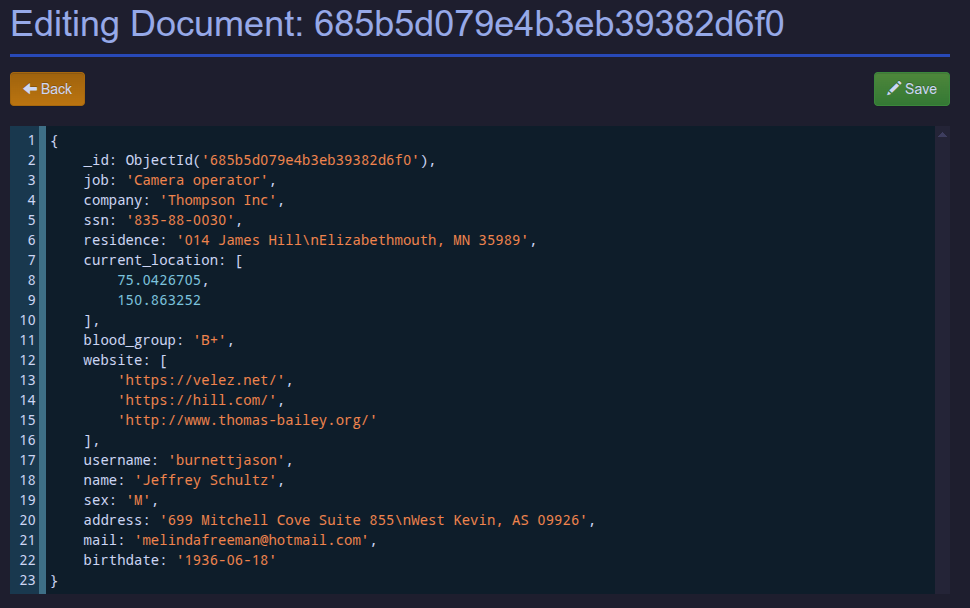
- Different document databases handle exactly how they comprise and store their keys and corresponding values in different ways
- MongoDB uses the very known and popular JSON framework though, so this is pretty straightforward
- Each document is a valid block of JSON keys and corresponding data
MongoDB Interactions
- Unlike most RDBMS which use some variant of SQL to interact with the
database, document databases usually have more bespoke interfaces
- Usually ported to a wide variety of languages though
- For MongoDB, those of most interest are likely:
- Mongosh: MongoDB’s cli interface client (similar to
psqlfor Postgres) - PyMongo: The Python library connecting and querying Mongo databases
- MongoLite: The most recent R library for working with Mongo databases
- Mongosh: MongoDB’s cli interface client (similar to
- The syntax between these is very similar
Making Connections
The primary way to connect to a Mongo database is through a connection string, extremely similar to how it worked with Postgres
The general form of the string is:
mongodb://|||username|||:|||password|||@|||host|||:|||port|||/|||database|||In Python then:
from pymongo import MongoClient

client = MongoClient(
  "mongodb://jed:mypswd@localhost:27017"
)
db = client['database']
Accessing a Particular Database
Once you are connected, you can see what databases are available:
print(client.list_database_names())And then you can switch to that database with:
db = client.get_database(|||database name|||)To see the available collections within the database:
print(db.list_collection_names())
Inserting Documents
You can insert documents one at a time:
db.|||collection|||.insert_one(
  {"name": "Jed", "teaching": ["DATA510", "DATA599"]}
)
Or many at once:
db.|||collection|||.insert_many(
  [{"name": "Jed", "teaching": ["DATA510", "DATA599"]},
  {"name": "Rachel", "teaching": ["DATA510", "CS549"]}]
)
Normalization
- What if you wanted to insert the same document into two different collections (or parent documents)?
- Two main methods arise:
- Embedding: you just copy the contents of the document into each of the various places. Note that this results in data duplication, but everything is self contained
- Referencing: you insert a reference to the ObjectID of a document that exists in a different collection. This prevents data duplication, but you have to “join” the documents manually
- For most situations, unless the document is massive, folks usually take the route of embedding it in whatever context it is needed.
Querying Collections
You can call the
.find()method on a collection to grab all of the documents within the collectionTechnically, in PyMongo, the
.find()method returns an iterable, so you could loop over it:for document in db.|||collection|||.find(): print(document)If you just want a list of the documents:
list(db.|||collection|||.find())If you just want the first document:
db.|||collection|||.find_one()
Fancier Querying
What if we want to filter or sort the documents / data we get back?
We can utilize a collection of query selectors to the
.find()method to fine-tune what we get backGeneral form looks like:
db.|||collection|||.find({|||key|||: |||filter_document|||})where the
|||filter_document|||would either be a literal value or a document that specifies an specific query selector
Common Query Selectors
| Name | Description | Example |
|---|---|---|
$eq |
Matches values that are equal | {'$eq': 5} |
$gt |
Matches values that are greater | {'$gt': 8} |
$gte |
Matches values that are greater or eq | {'$gte': 8} |
$lt |
Matches values that are smaller | {'$lt': 3} |
$lte |
Matches values that are smaller or eq | {'$lte': 3} |
$in |
Matches values appearing in the array | {'$in': [1,2]} |
$ne |
Matches values that are not equal | {'$ne': 'Jed'} |
$regex |
Matches values that match the regexp | {'$regex': '^J'} |
Picking Fields
Just like we didn’t always want all the columns from a table, you may only want certain fields from the document
You can specify this with a second argument after the filtering argument in
.find()db.|||collection|||.find({}, |||field_choice_document|||)The document to choose fields is essentially a blacklist / whitelist of the desired fields
Black and White Fields
To indicate fields you want to keep, list the field name and a 1
db.|||collection|||.find({}, {'name': 1, 'age': 1})To indicate fields you do not want, just provide a 0 instead
db.|||collection|||.find({}, {'birthday': 0, 'parents': 0})which will get you all of the fields except those indicated
You can never mix 0s and 1s except with the
_idfield that is automatically assigned when a document is inserted
Logical Operators
There are also logical operators to combine various operations
Name Description $andReturns documents where both queries match $orReturns documents where either query matches $norReturns documents where both queries fail to match $notReturns documents where the query does not match Except for
$not, each has a list of query operators following it
New Data Sneak Peek
More Station Info
- A document database is coming online (also at
sources.advde) which will contain a collection of information related to each station - This will include information like:
- Zone
- Underground/above ground
- Turnstiles and service dates
- Turnstile schedules (ingress / egress)
- This will be a new data source that can be queried, snapshot, and incorporated into your data warehouse
But wait, there is more!
- Additionally, all current taps (and all future taps) will receive an
additional field:
turnstile_id - Coupled with the station documents, this should give you the ability to uniquely determine when and where an individual enters a station and leaves a station.
- This also means that the simulated ridership may become more
complex:
- Riders may start a new trip from a station different from the one they arrived at (they walked or caught some other transportation between)
- Riders may travel from station to station (they won’t always travel to and from places in perfect pairs
Milestone 3
- Milestone 3 will not be due until July 8th
- It is going to be based around the “lost” business decision from earlier this semester
- Official guide should be up this weekend
- You have more time for this in part to allow for the fact that you have to be adapting to a new existing pipeline! Don’t wait until the last minute to start!
Group Work
Welcome to a new world!
- You all have been officially moved to a new project at this point!
- What stays the same:
- Your VM domain name
- Your login information
- What changed:
- What VM that domain takes you to
- SSH keys to allow you access to that new VM
- What S3 bucket you have access to when you log in to MinIO
- What organization you have admin rights to when you log into Grafana
- Any Discord notifications should automatically propogate to the correct channels
Learning your new system
- The rest of the evening I have set aside for you to start learning the project you have inherited
- Make sure you can connect to everything!
- How are things structured and scheduled? Focus on big-picture questions first: don’t get mired in the details until you need to.
- Read over all of their documentation! Don’t make the mistake of accidentally breaking something because you didn’t bother to read the information they gave you.
- Each group will be getting a form early next week asking for your impressions of the documentation that was provided and its usefulness to your work.