Collaborative Writing
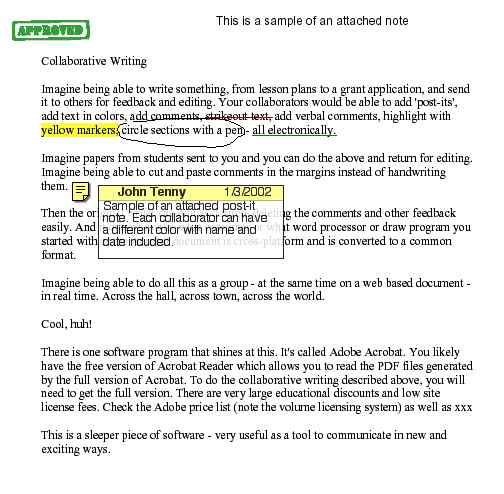
Imagine being able to write something, from lesson plans to a grant application,
and send it to others for feedback and editing. Your collaborators would be
able to add 'post-its', add text in colors, add comments, strikeout text, add
verbal comments, highlight with yellow markers, circle sections with a pen -
all electronically.
Imagine papers from students sent to you and you can do the above and return
for editing. Imagine being able to cut and paste comments in the margins instead
of handwriting them.
Then the original writer can edit as desired, deleting the comments and other
feedback easily. And it doesn't matter what computer or what word processor
or draw program you started with as the Acrobat document is cross-platform and
is converted to a common format.
Imagine being able to do all this as a group - at the same time on a web based
document - in real time. Across the hall, across town, across the world.
Cool, huh!
There is one software program that shines at this. It's called Adobe
Acrobat. You likely have the free version of Acrobat Reader which allows
you to read the PDF files generated by the full version of Acrobat. To do the
collaborative writing described above, you will need to get the full version.
There are very large educational discounts and low site license fees. Check
the Adobe price
list (note the volume licensing system) as well as OETC.
This is a sleeper piece of software - very useful as a tool to communicate
in new and exciting ways.

Here's a sample
January 13, 2002