Data Engineering
Jed Rembold
Monday, August 25, 2025
Announcements
- Welcome to DATA 351: Data Management with SQL!
- Things to do:
- Access the course webpage at https://people.willamette.edu/~jjrembold/classes/data351/data351/
- Also linked to from Canvas
- Read over the full syllabus
- Get yourself a copy of the book
- Make sure you can find and access the class forum on Discord (invite link in Canvas)
- Get a free GitHub account if you don’t already have one
- Access the course webpage at https://people.willamette.edu/~jjrembold/classes/data351/data351/
An Introduction
Who Am I?
- Name:
- Jed Rembold
- Background:
- PhD in Physics with specialization in Astrophysics
-
- Now full time in the CS and DS departments
-
- Teaching you the database skills I wish I’d had years ago
- Office:
- Ford 214
- Hours: MW 2-2:50, TTh 2-4, or anytime online or when my door is open!
- Email:
- jjrembold@willamette.edu
Motivations
- Data science is fundamentally tied to the data that it analyzes
- Before any analysis can be done, we need to know:
- In what way we want to store the data
- How we want to organize the data with that storage
- How we can easily retrieve the desired data when we need it
- All the above also need to be:
- Reliable: If a hard-drive goes corrupt, we can’t just lose all of our data.
- Scalable: We may need ways for thousands of individuals across the world to access at the same time.
- Maintainable: The needs of an organization or the data itself can shift over time. The storage needs to be flexible enough to handle these shifts.
- This is the work of a data engineer
Why a Database?
Data Storage
- There are many different ways information can be stored, with varying trade-offs!
- Suppose you wanted to keep track of your friend’s birthdays
| First Name | Last Name | Birthday |
|---|---|---|
| Frank | Stein | 4/2/2000 |
| Tessa | Loch | 8/23/2003 |
| Bobby | Wolf | 12/14/2005 |
Options!
As the previous slide may have suggested, you could store the information in some sort of table or comma separate values (CSV) file:
| First Name | Last Name | Birthday |
|---|---|---|
| Frank | Stein | 4/2/2000 |
| Tessa | Loch | 8/23/2003 |
| Bobby | Wolf | 12/14/2005 |
First Name,Last Name,Birthday
Frank,Stein,4/2/2000
Tessa,Loch,8/23/2003
Bobby,Wolf,12/14/2005
Alternatively, you might use some other form of common data structure like JSON to store the information:
[
  {"First Name": "Frank",
   "Last Name": "Stein",
   "Birthday": "4/2/2000"},
  {"First Name": "Tessa",
   "Last Name": "Loch",
   "Birthday": "8/23/2003"},
  {"First Name": "Bobby",
   "Last Name": "Wolf",
   "Birthday": "12/14/2005"}
]
The Plot Thickens…
- Suppose now you’d also like to keep track of what courses they are currently taking, and what times those courses are held
- Suppose each is taking 2-3 classes, some of which overlap
- This significantly complicates both example storage methods!
Example Table Storage
- We can’t store tables inside of tables, so we usually need to duplicate information over multiple rows:
| First Name | Last Name | Birthday | Class | Class Day | Class Time |
|---|---|---|---|---|---|
| Frank | Stein | 4/2/2000 | CS151 | MWF | 1:00pm |
| Frank | Stein | 4/2/2000 | MATH256 | MWF | 9:00am |
| Tessa | Loch | 8/23/2003 | CS151 | MWF | 1:00pm |
| Tessa | Loch | 8/23/2003 | IDS236 | TTh | 1:00pm |
| Tessa | Loch | 8/23/2003 | HIST123 | MWF | 12:00pm |
| Bobby | Wolf | 12/14/2005 | IDS236 | TTh | 1:00pm |
| Bobby | Wolf | 12/14/2005 | MATH256 | MWF | 9:00am |
- Duplication is generally bad!
Example JSON Storage
- We still have duplication issues with JSON as well.
[
  {"First Name": "Frank", "Last Name": "Stein", "Birthday": "4/2/2000",
   "Classes": [
     {"class": "CS151", "day": "MWF", "time":"1:00pm"},
     {"class": "MATH256", "day": "MWF", "time":"9:00am"}
    ]},
  {"First Name": "Tessa", "Last Name": "Loch", "Birthday": "8/23/2003",
   "Classes": [
     {"class": "CS151", "day": "MWF", "time":"1:00pm"},
     {"class": "IDS236", "day": "TTh", "time":"1:00pm"},
     {"class": "HIST123", "day": "MWF", "time":"12:00pm"}
    ]},
  {"First Name": "Bobby", "Last Name": "Wolf", "Birthday": "12/14/2005",
   "Classes": [
     {"class": "IDS236", "day": "TTh", "time":"1:00pm"},
     {"class": "MATH256", "day": "MWF", "time":"9:00am"}
    ]},
]
Relational Tables
- One solution to this issue is realizing that we are trying to actually keep track of two things: friends and classes.
- So we break things up into two tables, and then create relationships between them
- This is the core of what occurs in a relational database!
| First Name | Last Name | Birthday |
|---|---|---|
| Frank | Stein | 4/2/2000 |
| Tessa | Loch | 8/23/2003 |
| Bobby | Wolf | 12/14/2005 |
| Class | Day | Time |
|---|---|---|
| CS151 | MWF | 1:00pm |
| MATH256 | MWF | 9:00am |
| IDS236 | TTh | 1:00pm |
| HIST123 | MWF | 12:00pm |
| PHYS221 | MWF | 10:00pm |
Viewing Relational Databases
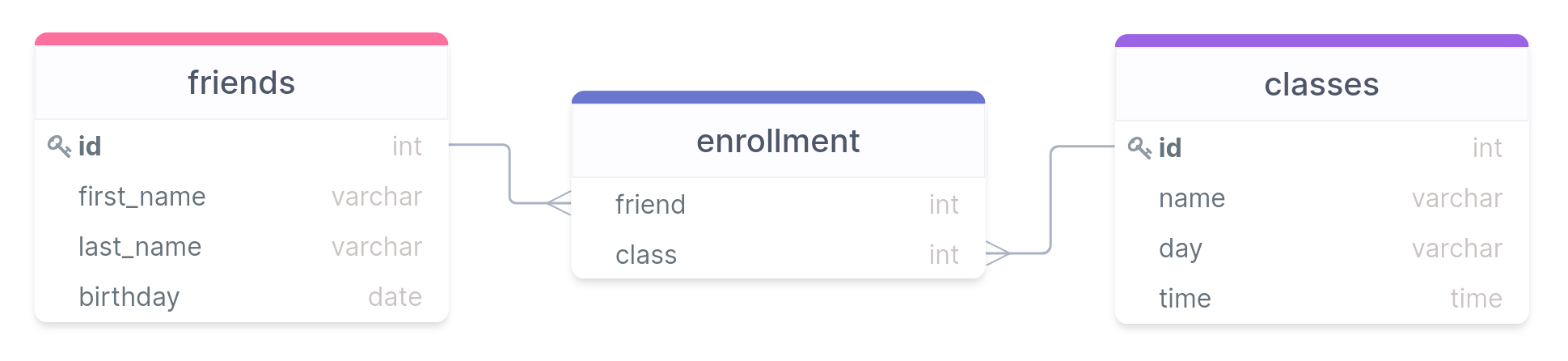
- In general, you’d probably use a third table to represent all the linkages
- Unique id keys are used to connect the different tables
Quick Note On Data Types
- Notice that in a relational database we can specify what type of information is allowed in each column
- Will discuss more in Ch 4, but you have the basic types you might
expect
intfor integersvarcharfor textdatefor dates
- This keeps information consistent and predictable
Relational Databases and SQL
- SQL is a language that allows you to define and query relational databases
- These days it is pronounced “ESS-CUE-ELL”, though you may still hear it occasionally referred to in an older form of “SEQUEL”
- Does not stand for “Structured Query Language”!
- Is not structured in a programming sense
- Does far more than just query
- Is not Turing complete in a language sense
- Comes in several variants, though the core standards are governed by
ANSI and ISO, so none stray too far from the standards
- We’ll be focusing on a variant called Postgresql this semester
PostgreSQL
SQL Servers
- Postgresql operates on a server model, where clients contact the
server and ask it to manipulate or query a particular database
- Multiple databases can exist on the server at a time
- Works well for large distributions, but you can also just run a local server on your computer, where you are the only client that can connect
- Several ways you can interact with the server once it is running
- From a terminal prompt (Ch 16)
- Using pgAdmin as detailed in the text
- Using Beekeeper Studio
(Community Edition)
- Will be my primary method
- Guide to set up will be posted on the website
Adding a New Database
SQL has commands to help with the administration of the database, as well as creating, manipulating, and querying specific tables within the database
New installs will come with a database already existing (called
postgres), but it is a good idea to create a new one and leave the default untouched.Can run SQL commands either by opening the terminal or running the command in a query.
- The commands look the same regardless
To create a new database, the syntax is:
CREATE DATABASE |||name_of_database|||;
Adding a new Table
- Creating tables is one of the more fundamental actions you may need to take with a database
- Need to specify several things upon creation
- The name of the table
- The names of the columns and associated data types
CREATE TABLE |||table name||| (
    |||column_name₁||| |||type₁|||,
    |||column_name₂||| |||type₂|||,
    etc...
);
A Note on Syntax
- SQL in general requires no special formatting in the form of capitalization or tabbing
- Following some conventions can help make your commands easier to
read though:
- Use uppercase for SQL keywords
- Use lowercase and underscores for table or column names
- Indent clauses and blocks of code for ease of readability
- A semicolon does indicate the end of a command though
- Text and date will need single quotes, numbers do not
Adding Values to a Table
- Your tables are initially empty!
- You add data to the table by inserting new values into the columns
- New rows are concatenated to the end of the table
- Need to include an entry for each column (rows can’t be unequal in length)
INSERT INTO |||tablename||| (|||colname₁|||, |||colname₂|||)
VALUES ('row1a', 'row1b'),
       ('row2a', 'row2b'),
       ('row3a', 'row3b');
Course Components
Homework
- Homework due Wednesday nights at midnight
- Will be submitted through GitHub Classroom
- Problems will largely involve writing SQL, but will occasionally be
more conceptual
- All problems will come with an existing text template into which you can add your conceptual explanations, SQL code, determined answer, etc.
- You’ll add your material to this template and then upload the files back to GitHub to submit them
- 72 cumulative, penalty-free hours allotted over the semester for
late submissions
- Late work past that point loses 20% value per day
- After 5 days is worth nothing
Project
- There will be a project at the end of the semester where you can get some experience stitching all the skills you’ve learned over the semester together
- Will involve compiling a database that takes information from several different sources and uses relations to join the data
- Will also involve doing some basic querying to attempt to answer an interesting question or explore and interesting relationship in the data
- Will be pairs based
- We will have short presentations about findings on the last day of class
Exams
- We will have a total of 3 exams over the semester
- Will involve a mix of theory, writing SQL statements, and interpreting SQL code
- I have old exams to give you, as well as a study guide with “exam-like” questions on it to give you an idea of what to expect
For Wednesday
- Read over Ch 2 in the text, as that is what we will be discussing
- See about getting PostgreSQL server installed on your personal system. Instructions in Intro or Ch 1 of book for various operating systems.
- Get an SQL client installed: Beekeeper is my fav
- First assignment will be posted by Wednesday!